Forum Discussion

Autofill in Microsoft Edge
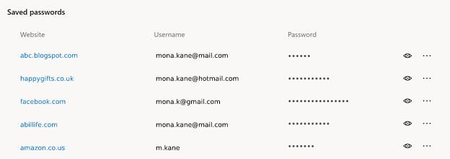

Eric_Lawrence wrote:
... a single Windows User Account may have multiple unrelated Edge Profiles, each of which is designed to have a separate set of unshared credentials.
I'm probably being particularly dense, but I still don't get it.
I have spent years of my life - since XP days - trying to persuade people not to share their Windows user account with anyone who they don't want to be able to read their documents, see their pictures, read their email and see their passwords.
Each set of credentials is unique. A particular site - login.live.com, for example - may allow for multiple usernames for a single account (any number of aliases, a phone number and a Skype name), but the password is (or should be) unique to that account. So the Windows Credential Manager stores this unique password for each of the usernames whenever it's used in IE or Edge. There is no possibility (or ought not to be) of being able to sign in at a particular site with a specific username and more than one password.
So where does unshared come from? Of course credentials are not (normally) shared with different Windows user accounts, although it's quite possible for, say, a whole family to share an Outlook.com's calendar and contacts simply by having a 'family account' expressly for that purpose.
"passwords can only be revealed by entering the user's Windows username and password"
It's not quite as simple as that. As soon as any password is filled in the browser, it is trivial to retrieve it.
Sorry, I was referring solely to being able to reveal passwords in Credential Manager.
The article you referred to only talks about 'stealing' your own password from the browser. That password may be stored by the browser in the browser profile, but that profile is only accessible by the Windows user concerned. If the Windows user account is properly protected with a strong password or biometric data as Mary explained, then the browser profile and its stored passwords are equally well protected. ¿No?

Noel Burgess
That password may be stored by the browser in the browser profile, but that profile is only accessible by the Windows user concerned. If the Windows user account is properly protected with a strong password or biometric data as Mary explained, then the browser profile and its stored passwords are equally well protected. ¿No?
YES, Noel. I will just add to what you have said & said well. That is the whole nice point of single sign-on; the MS/Windows acc't with its VERY unique User name & P/W is a person's passport, allows travel and gets a visa stamp when they go anywhere with it so they can enter various 'countries' and be recognized. Plus, beyond & an addition to that, specific sites or heaps of things we do require their own unique User name & P/W to enter THAT place. Just use strong P/Ws & let's move on 😊 Well, as long as you don't forget P/Ws 😉 If everyone, really, knew the authentication processes & policies of MS & Windows there be less discussion or concern... to know them is to appreciate them. It is, deep, wide & strong!
Cheers,
Drew
 laalithyaJul 01, 2019
Microsoft
Noel Burgess thanks for sharing an example of how it works.
- Noel BurgessJul 01, 2019Steel Contributor
Sometimes there is a need to use 2 separate accounts for the same website/form...This is something that password managers such as LastPass support, but the browser (Edge C) doesn't (as far as I'm aware).
Have another look. Here's (part of!) my list of credentials in Dev for https://login.live.com. I also wanted to show that the same account can have several different usernames - the one with a phone number is the same as two of those with email addresses (primary and secondary alias) and as one of those with just a Skype name. And they all appear in a dropdown from the username entry field when I visit the site.
- Eric_LawrenceJul 01, 2019Sure, Edge (and all other Chromium-based browsers) support having multiple accounts for a single form field. The browser will autofill one (probably the most recently used) but you can easily just click into the field and select the other account from the dropdown.
Screenshot: https://snag.gy/Vt9Yx1.jpg  kevmy21Jul 01, 2019Copper Contributor
Sometimes there is a need to use 2 separate accounts for the same website/form. Examples could include when dev/testing a website or service, or if you have one admin account and one regular account for something.
This is something that password managers such as LastPass support, but the browser (Edge C) doesn't (as far as I'm aware).
