Forum Discussion

Autofill in Microsoft Edge
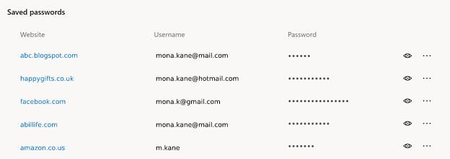

Apologies for my English!
Leaving the security of the passwords of your favorite sites in the hands of your computer's windows account is an option ... but it does not seem the most appropriate, or at least it does not seem enough. I think that there where you keep passwords should have a layer of security and this is the suggestion I make in this section. Firefox and thunderbird do it with a master key. I do not think he's asking for anything absurd.
In any case, it is a suggestion that I make and that I think is positive for everyone. It is not my intention to create any discussion.
Thank you!
------------------------------------------------------------
(En español)
Disculpas por mi ingles!!
Dejar la seguridad de las contraseñas de tus sitios favoritos en manos de la cuenta de windows de tu equipo es una opcion ... pero no me parece la mas apropiada, o al menos no me parece suficiente. Creo que alli donde tu guardes contraseñas deberia tener una capa mas de seguridad y esto es la sugerencia que hago en este apartado. Firefox y thunderbird lo hacen con una clave maestra. No creo que este solicitando nada absurdo.
En cualquier caso, es una sugerencia que hago y que creo que es positiva para todo el mundo. No es mi intencion crear ninguna discusion.
Gracias

ppnacho the Windows account is protected by multiple layers of security, including biometrics if they're on your device; so when I go to view a credential, it uses Windows Hello facial recognition because that's how I sign in. If you use a PIN, it's encrypted and stored in the TPM. no need to make security inconvenient because if it is, users will turn it off.
- Noel BurgessJun 27, 2019Steel Contributor
MaryB wrote:
... the Windows account is protected by multiple layers of security,
MaryB , Eric_Lawrence
I apologize for writing a long post on this topic yesterday; this article is well hidden and I hadn't seen it before1.The article answers many of my questions, but not this one: what is the objection to updating the Windows Credential Manager each time Edge saves a password in one of its profiles? Windows Credentials are protected by yet another layer of security on top of the multiple layers you mention: passwords can only be revealed by entering the user's Windows username and password.
It is tiresome to have to maintain multiple lists of saved passwords when we used only to have one to deal with.
- I customarily open the Discussions bit of this community to see what's new. I hadn't realized that there was a second, busy section called Articles, many of which also have a long tail of comments, questions and answers. Could I suggest that an article author post briefly in Discussions to alert users to a new article's existence? And perhaps suggest that users discuss its subject matter in Discussions?
- Eric_LawrenceJun 27, 2019
Microsoft
"what is the objection to updating the Windows Credential Manager each time Edge saves a password in one of its profiles?"
The most immediate problem is that Windows Credential Manager is a per-Windows-user-account feature, while a single Windows User Account may have multiple unrelated Edge Profiles, each of which is designed to have a separate set of unshared credentials.
"passwords can only be revealed by entering the user's Windows username and password"
It's not quite as simple as that. As soon as any password is filled in the browser, it is trivial to retrieve it. https://textslashplain.com/2017/10/16/stealing-your-own-password-is-not-a-vulnerability/- Noel BurgessJun 27, 2019Steel Contributor
Eric_Lawrence wrote:
... a single Windows User Account may have multiple unrelated Edge Profiles, each of which is designed to have a separate set of unshared credentials.I'm probably being particularly dense, but I still don't get it.
I have spent years of my life - since XP days - trying to persuade people not to share their Windows user account with anyone who they don't want to be able to read their documents, see their pictures, read their email and see their passwords.
Each set of credentials is unique. A particular site - login.live.com, for example - may allow for multiple usernames for a single account (any number of aliases, a phone number and a Skype name), but the password is (or should be) unique to that account. So the Windows Credential Manager stores this unique password for each of the usernames whenever it's used in IE or Edge. There is no possibility (or ought not to be) of being able to sign in at a particular site with a specific username and more than one password.
So where does unshared come from? Of course credentials are not (normally) shared with different Windows user accounts, although it's quite possible for, say, a whole family to share an Outlook.com's calendar and contacts simply by having a 'family account' expressly for that purpose.
"passwords can only be revealed by entering the user's Windows username and password"
It's not quite as simple as that. As soon as any password is filled in the browser, it is trivial to retrieve it.Sorry, I was referring solely to being able to reveal passwords in Credential Manager.
The article you referred to only talks about 'stealing' your own password from the browser. That password may be stored by the browser in the browser profile, but that profile is only accessible by the Windows user concerned. If the Windows user account is properly protected with a strong password or biometric data as Mary explained, then the browser profile and its stored passwords are equally well protected. ¿No?
- ppnachoJun 05, 2019Iron Contributor
I feel again that my English is not good!
I fully understand the security offered by the windows login account. I have no doubt about it.
But in my work, I initiate session when I arrive and block the session when it is coffee time. After the coffee I return to start session and at the end of my day, I turn off. I usually get up frequently and I'm not always in front of my pc. The option to block my session every time I get up and unlock it when I feel it is not very practical in my work. So, if I get up from my position to go talk to my boss, I'm leaving my session open and anyone with bad intentions has a free way to see all the passwords of my favorite sites. Honestly, I do not like it.
You know, for tastes there are colors.
I return to comment that it is only a suggestion and that it is not my intention to create any debate about it.
There are tools like lastpast that perform the function perfectly. I believe that the new edge should bring it integrated. But it's just my personal opinion.
And thanks to Microsoft for allowing me to participate in this forum and be able to give my point of view. I know that Edge Chromium is very young and you have to give it time to grow older.
Thank you to all for reading me.
----------------------------------------------------
(En español)
Siento de nuevo que mi ingles no sea bueno!!Entiendo perfectamente la seguridad que ofrece la cuenta de inicio de sesion de windows. No tengo ninguna duda sobre ello.
Pero en mi trabajo, inicio sesion cuando llego y bloqueo la sesion cuando es la hora del cafe. Despues del cafe vuelvo a iniciar sesion y al finalizar mi jornada, apago. Me suelo levantar con frecuencia y no siempre estoy delante de mi pc. La opcion de bloquear mi sesion cada vez que me levanto y desbloquearla cuando me siento es poco practico en mi trabajo. Por eso, si me levanto de mi puesto para ir a hablar con mi jefe, estoy dejando mi sesion abierta y cualquier persona con malas intenciones tiene via libre para ver todas las contraseñas de mis sitios favoritos. Sinceramente, no me gusta.
Ya se sabe, para gustos hay colores.
Vuelvo a comentar que solo es una sugerencia y que no es mi intencion crear ningun debate sobre ello.
Existen herramientas como lastpast que realizan la funcion perfectamente. Considero que el nuevo edge deberia traerla integrada. Pero solo es mi opinion personal.
Y gracias a Microsoft por permitirme participar en este foro y poder dar mi punto de vista. Se que Edge Chromium es muy joven y hay que ir dandole tiempo para que se haga mayor.
Gracias a todos por leerme.
- MaryBJun 06, 2019Steel Contributorppnacho you're missing a step in the process. Even if you choose to leave your machine unlocked (pressing Win-L locks it for you BTW, which is the same extra step you're asking for here), you still have to enter your Windows password or authenticate to Windows Hello to see the credential.


