Forum Discussion

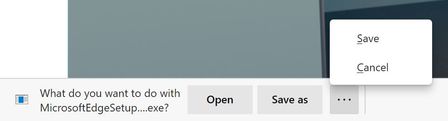
Announcing the Open/Save as/Save and Delete prompts for downloads!
 Oct 12, 2020
There is absolutely an extra click after this change.
Before: Click link > Change folder if needed > Save
Now: Click link > Click Save As > Change folder if needed > Save
Additionally that extra click happens at the bottom of the screen (whereas the file browse dialog appears in the middle of the screen), so that extra click is probably far from where your mouse cursor was.


Deleted No, the way Edge did with the Save As dialog popping up immediately before they instituted this change several months ago. Many of us in this thread have gone to great lengths to explain it in detail. The simplest way of explaining it is how Chromium (and Chrome) do it since Edge is based on Chromium. The new way is great for some people who like that sort of thing, but it's a step backward for many of us causing more clicks for each and every download that I might want to save, for example, a download in one particular folder, and then the next download in another particular folder.
We can still do that with the new way but it's more steps than it used to be. It's unacceptable for me and I stopped using Edge until this is fixed. I'm fine with there still being an ability for those who like it to use the new way, but it's too much of a hassle without having an option to bring up the save as dialog immediately, so I went back to Chrome for now. A guy found the workaround which is to assign a temporary drive letter to a partition, have Edge set to default save to that drive letter, and then remove the drive letter from Windows. This causes Edge to open up the save as dialog immediately, although it then never remembers or defaults to the most recently saved to location, so it's only a partial workaround.
- AnonymousJan 24, 2021Oh I see what you mean now, yes I do wish that would come back for those that want it. Thanks for explaining, I will send feedback bout this.
- roirraWedorehTJan 24, 2021Brass ContributorThank you, and you're welcome! I've sent feedback about this previously as well.
- AnonymousJan 24, 2021You're welcome!! So you are saying that in other chromium browsers when you download something it popups the file explorer to pick the location? So what happens when you x out of the file explorer?
I think that Edge put this feature back since a lot of legacy users of Edge Classic wanted it as described here " https://www.windowscentral.com/microsoft-edge-gets-new-save-options-downloading-files"
I do enjoy this feature since I can open and save but I do want to make sure that everyone is eghtting the experience they want since I am a big fan of Edge and want to recommend this to everyone and want to make sure that they get what they deserve.
Have a great day and good luck!
Shawn