Forum Discussion

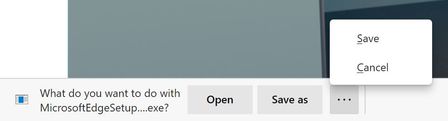
Announcing the Open/Save as/Save and Delete prompts for downloads!
 Oct 12, 2020
There is absolutely an extra click after this change.
Before: Click link > Change folder if needed > Save
Now: Click link > Click Save As > Change folder if needed > Save
Additionally that extra click happens at the bottom of the screen (whereas the file browse dialog appears in the middle of the screen), so that extra click is probably far from where your mouse cursor was.

i-am-kent I've been enjoying the Canary build of Edge for a while now and this is the first major change that I absolutely hate. I have to download lots of files to different locations and prefer the option to always prompt to Save As and to default to the last folder saved to. With this option, I now have to click the link, click Save As on the bottom bar, then navigate to the folder I want to save to each time. Best case scenario (with a pinned folder), I now have to go through 4 clicks instead of 2 in order to save a file to the last folder I was saving to.

- HotCakeXJan 06, 2021MVP
You sure?
