Forum Discussion

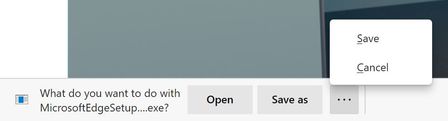
Announcing the Open/Save as/Save and Delete prompts for downloads!
 Oct 12, 2020
There is absolutely an extra click after this change.
Before: Click link > Change folder if needed > Save
Now: Click link > Click Save As > Change folder if needed > Save
Additionally that extra click happens at the bottom of the screen (whereas the file browse dialog appears in the middle of the screen), so that extra click is probably far from where your mouse cursor was.


roirraWedorehT, just turn off the prompt in Settings (set it back to default), and voilà, no extra clicks. The "extra" clicks are only needed if you have already changed the default in Settings to prompt you for what to do when clicking to download a file. In that case, Chromium Edge, prior to this much needed feature finally being added, was MISSING the basic capability that has been available since the early days of IE and in Legacy Edge, basically for longer than many people have been using the Internet: the ability to Open or Run a file without having to go through all the steps associated with saving it first and then having to manually go back and delete it later.
On the other hand, I think there is universal agreement with you that it should remember the last saved location. I haven't heard anyone defend that it forgets that between saves. That just seems like a bug and I expect it will be fixed shortly.
- roirraWedorehTNov 13, 2020Brass Contributor
GraniteStateColin Thanks for your reply. Like the other users who complained about this new "feature", I still want to choose where I save a download on a file by file basis, so I want the dialog that use to pop up prompting me for where to save, for every single file. I just confirmed that if I disable the "Ask me what to do with each download" setting that it automatically saves the file in my default Download location, which is not what I want.
I don't mind that the new feature is available to others who want it - I just don't need it and I prefer the way it was, so there should be a way to enable an immediate save as dialog instead of a prompt at the bottom of the screen that for each and every download I have to click "Save As", so more mouse movement and an extra click each time.
This is annoying enough that I'm going to go back to using Chrome and I'll check back in on Edge every great once in a while to see if there's a way to enable the old way.
- HotCakeXNov 13, 2020MVPIt is like it was. just has more options.
1. if you have to download lots of files one after another, then turn this off:
edge://settings/downloads
2. if you download files casually then keep it open.
it's actually as simple as that.- illtechthatNov 13, 2020
Microsoft
HotCakeX You seem very convinced based on all the replies you have already left in this thread that you only have those two workflows.
---
1. if you have to download lots of files one after another, then turn this off:
edge://settings/downloads
2. if you download files casually then keep it open.---
In my case, I download lots of files one after another but I still want to change the file location each time. Example, for my work I will download various office files or images (sometimes 50+ per day) that I save in ~10 different directories. If I use option 1, then I have to use an additional click for each download to hit the save as button in order to get file explorer to show me folder choices. Compare this to Google Chrome where the file explorer button will automatically come up.
If I use option 2, then I can't change the file location at all they will all go to only one folder location and I would have to move it manually.
