Forum Discussion

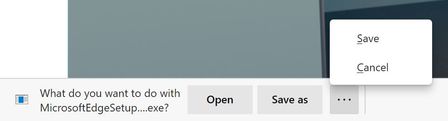
Announcing the Open/Save as/Save and Delete prompts for downloads!
 Oct 12, 2020
There is absolutely an extra click after this change.
Before: Click link > Change folder if needed > Save
Now: Click link > Click Save As > Change folder if needed > Save
Additionally that extra click happens at the bottom of the screen (whereas the file browse dialog appears in the middle of the screen), so that extra click is probably far from where your mouse cursor was.

putting them next to other 2 options will fix the problem.
showing both previous options and new options next to each other. (2 of them were already available on older Edge versions and also chrome right now) and (2 others are new because people asked in this community).
if you still have problem with those changes applied, you need to be looking elsewhere for solution.
There's no need to overcomplicate the solution. It's very simple.
All they need to do as add a setting to "ask every time" just like they had before.
The code obviously already exists, since that was the behavior until this "feature" was released.
That's not in place of this other way of doing it, it's in addition. There's no need to kill the workflow for group A of users to give group B the workflow they prefer.
Also, adding the Save and Cancel buttons to the bottom bar doesn't change the fact you'd still have an extra click, hidden at the bottom of the screen (such a terrible UX) on every download.
- HotCakeXOct 14, 2020MVP
so the problem is that it's not obvious enough when you get the download prompt because it's gray and blends in with the rest of the UI color.
- I think they should change its color and also relocate it to the bottom-middle of the Edge window like in Edge legacy and also add a blinking flash to that part of the screen to notify user. the flash doesn't need to be intrusive at all or white, just a color that gets the user's attention to ask for input as to what to do.
- also, they should show all 4 options by default instead of hiding them, none of them is less important than the other.
about Edge legacy, the problem wasn't the UI, the problem was the engine that was incompatible with some websites and also incompatible with Chromium and Firefox extensions. the UI was probably the best thing about Edge legacy.
TL;DR;
applying these 2 changes will improve download experience substantially.
there is nothing to "fix" because it's not broken.
- IshaiHOct 14, 2020Brass Contributor
HotCakeX First, yes, it is a problem. It's not one extra click a year that's the problem. It's not "oh, I had to do into settings one time and change something". It's every single time I download a file.
Second, putting that button on the bottom left is the worst UX decision you can make. The way your eyes scan a screen, that's the place you would hide things you don't want people to see. This is something filmmakers learned decades ago...
I guess whoever made the choice a long time ago to have the start menu on the bottom left and the notification area on the bottom right, knew that.
The result is, I click on a download link, and nothing happens, because it's in the "hidden" area that eye scan skips. So I have to remember that I'm supposed to look for that button all the way on the bottom left. And if I have a lot of downloads, I have to go back and forth to that area for every single one.
And finally. it doesn't help that other browsers have trained us for years on how downloads work. Yes, the old Edge might have done it differently but the old Edge was a failure and most of the potential users for the new Edge never used it or hated it. I'm not saying don't bring over features from that failed product, but let us turn them off.
TL;DR;
This is really bad UX and users should be able to turn it off and use the previous feature.
 geheimOct 13, 2020Copper Contributor
These links should confirm your statement and that not only here people are looking for a solution.
- illtechthatOct 13, 2020
Microsoft
geheim Thanks for the links but I am not sure why you shared these with me. These seem to just describe the issue that has already been discussed in this thread.
- geheimOct 13, 2020Copper Contributor
https://answers.microsoft.com/en-us/microsoftedge/forum/all/the-ask-where-to-save-file-each-time-before/e06b8f40-651c-4ef6-ac7b-02f185e92106
https://www.tenforums.com/browsers-email/166077-no-direct-save-window-file-download-new-ms-edge-stable-v86.html
- illtechthatOct 13, 2020
HotCakeX As many people have already stated on this thread... yes one extra click is a problem for me and for them.