Forum Discussion

Announcing the Open/Save as/Save and Delete prompts for downloads!
 Oct 12, 2020
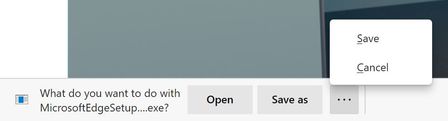
There is absolutely an extra click after this change.
Before: Click link > Change folder if needed > Save
Now: Click link > Click Save As > Change folder if needed > Save
Additionally that extra click happens at the bottom of the screen (whereas the file browse dialog appears in the middle of the screen), so that extra click is probably far from where your mouse cursor was.
I think the part you're missing is that you don't always interact with the complexity of the save file dialog. If you don't want to rename the file and the folder is already correct (it used the folder from the last file you downloaded), you just click OK and move on.
The main issue here is that an existing feature (prompting for a location to save files) has been conflated with a new feature (asking you if you want to just open the file.)
Sure, "it's just one click", but it's on click where I will always hit the same button. It's a click that wasn't there before.
