Forum Discussion

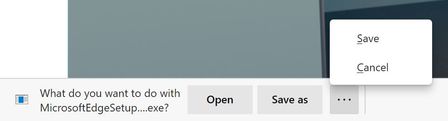
Announcing the Open/Save as/Save and Delete prompts for downloads!
 Oct 12, 2020
There is absolutely an extra click after this change.
Before: Click link > Change folder if needed > Save
Now: Click link > Click Save As > Change folder if needed > Save
Additionally that extra click happens at the bottom of the screen (whereas the file browse dialog appears in the middle of the screen), so that extra click is probably far from where your mouse cursor was.
There is absolutely an extra click after this change.
Before: Click link > Change folder if needed > Save
Now: Click link > Click Save As > Change folder if needed > Save
Additionally that extra click happens at the bottom of the screen (whereas the file browse dialog appears in the middle of the screen), so that extra click is probably far from where your mouse cursor was.

- GraniteStateColinOct 12, 2020Steel Contributor
HotCakeX, I think the difference for PathogenDavid (and IshaiH too probably) is that they want to be prompted for a location to save the file, but don't want the intermediate prompt where they have to hit "Save As."
What's strange to me about that is that the file dialog, which only appears if you turn that on in settings is a relatively "complex" process in that it's not just a click. I would think that if you're already dealing with a whole dialog to navigate to a save location, then the having to click on "Save as" would be so trivial as to be unnoticeable, but apparently not. It's effectively 1 extra click in a sequence of several clicks, including navigating through a folder tree, and possibly typing a filename (if renaming the file before saving). It's NOT 1 click in 3, which would be a 33% increase; it's more like 1 added click in 5+. So that is a real increase, but I have a hard time imagining that being a bad UX.
PathogenDavid , is that the issue? Am I following your concern correctly now?
If so, this would suggest the original way it worked back in IE and Legacy Edge where you right clicked if you want to Open might be better, or another option in Settings to "Immediately open 'Save as...' dialog". I wouldn't mind the extra click to preserve the ability to open directly from the browser (that's still a huge saving over dealing with the file in a Downloads folder), so happy to take the extra work on my end if it keeps others happy.
- PathogenDavidOct 12, 2020Brass Contributor
I think the part you're missing is that you don't always interact with the complexity of the save file dialog. If you don't want to rename the file and the folder is already correct (it used the folder from the last file you downloaded), you just click OK and move on.
The main issue here is that an existing feature (prompting for a location to save files) has been conflated with a new feature (asking you if you want to just open the file.)
Sure, "it's just one click", but it's on click where I will always hit the same button. It's a click that wasn't there before.
- HotCakeXOct 12, 2020MVP
- HotCakeXOct 12, 2020MVP
oh okay, so all the problems in the world comes down to 1 click. gotcha
anyway, yeah i also would be happier if i could see all 4 options by default, but i can spend few mili-seconds more of my life clicking on an arrow. i mean I'm only doing it for 1 or 2 files, if i had a lot of files i would just turn that option off completely because that's wiser.
hopefully they will show all 4 options by default in a future update, until then, it's not high priority at all, no matter how you look at it..
- GraniteStateColinOct 12, 2020Steel Contributor
HotCakeX, I'm with you on this, but I can see how if you view Edge and Chrome as basically the same (for those who don't care about any of the other unique features in Edge), then that 1 extra click becomes a reason to use Chrome, because it saves you a click. That's a fair and rational decision, and unfortunate, because Legacy Edge and even IE didn't require this extra click (I don't think, trying to recall process from memory).
- PathogenDavidOct 12, 2020Brass Contributor
I don't think you understand. I've had that setting enabled since I switched Chrome and eventually Edge. I want it to ask me where the files go. What I don't want is for the extra prompt of whether to open the file or save it, which is the new feature this topic is about.
- HotCakeXOct 12, 2020MVP
I do understand, and those extra options were asked by many people. it's nothing new, they simply brought it back from Edge classic.
all they have to do now is to show all 4 options by default instead of hiding 2 of them under an arrow.
- PathogenDavidOct 12, 2020Brass Contributor
That's chill, and I'm sure the people who used Edge classic love it. But just because many people asked for it doesn't mean people aren't allowed to express distaste from it.
"this is all they have to do"
You really don't understand the issue we have with this. I have 0 interest in that solution, it doesn't solve any problems I have with this new feature.
