Forum Discussion

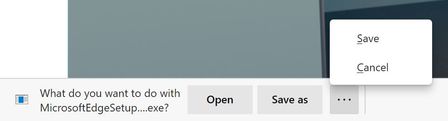
Announcing the Open/Save as/Save and Delete prompts for downloads!
 Oct 12, 2020
There is absolutely an extra click after this change.
Before: Click link > Change folder if needed > Save
Now: Click link > Click Save As > Change folder if needed > Save
Additionally that extra click happens at the bottom of the screen (whereas the file browse dialog appears in the middle of the screen), so that extra click is probably far from where your mouse cursor was.
With the introduction of this feature, the Save As no longer remembers the last save location. That's probably a bug but it makes this feature very annoying.
Even if the last location was still used when I select Save As, you've basically added an extra click to get there and I'm not sure what you've actually enabled here. Before this "feature" I could cancel the download when the save to dialog showed up. I could open the file from the bar below by just clicking on it. Am I missing something here?
Please add a way to turn this off and use the current behavior.
A much more useful feature would be the option for downloads from different sites to remember their own save locations or make the list of last save locations consistent and correct. Features that might save time for people instead of making basic tasks harder
- GraniteStateColinSep 11, 2020Steel Contributor
IshaiH, yes, you are missing something. 🙂
The previous "Open" option required first saving the file. This created not just an extra click, but a whole workflow change compared with Legacy Edge and IE to deal with files that are intended to be opened once for a few seconds, but not saved -- pictures, audio files, executables (just run them), etc. Before this change, you either left the files to accumulate or had to add a step to your workflow to manually navigate to the folder (potentially difficult if you save downloads to different locations) and remove the files that you never wanted to save in the first place. This is a HUGE improvement.
Having said that, I agree with the criticism that Save As should not always revert to the Downloads folder. I would prefer that it remember and go to the last Save As location.
- IshaiHOct 12, 2020Brass Contributor
GraniteStateColin That's an odd behavior to me but you do you, I guess.
For me, it's rare that I download a file for a single use and want it deleted. It's definitely not worth the extra clicks on every download.
What would make sense is to make this an option. If you want a new download hidden at the bottom of the screen waiting for you to hit Save As instead of the file dialog just showing up, fine, for those of us who don't want that option, let us turn it off.
People who download a lot of files will find this new feature very annoying. I know I do.
In fact, now that it's made it's way to the prod version of Edge, I'm switching back to Chrome.I really only checked this page to see if i-am-kent ever responded to the many comments complaining about this feature.
- HotCakeXOct 12, 2020MVP
IshaiH wrote:That's an odd behavior to me but you do you, I guess.
For me, it's rare that I download a file for a single use and want it deleted. It's definitely not worth the extra clicks on every download.
I wouldn't be lying if i said that In the past year i've seen more than 100 people asking for this feature because they have single-use files to download and don't want to go to downloads folder and delete them manually, just want to run it temporarily, like in Edge classic.
but for you that don't want this, just turn it off: edge://settings/downloads
yes that's obviously annoying when downloading a lot of files, that's why they put that option in Edge settings. exactly for that reason.

