Forum Discussion

Announcing a new way to paste URLs, Link format!

Thank you, rshupak.
I'm not able to reproduce the behavior you describe on that URL (and I have tested other non-ASCII cases as well).
A few questions for you to better understand what you are experiencing:
- Which channel and build of Edge are you using? You can find both the build and channel in edge://version
- Where exactly (in which website, web app or Windows app) are you attempting to paste the URL?
- What is your default format setting in edge://settings/shareCopyPaste ?
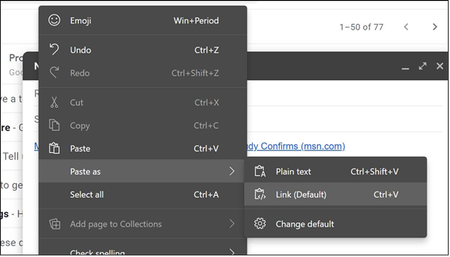
- How are you attempting to perform the paste (ctrl+v, ctrl+shift+v or the right-click context menu)?
For example, when I use the "plain text" paste format here, I get: https://en.wikipedia.org/wiki/Bia%C5%82ystok. as you described I should.
Thanks very much,
Jared

JaredB81 I tried this on Canary 87.0.641.0. I just checked dev 87.0.637.0 and it is the same.
Copy the URL from the address bar. If you find the IRI copied to the clipboard instead of the URL encoded form, I would be very surprised. Please confirm that you see the encoded URL that Anaheim has always copied.
I am a bit surprised that the UTF-8 encoded CF_HTML content writes the encoded URL to the A element href property. This should be able to handle an IRI but maybe there are plenty of broken apps. All the ones I use support IRIs so it bothers me to see the unreadable encoded URLs as nothing I have seen except the browser address bar reverses the process to display the IRI.
For the Text, Unicode Text, and OEM Text content that Edge places on the clipboard, I have tools to fetch the clipboard contents directly but these three formats can be seen by pasting into Notepad.
The CF_HTML is also retrieved by a tool. Here is what I see. Note that this site will want to corrupt the HTML so I will paste a screenshot.
On a related note, I cannot paste an image into this site from Edge canary. This used to work. I don't know if it is a bug introduced into the site, Edge, or both.
I don't have a tool to retrieve the two new link specific formats. The Office apps don't support those, at least not yet, so default Paste and Paste Special by choice use the CF_HTML which behaves exactly as expected and matches the HTML from the clipboard.
Pasting into this site with Ctrl+Shift+V does match the Unicode Text content. Ctrl+V behavior matches the CF_HTML content but could be one of the new link formats. I didn't look into it.
Not a single one if these variants will paste the IRI. I might even be OK with a link format that uses the encoded URL with the link target and the IRI with the link text. I can't say I never want the page title but I personally rarely want the text that the target itself uses as its title.
I mentioned the issue with IRIs only point out that Anaheim previously would not copy what the user sees. My major gripe is that I need any app that understands CF_HTML of presumably the new link clipboard types to support Paste Special if they will prioritize HTML over plain text, which any such app would presumably do. And when they do, such as the Office apps, is requires much more effort than just Ctrl+V which I believe is the point of the post to which I replied. My more serious gripe is that I use Win+V a great deal, more often than not with URLs, and there is no mechanism for Win+V and Paste Special. Maybe discuss this with the Windows team that just combined Win+V and Win+. to fill this hole.
I also want to mention, though you likely knew this, is that Copy Link in the context menu of right clicking on an HTML anchor element doesn't work as I would expect which would be to copy the link using the inner text as the title. Obviously this is complicated by the ability to have more than just text but it seems weird.
I also suggest updating https://support.microsoft.com/en-us/help/4575292/improved-copy-and-paste-of-urls-in-microsoft-edge to not suggest that Ctrl+Shift+V is a standard to be used in arbitrary apps.
And I purposely used Ctrl+V to paste the link to the support page above to give an example where I think it is less clear than if the URL itself were used.
Rich
- rshupakSep 15, 2020Iron Contributor
And to make my point with copying an anchor. I right clicked on the support link in my reply after it was posted. I will now use Ctrl+V to copy it here
https://support.microsoft.com/en-us/help/4575292/improved-copy-and-paste-of-urls-in-microsoft-edge
I would expect that if you support copying links with titles that you could re-copy links with titles and see the same result. In other words, if I send you a link, you should be able to reuse it i the same format. This works in Office. Specifically, I pasted the same link into an email that I sent to myself. When I received it, I right clicked and picked Copy Hyperlink. I then started a new email and pasted into that. No Paste Special. Just Ctrl+V. The link and title were preserved. I don't know if this is via the CF_HTML format it puts on the clipboard of the "Hyperlink" format that Office uses. Regardless of how it is done, I expect the same from Anaheim. Interop with Office on Windows should be considered so you don't invent a new wheel when Office has one.
Rich
- JaredB81Sep 16, 2020Former Employee
rshupak thank you for the details, Rich! We will look into it.
One follow-up questions for you - If you change the default to be Plain Text, does copy / paste work as you would expect (ie: how Edge used to handle non-ASCII characters in the URL)?
As for link elements within the HTML body, yes, we are aware that the enhanced formats do not yet apply. We are testing that behavior internally before we roll it out externally, but rest assured that was part of the plan (links will be handled consistently, in a holistic manner) and the setting, the "paste as" context menu options and the shortcut keys will all behave consistently for both URLs in the Address Bar and for links on the page.
Finally, I hear you on the Ctrl + Shift +V behavior for plain text and that it's not perfectly consistent. Ctrl + V is also imperfect in some cases. The web is a bit of a wild west with how paste is handled and as you point out, there are some Win32 apps that do their own clipboard manipulations as well. This is one of the reasons we offer the setting to revert back to plain text by default. If your most common work flows are on sites or in apps that don't behave as you would expect with the new Ctrl + V or the fallback Ctrl +Shift + V shortcut keys, you can revert to the previous behavior in Edge settings.In fact, that's why I'm particularly interested in how your particular example behaves when you change the default back to Plain Text.
Thanks again,Jared
- rshupakSep 16, 2020Iron Contributor
JaredB81 As I expect, yes, as long as I stop expecting to see the same IRI in the clipboard that I see in the address bar. I do have the expectation that the text I see and select is what I copy and I can get almost what I want with more effort by selecting the address bar text excluding the initial "h". Please, add an option to edge://settings/shareCopyPaste to control whether IRIs can be copied as is.
I forgot that I had written a tool long ago to retrieve arbitrary clipboard data so I looked at the contents of the "Link Preview Format" and "Titled Hyperlink Format" formats. These are identical to one another and to the CF_HTML "HTML Format" contents. Is there a scenario where they differ or did you just create another format so that the option exposed by edge://settings/shareCopyPaste will only affect clients that support CF_HTML while having no effect elsewhere? And then, why two new formats?
Given that with the plain text option selected, the two renamed HTML variants still exist, I expect there will come a time that some app supports these new formats and the Edge option will be considered broken because it is no longer controlling since it affects CF_HTML consumers only. What am I missing?
I have no concern with Win32 apps having "their own clipboard manipulations". There are several specific concerns I do have.
Ctrl+Shift+V is not a standard. Edge documentation should not suggest it is and, more importantly, should not assume its existence as a mitigation for issues that arise.
Edge's context menu added Paste as plain text. This is limiting. There are plenty of examples where the clipboard contains a combination of text, images, and HTML, all of which can be consumed by Edge. Why not just implement Paste Special, a well known function, so that you don't need a unique menu for all non-default formats. You can still keep Ctrl+Shift+V as a shortcut for CF_UNICODETEXT.
Because Edge now copies HTML where it used to copy text only increases the need for users to override the default to get text. Paste Special and Ctrl+Shift+V only paste the most recent clipboard item. Win+V which gives access to the clipboard history doesn't have paste special variants. Worse, as the screenshot I shared before shows, when the clipboard history item contains text and HTML, the Win+V UI displays the text but selecting this will paste the HTML. This is a task for the team that owns Win+V but Edge's new behavior exasperates the issue.
Finally, why isn't Edge creating a CFSTR_INETURLW clipboard item for this. This format contains a link and a title. It is a format that Edge already supports with Copy Image.
Rich