Forum Discussion

Kam
Oct 16, 2020Silver Contributor
Dark Mode in Bing
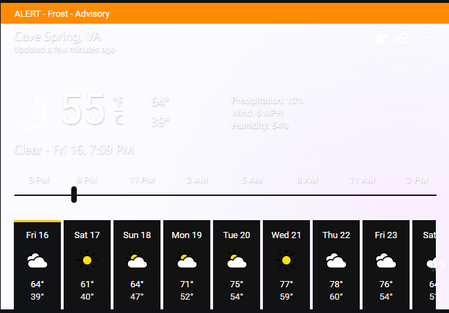
I have the Force Dark Mode for all websites flag enabled. But for weather I pulled up the navigator to 7:09 PM and it shows this: HotCakeX said that when the native dark mode rolls out, it wil...

Anonymous
Jan 06, 2021May I ask how to reinstall Edge if it was pushed out to you via 20h2 or a windows update?

Kam
Jan 06, 2021Silver Contributor
Deleted Go to edge://settings/reset and click "Restore to default values", I don't think you need to fully reinstall but if you need to, go to Control Panel -> Programs & Features -> Add and Remove Programs and find Microsoft Edge in the list, right-click, and select "Uninstall." Then, in whatever browser you have, go to https://microsoft.com/edge and download Microsoft Edge.
- HotCakeXJan 06, 2021MVP
Deleted
Deleted wrote:
Yeah, I do that when it isn't working and pressing reset. The uninstall button is greyed out though and what if the browser is corrupt?if the browser is corrupt, for whatever reason, you always have the option to reset Edge from within, or use recovery options in Windows 10
- HotCakeXJan 06, 2021MVP
Kam wrote:
DeletedGo to edge://settings/reset and click "Restore to default values", I don't think you need to fully reinstall but if you need to, go to Control Panel -> Programs & Features -> Add and Remove Programs and find Microsoft Edge in the list, right-click, and select "Uninstall." Then, in whatever browser you have, go to https://microsoft.com/edge and download Microsoft Edge.You can't uninstall Edge from control panel or Windows settings.
it's been like that for more than a year.
- KamJan 06, 2021Silver ContributorDeleted Well, maybe it's because it doesn't want to have the old Edge back again. You may want to check in with support (https://microsoftedgeinsider.com/en-us/support) and tell them what you're experiencing.
- AnonymousJan 06, 2021Yeah, I do that when it isn't working and pressing reset. The uninstall button is greyed out though and what if the browser is corrupt?
