Forum Discussion

WVD Licensing setup
- Jun 20, 2019
It's similar to how on-premises licensing works . If you are using Windows Server RDSH, you need a RDS CAL for every user that connects. If you are using a Windows Client OS, you are covered with your Windows E3 (or better) Per User licensing.
Since, from a licensing perspective, Windows 10 Multi-session is considered a client OS - you don't need an RDS CAL and there is no need to configure a TS licensing host.
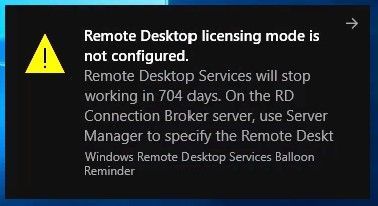
An Admin might be getting pop-ups about a grace period, that's something we are fixing.
- For 1903 builds that should go away in a couple of weeks.
- For 1809 builds it will take longer and the best workaround is using the latest image from the gallery which has a grace period of 800 days. We promise to fix this before the 800 days are over.
Thanks, Pieter

Should we even be using RDS cal's for this environment? It was my understanding that the Microsoft E3 license covered that for multi user session.

It's similar to how on-premises licensing works . If you are using Windows Server RDSH, you need a RDS CAL for every user that connects. If you are using a Windows Client OS, you are covered with your Windows E3 (or better) Per User licensing.
Since, from a licensing perspective, Windows 10 Multi-session is considered a client OS - you don't need an RDS CAL and there is no need to configure a TS licensing host.
An Admin might be getting pop-ups about a grace period, that's something we are fixing.
- For 1903 builds that should go away in a couple of weeks.
- For 1809 builds it will take longer and the best workaround is using the latest image from the gallery which has a grace period of 800 days. We promise to fix this before the 800 days are over.
Thanks, Pieter
 jonasnilssonNov 05, 2019Copper ContributorPieter, do you have a fix for the issue when running Windows 10 1903?
- PieterWiglevenNov 05, 2019Former Employee
jonasnilsson did you follow these instructions: https://docs.microsoft.com/en-us/azure/virtual-desktop/troubleshoot-vm-configuration#remote-desktop-licensing-mode-isnt-configured
Please let us know if this helps.
- jonasnilssonNov 05, 2019Copper Contributoryes I have followed it and the GPOs that are addressed in the article shows up as "Not Configured" . Note: it works for 4 other VMs, that are under the same OU and get the same GPOs applied as the one that it doesn´t work for. I have also checked for Windows updates multiple times but it sais that we have the latest ones
- HandAOct 23, 2019Brass ContributorHi there,
I still get this pop up when using the market place Images of Windows 10 1903. Should this have been fixed by now? I have a M365 E3 license assigned to the admin user I am using
Thanks
Gerry- jonasnilssonNov 05, 2019Copper Contributor
Bump, we have the same issue with one (out of 6) host. It is running Windows 10 1903
- Nicholas SemenkovichNov 05, 2019Brass Contributor
We're also seeing this and are somewhat worried, since our counter is approaching 30 days (screenshot from a few days ago):
- Joachim LøeAug 13, 2019Brass Contributor
Still i get this when using the Remote Desktop Client (WVD).
If no RDS license server is required, then why. This suddenly started.
I have 2 hosts in a pool. Only 1 have this issue./Joachim
- Joachim LøeAug 14, 2019Brass ContributorI ended up redeploying to the 1903 image. Working now.
- TheDoojJun 28, 2019Copper Contributor
Cool, thanks for the info. Ive found this forum more helpful than any other Windows forum, keep up the good work!
