Forum Discussion

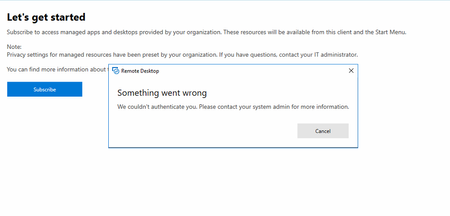
WVD Client - Something went wrong - Solved
 May 14, 2019
Updating to 1809 solved the issue.
The best solution seems like a real drastic solution if updating the build is not an option.
Some users were experiencing this error and our organization managed to solve it by removing certain personal certificates in their account till we found which certificate was giving the "Something went wrong" message without a login screen...
This can be done using de certmgr.msc or exploring to %appdata%\Roaming\Microsoft\SystemCertificates\My\Certificates and deleting the certificate which is causing an issue...
Hope this might work for others who might have the exact same issue...

 Microsoft
SBK297 Appreciate the information. Any data on what certificate it was? I'd normally have thought it would be some AAD issue and either rebooting or clearing the cache might help.
Let us know if someone else is still hitting this.
- SBK297Jul 24, 2019Copper Contributor
After troubleshooting a handful of PC's, that were experiencing this issue, we've pinpointed the culprit to be this certificate:
ms-organization-access
- DavidBelangerAug 15, 2019
SBK297 Any chance you are still seeing this? If so, I might ask for more information to see if we can track the issue down.
 Bianca2050Dec 18, 2019Copper Contributor
DavidBelanger A user is having this problem on a Windows 7 Home Premium machine. I understand Win 7 is approaching its EOL but wanted to report this, as I have been working on it for a while now. The user can log into the web client without a problem.