Forum Discussion

Windows Virtual Desktop - Deployment failed
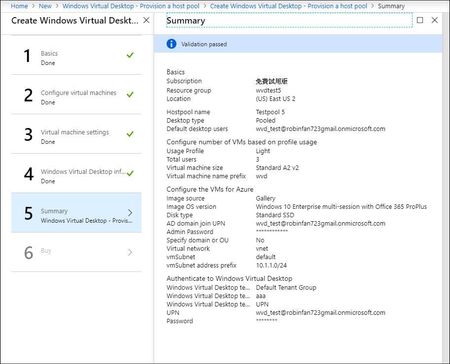

And if you have enabled user accounts for Azure Active Directory Domain Services and generated password hashes, your deployment should work if all other settings are correct.

Sami_Holtta , I have created a member ( mailto:wvd_test@robinfan723gmail.onmicrosoft.com) under the AAD Domain.
Next, to generate password hash, I followed this article, https://docs.microsoft.com/en-us/azure/active-directory-domain-services/join-windows-vm, and in the step of join a Windows server VM to a managed domain, I failed again at connect to VM. It asked "Request access" before connecting it and after I click it, the event "Requesting just-in-time access" is running, however, it can't finish and keeps running infinitely. Not sure why and any steps I ignore ?
 BionicjoeSep 09, 2019Copper Contributor
I created a test VM and in order to connect to it via RDP I had to add my local public IP to the network security rules. Once I could connect I joined it to the domain just fine.
Still when I create the WVD hostpool it fails at the same point.
- Garima2508Sep 06, 2022Copper Contributor
Bionicjoeif you are using active directory then below solution might help you.
Open the virtual machine on portal which is acting as Active directory and click on the virtual network in which it resides.
In the DNS servers section enter the private IP of the machine and save.
Start the deployment again from beginning. - Garima2508Sep 05, 2022Copper Contributor
I am having the same issue. I created virtual machine and was able to connect to it. But WVD deployment is failed. I have checked the Microsoft.DesktopVirtualization is also registered in my subscription.
- Garima2508Sep 05, 2022Copper Contributor
same issue