Forum Discussion

jdenney
May 21, 2021Copper Contributor
Unable to start more than 1 session per session host during normal business hours
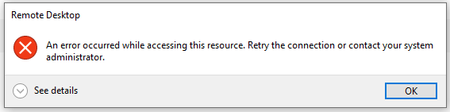
We have a bit of a strange and frustrating issue going on. I am hoping someone else may have had this issue before. We have an open support ticket, but so far microsoft support has no solution for u...
 May 26, 2021Hi, Really sounds like you need to open a ticket with Microsoft as from what you have described it all sounds like your set up correctly. Sorry I couldn't be anymore use, however id be interested to know what the fix ends up being.

jdenney
May 25, 2021Copper Contributor
Changing to depth first had no impact on the issue. When set to depth first with a max of 10 users per host, we can only get one use connected between the hours of 8AM and about 5:15 pm.
- StevenRMay 25, 2021Brass ContributorHave you set a scaling script up? sounds like its worth checking that, also try setting 9 and see what happens if it lets more than 1 on also what region have you built your hostpool in?
- jdenneyMay 25, 2021Copper ContributorThe hostpool and all resources are in the the east region. I have no doubt a scaling script would work but it kind of defeats the purpose of having a pooled hostpool if I have have to add a new host for each user. The key here is outside of the hours from 8:00 AM to 5:00 pm WVD works as expected allowing many sessions per session host. It seems to me that some thing about the activity on our on prem network is causing some sort of authentication error or permissions error to happen. I have been unable to see any log errors or performance issues that would back up my theory or shed any light on the actual cause of the issue.
- StevenRMay 25, 2021Brass Contributorthe reason I ask is because it almost sounds like a time zone issue if it allows multiples out of hours but not in hours. The scaling script i use to to say when in office hours keep X amount of seats available and then turns on and off resources to keep availability as close to X as possible, then out of hours X is a much lower figure to only have a small number of resource availble. Obviously power on connect is currently in preview and will help resolve that. Is your hostpool set to Pooled?