Forum Discussion

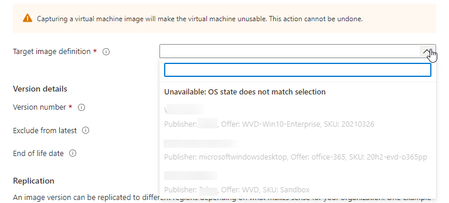
Unable to capture VM to shared image gallery - OS state does not match selection

David Schrag I am having this exact same problem. I will also be opening a ticket. In the meantime it looks like "rebuild the VM" is the path forward.

Rob_Pasell I've had a support ticket going with MS on this for a while now. It seems they had a glitch with the Shared Image Gallery function a while back, and I think that perhaps any images created during that glitch are now "frozen," no longer to accept version updates. I created a new base image since then (built from the same snapshot), and it looks like I'm able to add versions to that one. My ticket is still open and I'll try to remember to post an update here if it gets resolved.
- Rob_PasellApr 16, 2021Tin Contributor
David Schrag appreciate the quick response. Good luck.
Edit. I rebuilt the VM and it worked the second time, so most likely whatever that glitch in the Shared Image Gallery was caused the problem.
- David SchragApr 19, 2021Iron ContributorThat's good. I was able to add a version to a post-glitch image as well. However, I keep getting errors when trying to deploy session hosts based on that new version -- an error about downloading a .zip file from https://wvdportalstorageblob.blob.core.windows.net/galleryartifacts/. I've never seen that error before and don't know what would cause it, so now I have another ticket open.