Forum Discussion

p_chan784
Apr 23, 2021Copper Contributor
Session count discrepancy
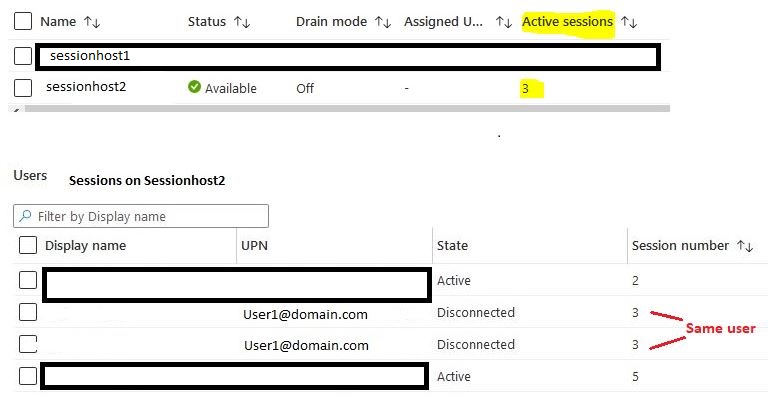
Hi, We have a host pool with two sessions hosts. They are set to a maximum limit of 4 sessions each and depth-first. A user with the same UPN and session number shows up twice in the session list....

StevenR
Apr 26, 2021Brass Contributor
It’s all a bit of belt and braces and another thing that may also help is forcing user log offs when either not active or disconnected after a period of time which may help the issues but also keeps costs down as you won’t have as many seats taken which in turn will mean vm’s go offline more frequently and even less likely to have the session issues. It’s not a perfect solution still so many bugs but there are things you can do to make the service desk quieter.

p_chan784
Apr 26, 2021Copper Contributor
Oh yes, totally agree. We have session timeouts in place and scaling is a work in progress.
- StevenRApr 26, 2021Brass ContributorHow do you mean work in progress, there is a very good script out there not Microsoft’s that I have used with great success (not my script not taking credit) but it’s on a few forums/how too’s
- p_chan784Apr 26, 2021Copper ContributorWe haven't gotten into automating this with scripts yet, though that is the very next step we're going to look at. We were working off of this doc: https://docs.microsoft.com/en-us/azure/virtual-desktop/set-up-scaling-script#how-the-scaling-tool-works and just got all the VM images, extensions, and a VMSS into place and tested successfully. Could you share the script you have used? Thank you.
- StevenRApr 26, 2021Brass Contributorhttps://github.com/tsrob50/WVD-Public/blob/master/StartStop-HostPoolVMs
Pretty straight forward just set working hrs and how many available seats you want peak off peak.