Forum Discussion

Created a WVD Pool using custom VM, but can't login to it when accessing the pool
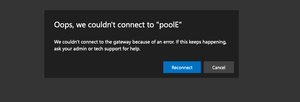

michawets this is what i get
ErrorSource : RDBroker
ErrorOperation : LookupSessionHostPool
ErrorCode : -2146233088
ErrorCodeSymbolic : ConnectionFailedNoHealthyRdshAvailable
ErrorMessage : Could not find any SessionHost available in specified pool = ≤poolE≥, due to either: sessions are not allowed, no healthy host (RDAgent did not report health information), session limit reached
on all SessionHosts in the pool or the pool is empty. Run Get-RdsHostPool and Get-RdsSessionHost cmdlets to get more information.
ErrorInternal : False
ReportedBy : RDGateway
Time : 9/20/2019 9:11:36 AM
So I ran Get-RdsSessionHost:
SessionHostName : vdiE-0.xxxxx.onmicrosoft.com
TenantName :xxxxx.onmicrosoft.com
TenantGroupName : Default Tenant Group
HostPoolName : poolE
AllowNewSession : True
Sessions : 0
LastHeartBeat : 9/19/2019 5:50:04 PM
AgentVersion : 1.0.1345.5400
AssignedUser :
OsVersion : 10.0.18362
SxSStackVersion : rdp-sxs190816002
Status : SxSStackListenerNotReady
UpdateState : Succeeded
LastUpdateTime : 9/19/2019 4:11:19 PM
UpdateErrorMessage :
Can it be that I didn't install the RD agent before i create the image. But I did install it after while trying to resolve this issue?

Can you check if the Windows Virtual Desktop Agent and Windows Virtual Desktop Agent Boot Loader are correctly installed?
https://docs.microsoft.com/en-us/azure/virtual-desktop/troubleshoot-vm-configuration#windows-virtual-desktop-agent-and-windows-virtual-desktop-boot-loader-are-not-installed
If not, follow these steps to install or reinstall both agents on your VM:
https://docs.microsoft.com/en-gb/azure/virtual-desktop/create-host-pools-powershell#register-the-virtual-machines-to-the-windows-virtual-desktop-preview-host-pool
After that, your sessionhost should end up as available in the Get-RdsSessionHost cmdlet.
Hope this helps
Kind regards
- ramitadrosOct 07, 2019Copper Contributor
I'm re-installed agent and bootloader, but still getting a
Status : SxSStackListenerNotReady
when running Get-RdsSessionHost. Do I need to isntall any additional agents?
 PatBrodeurNov 26, 2019Copper Contributor
I have the exact same problem. IT did uninstall and reinstall the agent, and the became "Available" for few minutes, but turned back to "SxSStackListenerNotReady". I created a deployment of 5 VMs from a template. I created a host pool from the market place templatesm and no problem. I I try to add a VM from an image to that pool, I get the same "SxSStackListenerNotReady" error.
- PatBrodeurFeb 07, 2020Copper Contributor
Hi! I finally contacted support, and after a few weeked, we found that my VM template was using Windows 10 Pro, and not Enterprise. The Microsoft support guy told me that Windows 10 Pro IS NOT supported with WVD. So I rebuilt my VM template with Windows 10 Enterprise, and of course... NO PROBLEM, never. What edition of Windows 10 were you using?