Forum Discussion

MSIX app attach Azure portal integration public preview


I PM'd you my business sub ID.
I have the cert install via the image does that matter or does it need to be done per session host individually? Im guessing Im fine since I did get past part of my issues. For some reason 2 days later the UNC paths just magically worked after I changed nothing as far as the VHDs.
However now if we make CPU-Z/NotePad++/VLCPlayer a remote app, they show in the RD Client but when we launch them it just opens up Documents on my machine -- very odd.
When I add the apps to the DAG nothing happens. No apps snap in, nothing.... I followed Christian Brinkhoff's guide bit by bit and this doesn't work.
I can't even continue testing right now because ever since this new agent 1.0.2839.400 got pushed my SessionHosts go to Unavailable. If I remove the agents, and sxs module, remove it from the host, then reinstall the agent downloading from MSFT docs which is an older version its fine and is available UNTIL this new agent installs then its back to Unavailable. This was occurring across all my Session hosts, even ones that were 2-3 images behind so I could see if something weird happened between tests.
- jlou65535Feb 22, 2021MCT
I have exactly the same issue than you "they show in the RD Client but when we launch them it just opens up Documents on my machine"
Did you find an explanation ?
Thank you
 AndrewTaylor140Feb 26, 2021Copper ContributorI'm seeing the same thing as well, these packages worked previously though which is even more strange. Did you manage to solve it?
- DBR14Feb 22, 2021Iron Contributor
Pfft.. no. All external subject matter sources have been radio silent on this stuff. I'm currently trying to open a ticket with Azure Support but because I have to go through this trash 3rd Party Tech Data in order to get to MSFT it's really slowing me down...
What's funny is the guide I followed for this is published by a MSFT Employee but his screenshots even show his SessionHosts as offline as well... I think this stuff is too much in its infancy to rely on as a solution which is really unfortunate as we were wanting to get off Vmware and go full WVD.
- DBR14Feb 19, 2021Iron Contributor
I'm quite stuck and confused.
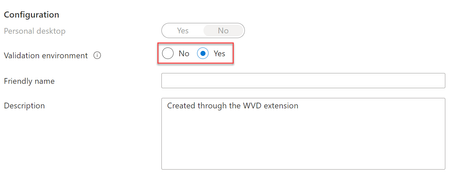
In order to test this MSIX App Attach my hostpool has to be in a validation environment HOWEVER when put in this mode it downloads this WVD AGENT 1.0.2839.400 which almost immediately breaks my host into Unavailable and that seems to prevent other parts of this from working stating that the Hostpool doesn't have any available VMs
Well I put my hostpool back into non-validation environment and rebooted my SessionHosts and VIOLA they downloaded WVD AGENT v1.0.2800.2700 and the SessionHosts are now available.
Can someone explain how this is supposed to work if its required to be in validation but validation then breaks the SessionHosts availability?
- Stefan BeckmannFeb 23, 2021Copper Contributor
Not exactly the same problem, but also a bug with the new agent. I get a "needs assistance" error. When I restart, the SH is available again. After a while, however, it falls back into the status "needs assistance". If the agent is then downgraded to the previous version after the environment has been moved from validation to production, everything is OK.
In the "needs assistance" state, no more MSIX packages can be added.
- DBR14Feb 23, 2021Iron Contributor
Interesting. I've not seen that status.
I see available > updating > unavailable.
As of ~1020am CST - In Validation
as of 1040am CST - Validation NO - and 1 host rebooted
- DBR14Feb 19, 2021Iron Contributor
Now I managed to at least for the moment get a SH available while the HostPool is set to validation mode. My other 2 SH's are still unavailable. I put in the UNC path of my newly made VHD and get this. So I thought hmm maybe I'll just delete the working one and use the UNC that I know worked. Nope wrong same error.
ActivityId: 6a121aee-ed88-404f-9d10-b0fbab6cecac Error: The MSIX Application metadata expand request failed on all Session Hosts that it was sent to. Session Host: TestHost-6, Error: Object reference not set to an instance of an object.. (Code: 400)

