Forum Discussion

High DWM.exe usage on WVD Windows 10 v2004
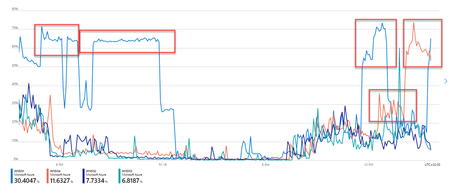

Marco Brouwer I'm seeing high dwm.exe CPU usage as well on a pooled session host. A single user is consuming 1-2 cores.
- Soo Kuan TeoFeb 05, 2021
Microsoft
Thank you for reporting. Can you please file a support case and escalate to product team? if possible, after you filed the case, please share the link to your case in this thread. Marco BrouwerFeb 08, 2021Brass Contributor
Yes, we did create a case at MS support, and it has been solved. Sorry for not reporting it here.
The problem was caused by soms HP Printer Driver utility on the WVD host, causing DWM.exe to use excessive CPU.
After deleting this printer driver, the issue was gone.
This was the reaction by MS support after sending them some log files of the affected host:
There are a total of 6 DWM.exe processes which are active when the trace was captured.
Out of these 3 were under normal usage, 1 was showing as low and there were two processes which were showing as high. While checking the stack tree for DWM.exe application we were able to see that Direct3D Image Rasterizer DLL which is D3D10Warp.dll is the file being used by DWM and next comes DWMCore.dll which is the source file for DWM.exe
We then matched the DISK Usage sample and CPU (Actual Usage Samples) from WPR and see that DWM.exe was constantly having high IOPS due to backgroundhost.exe application which then led us further to find the exact application causing the issue.
Backgroundhost.exe is the consent windows application that stays in the suspended state unless used by the application itself. We found that <AD2F1837.HPPrinterControl> is making this happen,
<AD2F1837.HPPrinterControl> (41012), 71.996121700, 6,070.100, 16.384, 1.
If you check the first value which 41012 which is the thread ID for this process, followed by CPU threshold (71.99) for 6 seconds and then followed by 6,070 which is IOPS count, and finally the wait time (in secs) that is exactly 16secs.
DWM is just a medium for rendering between system GUI and the application. We suggest you to disable or update this specific HPP Printer Control application and let us know if the issue exists.
Let me know if you have any query.- Soo Kuan TeoFeb 08, 2021Thank you for sharing your results Marco!
