Forum Discussion

GPO's not applying at startup for users
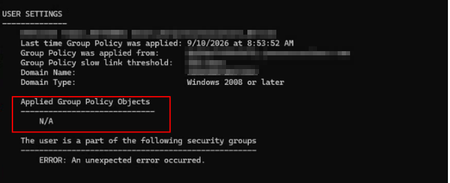

This is a known behavior difference between Windows 10 AVD and Windows 11 AVD when applying Group Policy Objects (GPOs) at user logon. The issue you are seeing applied Group Policy Objects: N/A until a manual gpupdate /force indicates that user policy processing is delayed or skipped at initial sign‑in due to changes in Windows 11 logon architecture and session handling for Azure Virtual Desktop.

ok based on other docs seems like logon and delay from when user signs in (FSLogix) and how GPO's are read seems to be theme in troubleshooting this.
Any suggestions in what I can review aside from that article. As that seems to suggest to try and disable programs at startup BUT if there are no programs then there has to be something else that can be reviewed to resolve this dilemma.