Forum Discussion

Error when connecting to MVD - 0x3000047
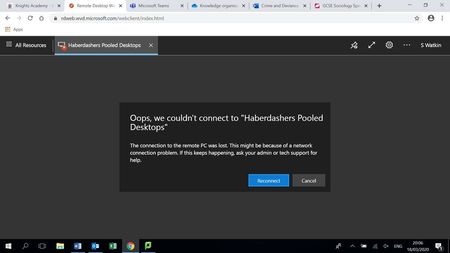
- Mar 24, 2020
serge I think you are on the right track. Here's what we see internally:
Client gets an Error during Orchestration.
Orchestration failed. Code=0x80075a1e, symbolicCode: E_PROXY_ORCHESTRATION_UNKNOWN_ERROR, message: Failed to add user = ≤USERNAME REMOVED≥ to group = Remote Desktop Users. Reason: Win32.ERROR_NO_SUCH_MEMBER, target: (null):4

 Microsoft
serge I think you are on the right track. Here's what we see internally:
Client gets an Error during Orchestration.
Orchestration failed. Code=0x80075a1e, symbolicCode: E_PROXY_ORCHESTRATION_UNKNOWN_ERROR, message: Failed to add user = ≤USERNAME REMOVED≥ to group = Remote Desktop Users. Reason: Win32.ERROR_NO_SUCH_MEMBER, target: (null):4

DavidBelanger OK, so that's interesting.
In AD, she's mailto:a.user@domain.com while in AAD she's mailto:a.user@domain.com. Both accounts are linked but have different UPNs in either service. I take it that's the problem then?
/edit Actually, no, somehow she's managed to end up with two accounts in O365, one synced from AD and a cloud account. Of course, she's trying to use the Cloud account to get in. What fun.
Thank you for your help.
- Bogdan GrozoiuMar 25, 2020Copper Contributor
The UPNs must be the same in on-prem DC(-s) and Azure AD.
What we've just done was to:
- Open “Active Directory Domains and Trusts”
- On the left hand side of the new window, right click on “Active Directory Domains and Trusts”, and select “Properties”
- Type in the domain suffix of the user allowed to use WVD, in to the “Alternative UPN suffixes” box, and then click “Add”.
- Modify the user logon name property of the respective user from (e.g:) mailto:username@domain.local to mailto:username@domain.tld (as the user has it in O365 / AAD tenant)
- Try again.
TLDR;
Make sure the O365 UPN is the same with the User Logon Name in local Active Directory.
- DavidBeeMay 07, 2020Copper Contributor
Thank you.
This solved my problem with a session pool where the VMs were not joined to the Azure AD DS domain, but were in an internal domain, with a separate isolated domain controller on a VM within the same subscription.


