Forum Discussion

LGADMIN545
May 24, 2022Copper Contributor
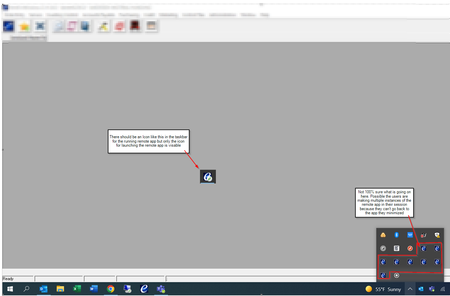
AVD Remote App Running instance not displaying in taskbar after Client update to 1.2.3130
Good Day - I was wondering if anyone has experienced issues with Remote app programs not displaying in the taskbar after users have launched them. This is causing issues for Laptop users with single ...

Xandven_
Jun 02, 2022Copper Contributor
We are getting closer to a solution. If the AVD Web Client is working ok, then
GPO: Administrative Templates/Remote Desktop Services/Remote Desktop Session Host/Remote Session Environment [Use advanced RemoteFX graphics for RemoteApp] (or the corresponding registry key) might be causing the issue if set to disabled. Try changing it to Enabled (or not configured).
GPO: Administrative Templates/Remote Desktop Services/Remote Desktop Session Host/Remote Session Environment [Use advanced RemoteFX graphics for RemoteApp] (or the corresponding registry key) might be causing the issue if set to disabled. Try changing it to Enabled (or not configured).

James Price
Jun 09, 2022Copper Contributor
Xandven_ This is the fix that we used with Microsoft Support. We deployed it to all our session hosts and it resolved the issue for now until Microsoft comes out with an update to resolve the issue. Also another workaround if you have a smaller environment is to download the Remote Desktop Client to 1.2.2927.0 if you can find it. If you have a large environment with lots of Remote Clients deployed i would suggest the GPO.
 Pedro_AravenaJun 09, 2022Copper ContributorHi James, do you have Remote Desktop Client 1.2.2927.0 download link ?
Thank you !