Forum Discussion

LGADMIN545
May 24, 2022Copper Contributor
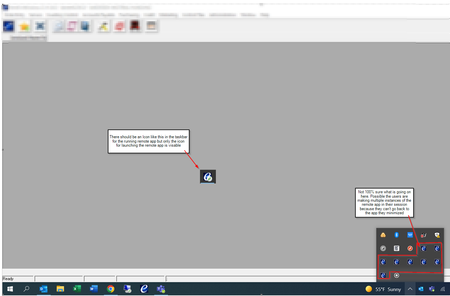
AVD Remote App Running instance not displaying in taskbar after Client update to 1.2.3130
Good Day - I was wondering if anyone has experienced issues with Remote app programs not displaying in the taskbar after users have launched them. This is causing issues for Laptop users with single ...

Luis_Del_Risco
Jun 07, 2022Copper Contributor
Any news from Microsoft? the issue persists independent of many of the workarounds listed here..
If anyone have news please comment
Thanks in advance

JBowser
Jun 07, 2022Copper Contributor
Luis_Del_Risco Since upgrading to the latest desktop client (1.2.3213.0), we have not experienced this issue.
 JimbowJun 08, 2022Brass ContributorThis worked for us:
1. New rdagent DEV Version: 1.0.4739.800 (needs to activate validation environment to yes)
2. New RDClient Version: 1.2.3213.0
3. Regkey fEnableRemoteFXAdvancedRemoteApp = 1 Missing_JaccoJun 14, 2022Copper Contributor
Jimbow
We are facing this exact same issue at 3 customer locations.Updating the client to 1.2.3213 and setting the reg key didn't change anything.
Can you maybe explain how I set "1. New rdagent DEV Version: 1.0.4739.800 (needs to activate validation environment to yes)"
Thank you in advance
- JimbowJun 15, 2022Brass ContributorHi,
here is the docs article for setting validation environment. This is just a workaround until MS fixes this in the prod rdagent version! After fix, you need to disable it again!
https://docs.microsoft.com/en-us/azure/virtual-desktop/create-validation-host-pool?tabs=azure-portal
- JimbowJun 09, 2022Brass ContributorStatusupdate:
Okay with dev rdagent 1.0.4739.800 version we can't click on the icons on the right side of the taskbar 😄
With version prod rdagent 1.0.4452.2100 the icons on the right taskbar work. Send feedback to MS-Ticket!