Forum Discussion

LGADMIN545
May 24, 2022Copper Contributor
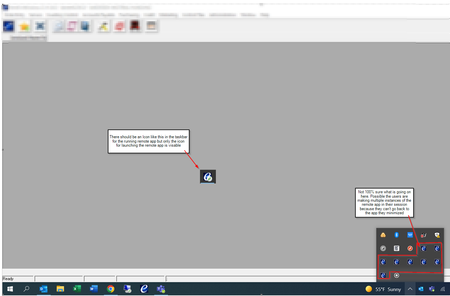
AVD Remote App Running instance not displaying in taskbar after Client update to 1.2.3130
Good Day - I was wondering if anyone has experienced issues with Remote app programs not displaying in the taskbar after users have launched them. This is causing issues for Laptop users with single ...

Xandven_
Jun 02, 2022Copper Contributor
We are getting closer to a solution. If the AVD Web Client is working ok, then
GPO: Administrative Templates/Remote Desktop Services/Remote Desktop Session Host/Remote Session Environment [Use advanced RemoteFX graphics for RemoteApp] (or the corresponding registry key) might be causing the issue if set to disabled. Try changing it to Enabled (or not configured).
GPO: Administrative Templates/Remote Desktop Services/Remote Desktop Session Host/Remote Session Environment [Use advanced RemoteFX graphics for RemoteApp] (or the corresponding registry key) might be causing the issue if set to disabled. Try changing it to Enabled (or not configured).

JBowser
Jun 02, 2022Copper Contributor
Our DevOps Engineer found this documentation on MS....
https://docs.microsoft.com/en-us/windows-server/remote/remote-desktop-services/clients/windowsdesktop-admin
According to this documentation, it looks as though the update is controlled via registry settings.
https://docs.microsoft.com/en-us/windows-server/remote/remote-desktop-services/clients/windowsdesktop-admin
According to this documentation, it looks as though the update is controlled via registry settings.
- JBowserJun 02, 2022Copper ContributorTo disable the update, we had to set the following registry key before installing the previous client.
[HKEY_LOCAL_MACHINE\SOFTWARE\Microsoft\MSRDC\Policies]
"AutomaticUpdates"=dword:00000000
We'll go back in and remove this after the issue is fixed by Microsoft.