Forum Discussion

LGADMIN545
May 24, 2022Copper Contributor
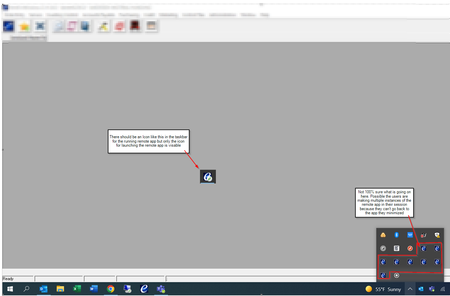
AVD Remote App Running instance not displaying in taskbar after Client update to 1.2.3130
Good Day - I was wondering if anyone has experienced issues with Remote app programs not displaying in the taskbar after users have launched them. This is causing issues for Laptop users with single ...

JBowser
Jun 01, 2022Copper Contributor
We have to fix that at each client machine. We have to reset user data, uninstall the desktop client, install an older desktop client to fix the issue. MS did not respond to the case we opened yesterday afternoon, but I have updated the case with our resolution.
Some of us have been on this latest client version since it was released without issue until now. I suspect MS updated some kind of service consumed by these newer client versions.
Although we haven't tested every client out there, this appeared to be limited to the desktop client only. The web client, Microsoft Store client, and iOS clients all worked as expected.
Some of us have been on this latest client version since it was released without issue until now. I suspect MS updated some kind of service consumed by these newer client versions.
Although we haven't tested every client out there, this appeared to be limited to the desktop client only. The web client, Microsoft Store client, and iOS clients all worked as expected.
 JimbowJun 02, 2022Brass Contributor
I can confirm, that WebClient and MS Store Client are working fine! MS Store Client is only showing the red MSRDC Icon on taskbar but better then nothing 😄
So, that's for sure, this issue is from newer Remote Desktop Client versions!
Ticket Status: We have sent the entire Remote Desktop Client logs via a special MS script (MS sent it to me) and are awaiting feedback.