Forum Discussion

AVD Remote App Running instance not displaying in taskbar after Client update to 1.2.3130
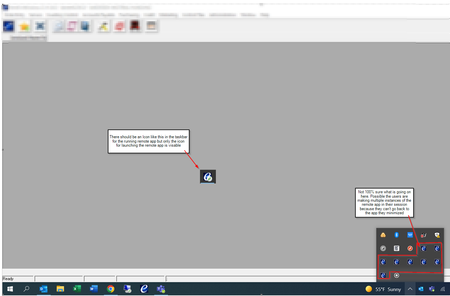

We have the same problem. We see it for 1 second and then it disappears. Only min/max window shows the tray icon again...
Which RemoteDesktop Client Version do you use to get it working? I jump back to 1.2.3128 and still get the same problem.
 LGADMIN545May 26, 2022Copper Contributor
Jimbow Some of our users are still having the problem after downgrading, probably about 5-10 from what it feels like from the helpdesk tickets. The majority seem to have the issue resolved by Clearing the user data from the client (Settings->About->Reset), uninstalling, restart PC, Installing a lower version (We have been using 1.2.33004) and re-subscribing.
I have been stumped on the users that are still having the issue after performing that procedure. I can't really find anything relevant in the logs to show an error of some sort. I guess we are stuck waiting for MS to release an update for the bug.
- JimbowMay 27, 2022Brass Contributor
I opened a MS Call but so far we're not getting anywhere. Checked some basics like remote app settings and Sessionhost Logs.
The app worked flawlessly until last week or the week before last. So I suspect that something has changed in the RemoteDesktop Client or in the RDAgent on the session host.I hope some developers from the remote desktop client team will read this technet post 🙂
