Forum Discussion

PyungraeCho Microsoft
Sep 01, 2021MicrosoftAuto Deallocation for Unused Azure Virtual Desktop Personal VMs
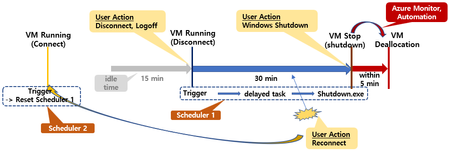
Auto-Deallocation method for Azure Virtual Desktop VM that has not been used for a specific period has been introduced in various places. I would like to introduce another scenario. But this is suita...

AIDADelios
Apr 05, 2024Copper Contributor
Hello,
Ok, I understand now. But the only app I can see is Windows Virtual Desktop Client, with the following application id fa4345a4-a730-4230-84a8-7d9651b86739 no 9cdead84-a844-4324-93f2-b2e6bb768d07 as you recommend.
Best,

jlou65535
Apr 05, 2024MCT
That app fa4345a4-a730-4230-84a8-7d9651b86739 is a legacy app as said here :
https://robjanssen.it/2021/11/15/conditional-access-for-avd-azure-virtual-desktop/
The right one should be named Azure Virtual Desktop with 9cdead84-a844-4324-93f2-b2e6bb768d07
JL
https://robjanssen.it/2021/11/15/conditional-access-for-avd-azure-virtual-desktop/
The right one should be named Azure Virtual Desktop with 9cdead84-a844-4324-93f2-b2e6bb768d07
JL
- jlou65535Apr 06, 2024MCTGood to know 😉
Thanks for your feedback  SuperDeliosApr 06, 2024Copper Contributor
Hello,
Finally solved. The correct APP name is Azure Virtual Desktop app with the following id 610684ab-c1fb-45c1-b95d-c7dc8d34a685.Tested and it's works.
Thanks a lots.- AIDADeliosApr 05, 2024Copper ContributorOk, I'll try to figure out why I can't see it.
Thanks!!