Forum Discussion

PyungraeCho Microsoft
Sep 01, 2021MicrosoftAuto Deallocation for Unused Azure Virtual Desktop Personal VMs
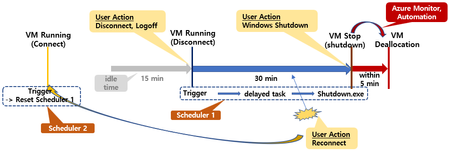
Auto-Deallocation method for Azure Virtual Desktop VM that has not been used for a specific period has been introduced in various places. I would like to introduce another scenario. But this is suita...

AIDADelios
Apr 05, 2024Copper Contributor
Hi,
I'll try your recommendation and give you feedback.
When you say double check the AVD application ID ? (9cdead84-a844-4324-93f2-b2e6bb768d07) what does it means?. I don't understand.
Thanks.
Best,
I'll try your recommendation and give you feedback.
When you say double check the AVD application ID ? (9cdead84-a844-4324-93f2-b2e6bb768d07) what does it means?. I don't understand.
Thanks.
Best,

jlou65535
Apr 05, 2024MCT
There is many Azure app about Azure Virtual Desktop / Windows Virtual Desktop.
Just take a look if you chose the right AVD app for RBAC role by clicking on it and check the Application ID 😉
JL
Just take a look if you chose the right AVD app for RBAC role by clicking on it and check the Application ID 😉
JL
- jlou65535Apr 06, 2024MCTGood to know 😉
Thanks for your feedback  SuperDeliosApr 06, 2024Copper Contributor
Hello,
Finally solved. The correct APP name is Azure Virtual Desktop app with the following id 610684ab-c1fb-45c1-b95d-c7dc8d34a685.Tested and it's works.
Thanks a lots.- AIDADeliosApr 05, 2024Copper ContributorOk, I'll try to figure out why I can't see it.
Thanks!! - jlou65535Apr 05, 2024MCTThat app fa4345a4-a730-4230-84a8-7d9651b86739 is a legacy app as said here :
https://robjanssen.it/2021/11/15/conditional-access-for-avd-azure-virtual-desktop/
The right one should be named Azure Virtual Desktop with 9cdead84-a844-4324-93f2-b2e6bb768d07
JL - AIDADeliosApr 05, 2024Copper Contributor
Hello,
Ok, I understand now. But the only app I can see is Windows Virtual Desktop Client, with the following application id fa4345a4-a730-4230-84a8-7d9651b86739 no 9cdead84-a844-4324-93f2-b2e6bb768d07 as you recommend.
Best,