Forum Discussion

ben-pg
Feb 14, 2025Copper Contributor
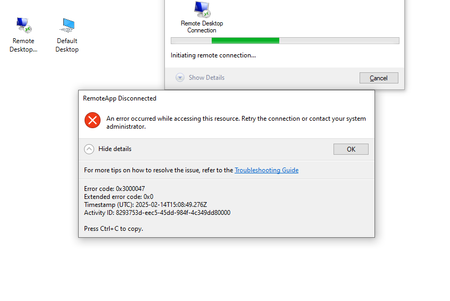
an error occurred while accessing this resource
When trying to connect to a remote desktop connection in the Remote Desktop client app i get "an error occurred while accessing this resource." trying from browser (https://client.wvd.microso...

Kidd_Ip
Feb 14, 2025MVP
How about try to fix by below?
- Check Account Permissions: Ensure that your account has the necessary permissions for accessing the remote resource. You mentioned having full owner RBAC on Azure and the Desktop Virtualization User role, but double-checking can't hurt.
- Use InPrivate Browser: Sometimes, using an InPrivate or incognito browser window can help resolve authentication issues. Try accessing the Azure Virtual Desktop (AVD) platform using an InPrivate browser window.
- Clear Browser Cache: Clear your browser cache and cookies, then try accessing the AVD platform again.
- Check Conditional Access Policies: Ensure that your Conditional Access policies are not blocking your access. Sometimes, policies can prevent access to certain resources.
- Re-register Azure VPN: Since you mentioned needing to use an Azure VPN to connect using on-prem AD credentials, ensure that your VPN client is correctly configured. You can follow the steps to configure the Azure VPN Client for Microsoft Entra ID authentication.