Forum Discussion

Adding MSIX applications to the host pool

 ArkadiuszOpoczkoFeb 10, 2021Brass Contributor
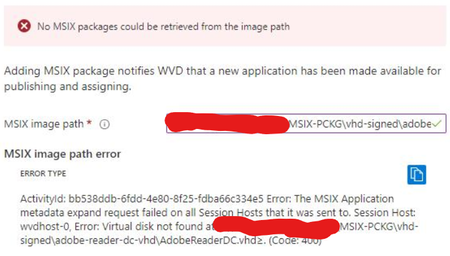
Stefan Georgiev so I tried it as well and it didn't like my cert. Had to repack using Device Guard but then it said there is no msix on .vhd I linked.
I'm really confused because when trying to upload the .vhd either from VM or storage account I get below errors:
- can't find vhd
- cert issue
I repacked the thing today like 15 times using Device Guard as well as self-generated cert using PowerShell, signing during packing or adding cert later. Still nothing.- Stefan GeorgievFeb 10, 2021Former Employee
ArkadiuszOpoczko Did you put the new certificate (with which the applications are packaged) on each machine in Trusted People? As for cannot find VHD, all session host machines must have access to the location
- ArkadiuszOpoczkoFeb 10, 2021Brass Contributor
Stefan Georgiev tried to do it from a VM outside the host pool. I will test it on a VM inside the host pool and we'll see what happens.
- Stefan GeorgievFeb 10, 2021Former EmployeeI am not expecting that VM outside of the host pool to work.
- ArkadiuszOpoczkoFeb 15, 2021Brass Contributor
Stefan Georgiev I tried adding a .vhd from a VM inside a host pool as well, still got the same errors though. Most of the time it just doesn't recognize the msix inside .vhd for some reason