Forum Discussion

Two labels does not appear in outlook
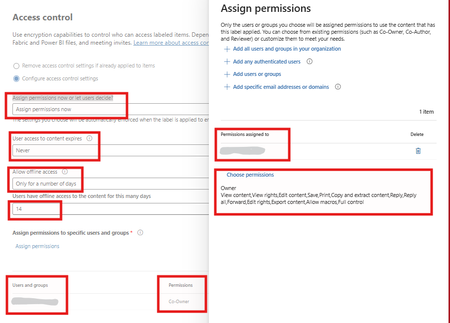

Since IRM passes, I would compare the label definitions and publishing policy rather than the encryption configuration. Outlook only offers labels whose scope includes email and that are published to the signed-in user.
In Microsoft Purview, open each missing label and verify that its scope includes Emails, not only Files and other data assets. Then open the publishing policy and confirm the pilot users are included directly or through the expected group. Check that the labels are not disabled, hidden under an unexpected parent label, or assigned only through a policy with a different priority.
After saving, allow policy replication time, then sign out of Outlook on the web and test a new message in a private window. Compare that with a label that already appears. If the missing labels still do not load, export the label and policy details with Security & Compliance PowerShell and open a Purview support request with the label GUIDs, policy GUID, affected UPN, and UTC test time. That will distinguish label publication from a working IRM backend.