Forum Discussion

KKiat
Aug 04, 2025Tin Contributor
MS Purview for DLP Endpoint not working.
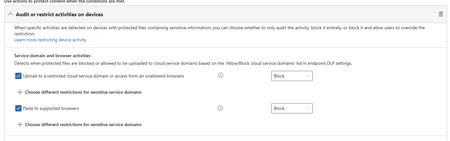
Hello Teams, need help on DLP Endpoint to prevent user to upload sensitivity label files to untrusted domain. Initially it working as expected when I configure as individual user in the policies but...

Prathista Ilango Microsoft
Aug 05, 2025MicrosoftHello KKiat,
It could be because of a variety of reasons. Please check the below to confirm,
- Make sure the Service domains setting under "Endpoint DLP settings->Browser and domain restrictions to sensitive data" is configured properly. Refer here for example scenarios to understand and configure per your requirement: https://learn.microsoft.com/en-us/purview/dlp-configure-endpoint-settings#service-domains
- Check the targeted users and devices from the old policy and new policy and make sure the intended user and device are added.
- Make sure device is synced for configuration and policy sync under "Device Onboarding->Devices". If policy sync status is not updated, click on the device and you should be able to see which policy is not updated, like below,
- If the above is the case. Check what is the sync status of the policy under DLP policies after modifying the policy, like below. If it is sync in progress, like in my case, wait for it to complete and try. This sync could take up to 2 hours to 24 hours.
- If the sync is taking too long or errors out, refer to this article to further troubleshoot: Troubleshooting endpoint data loss prevention configuration and policy sync | Microsoft Learn
Hope this helps!
Regards,
PI
Please mark as solution, if you find the answer helpful. This will assist others in the community who encounter a similar issue, enabling them to quickly find the solution and benefit from the guidance provided.