Forum Discussion

shreyabhurkuse
May 30, 2025Copper Contributor
Endpoint DLP Not Enforcing Real-Time Blocking
Hello Team, I’m currently testing Microsoft Purview Endpoint DLP and have configured policies to block sensitive data activities (e.g., copying to personal Gmail, uploading to cloud apps, etc.). I’v...

saloni Microsoft
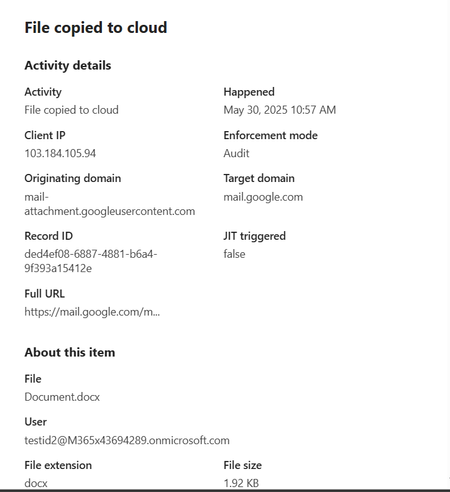
Jun 01, 2025MicrosoftIn the Activity Explorer event, check the Policy and Rule name fields- if it matches with the policy you created.
Also confirm whether the domain mail.google.com (or any other where you want the upload to be blocked) is added in Sensitive service domains block list in DLP settings.

shreyabhurkuse
Jun 01, 2025Copper Contributor
Hello Saloni,
In the Activity Explorer event -Policy and Rule name fields are showing blank, attached screenshot for your reference. And domain mail.google.com is also added in Sensitive service domains block list in DLP settings.
- saloniJun 08, 2025
This means the files are not getting classified and just audited by default.
- Check whether the created policy is synced to the device (device onboarding page shows policy sync status).
- Try editing any of the files again or create a new file having sensitive data and upload it. DLP (without just-in-time protection enabled) doesn't work on cold files created before the machine was onboarded.