Forum Discussion

DLP Policy with nested conditions including "message type is" condition
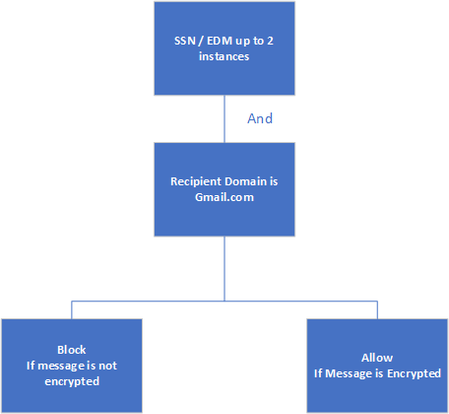
- Jun 20, 2023
I have configured an identical policy and it is functioning as expected. Can you see any data on the activity of sending the SSN through Activity Explorer? Or have you confirmed that the SSN and content you're entering in the email match the Social Security Number sensitive information type? You can copy the content you're using to a word file then upload it to the purview portal to see if it is a match. To do so:
- Navigate to Home - Microsoft Purview
- Drop-down data classification > select classifiers > sensitive info types
- Find and select your social security number option from the list
- On the SSN page, select Test
- Upload the file with the same data you were testing through exchange and see if it finds a match
If you aren't getting a match, I recommend leveraging test data that you can download from dlptest.com to test your policies.
Also, do you have any other exchange online DLP policy that may be conflicting or preventing this policy from taking effect?
I'd also add the condition for Message Type Is = Permission Controlled to also see if the message is using a pre-built protection template like "Encrypt" or "Do Not Forward" or if you have configured Sensitivity Labels that enforce encryption will be covered by the "Permission Controlled" type as well, which I highly recommend and encourage you to leverage labels as well as DLP.

I have configured an identical policy and it is functioning as expected. Can you see any data on the activity of sending the SSN through Activity Explorer? Or have you confirmed that the SSN and content you're entering in the email match the Social Security Number sensitive information type? You can copy the content you're using to a word file then upload it to the purview portal to see if it is a match. To do so:
- Navigate to Home - Microsoft Purview
- Drop-down data classification > select classifiers > sensitive info types
- Find and select your social security number option from the list
- On the SSN page, select Test
- Upload the file with the same data you were testing through exchange and see if it finds a match
If you aren't getting a match, I recommend leveraging test data that you can download from dlptest.com to test your policies.
Also, do you have any other exchange online DLP policy that may be conflicting or preventing this policy from taking effect?
I'd also add the condition for Message Type Is = Permission Controlled to also see if the message is using a pre-built protection template like "Encrypt" or "Do Not Forward" or if you have configured Sensitivity Labels that enforce encryption will be covered by the "Permission Controlled" type as well, which I highly recommend and encourage you to leverage labels as well as DLP.
 Afsar_ShariffJun 21, 2023Brass ContributorThanks You
I have selected "Encrypt" and was using OME templates to encrypt the message. After selecting permission controlled it is working.