Forum Discussion

Sophie_Bruehl
Jan 21, 2024Iron Contributor
Automatically delete deleted mails from the deleted item folder
I would like all mails older than 1 day to be automatically deleted from the deleted items folder. I have E3 licences. I have selected "Exchange" under "Data lifecycle management" --> "Exchange" in ...

LeonPavesic
Jan 22, 2024Silver Contributor
Hi Sophie_Bruehl,
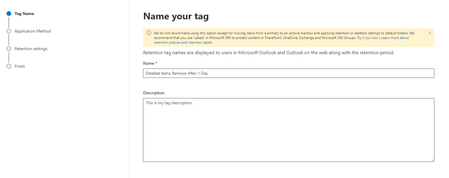
you can try to change the Retention Action settings to Permanently Delete, this should use the Retention Period in 1 day and Retention action of 0 days (not 14 days):
According to these settings, if the “Retention Period” is set to 1 day and the “Retention Action” is set to “Permanently delete”, the emails should be permanently deleted after 1 day.
Please click Mark as Best Response & Like if my post helped you to solve your issue.
This will help others to find the correct solution easily. It also closes the item.
If the post was useful in other ways, please consider giving it Like.
Kindest regards,
Leon Pavesic
(LinkedIn)

Sophie_Bruehl
Jan 26, 2024Iron Contributor
Hi Leon,
thank you so much for your help. I switched the Retention Action a few days ago to "Permanently delete", but this did not take any effect in the Mailboxes deleted items folder.... Do you have any other clue?
Thank you very much in advance and kind regards,
Sophie
thank you so much for your help. I switched the Retention Action a few days ago to "Permanently delete", but this did not take any effect in the Mailboxes deleted items folder.... Do you have any other clue?
Thank you very much in advance and kind regards,
Sophie