Forum Discussion

VPN to a 3rd party on-premise data centre via the 3rd party Azure Express Route connection?

https://learn.microsoft.com/en-us/azure/route-server/expressroute-vpn-support
It would be scenario 2
- _AndreGNov 18, 2023Tin Contributor
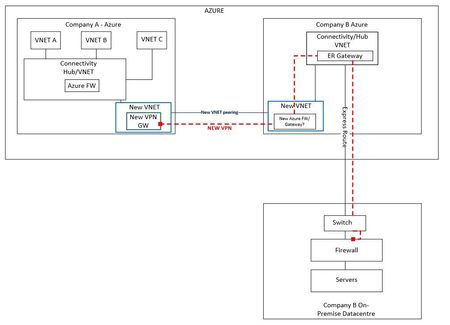
Actually, thinking on it a bit further, there are quite a few questions here:
- Why is there both a VNet peering and a VPN between Company A and Company B?
- Why a new hub in Company B?
- Why is the VPN gw for Company A not in its existing hub?
- You don't need a router
What I think is possible, though I can't currently test it out, is to simply put a VPN gateway in the existing Hub for Company B and put on in the existing Hub for Company A. You can normally only have one network gateway in a VNet, but you can have both an Express Route gateway and a VPN gateway in the same VNet (both being in the same subnet).
If the VPN connection in the hub for Company B is configured with a Local Network Gateway and this contains the needed IP range from Company A's VNet, it should work out of the box. The routes should be propagated over the express route. If BGP is enabled on the Company B hub VPN Gateway, than you need to use the route server.
No VNet peering is needed between company A and B, not sure that would even work.
- For Company B, the peering between the new VNet and the HUB is not going to work. Since you can only create a peering that routes to a remote gateway if the vnet does not contain a gateway, there is no way to route VPN traffic into the express route (you can set a Route Table on a Gateway subnet, but but the express route gw will not honor them)
- For Company A it depends on the actual hub setup. If there is no VPN gw in that hub, you might make it work. But I don't see why you would not put the VPN gw in the existing hub