Forum Discussion

which port to join domain azure ad domain service ?
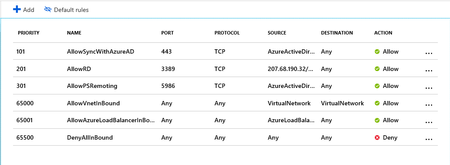
- May 03, 2019Hi good evening!
Now I understood, what you want.
In this case you will need to configure your own routes by using " User defined Routes" in the Azure Route Table, there you will can use a virtual Appliance to route the traffic.
It's not so complex, I will leave below two links, one talking about best practices on AZURE Networking and one to User Defined Routes, I recommend you read first the best practices.
Best practices= https://docs.microsoft.com/en-us/azure/security/azure-security-network-security-best-practices
User Defined Routes=
https://docs.microsoft.com/en-us/azure/virtual-network/tutorial-create-route-table-portal
Hope it helps you!
Don't forget, let me know if it was helpful
See you Soon!

Hello
Because default then all subnet can see Azure ADDS .
example as backend subnet then can see and join domain Azure ADDS but with DMZ subnet then i think need deny to see Azure ADDS . and also DMZ is public internet ,
and i see in on-premier then all subnet default will deny all and open IP to IP not all subnet , should I think in Azure as that , I am newbie azure .
please recommend help me best practice control traffic between all subnet in vnet ?
Best Regards,
Thanks

Now I understood, what you want.
In this case you will need to configure your own routes by using " User defined Routes" in the Azure Route Table, there you will can use a virtual Appliance to route the traffic.
It's not so complex, I will leave below two links, one talking about best practices on AZURE Networking and one to User Defined Routes, I recommend you read first the best practices.
Best practices= https://docs.microsoft.com/en-us/azure/security/azure-security-network-security-best-practices
User Defined Routes=
https://docs.microsoft.com/en-us/azure/virtual-network/tutorial-create-route-table-portal
Hope it helps you!
Don't forget, let me know if it was helpful
See you Soon!
- Tien Ngo ThanhMay 08, 2019Iron Contributor
RodNet : I Still some not understand
As i understand then all subnet in azure will see all port as default to control portl between these subnet then need route traffic by UDR and to NVA (VM+ Firewall) ? and to do that need follow as step below ?
- Create a route table
- Create a route
- Create a virtual network with multiple subnets
- Associate a route table to a subnet
- Create an NVA that routes traffic
- Deploy virtual machines (VM) into different subnets
- Route traffic from one subnet to another through an NVA
- RodNetMay 09, 2019Brass ContributorNO. Only Subnet inside the same VNET will have communication with each other by default, so in this case you will need to use a user defined route.
I'd suggest you to create the VNET and subnets first. but every others steps are OK.
=D- Tien Ngo ThanhMay 11, 2019Iron Contributor
Thanks all Support