Forum Discussion

Tien Ngo Thanh
May 02, 2019Iron Contributor
which port to join domain azure ad domain service ?
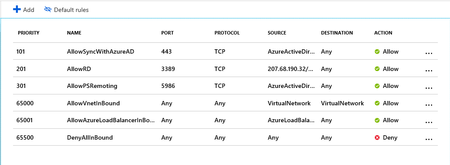
hello I try create Azure Ad domain service in separate subnet and assign nsg to subnet , i want deny all and open only these port need to use for Azure domain service as join domain , ldap , p...
- May 03, 2019Hi good evening!
Now I understood, what you want.
In this case you will need to configure your own routes by using " User defined Routes" in the Azure Route Table, there you will can use a virtual Appliance to route the traffic.
It's not so complex, I will leave below two links, one talking about best practices on AZURE Networking and one to User Defined Routes, I recommend you read first the best practices.
Best practices= https://docs.microsoft.com/en-us/azure/security/azure-security-network-security-best-practices
User Defined Routes=
https://docs.microsoft.com/en-us/azure/virtual-network/tutorial-create-route-table-portal
Hope it helps you!
Don't forget, let me know if it was helpful
See you Soon!

RodNet
May 03, 2019Brass Contributor
Hi Tien Ngo Thanh
Good morning.
It is not necessary to create any other rules to deny all inbound connection different of the rules that you have created, because if you see on the NSG you already have the rule 65500 DenyAllInBound that will do this for you.
The lower priority takes precedence.
There is a good article talking about it on the link below:
https://blogs.msdn.microsoft.com/igorpag/2016/05/14/azure-network-security-groups-nsg-best-practices-and-lessons-learned/
Please, let me know if it could help you.
have a nice day!
Good morning.
It is not necessary to create any other rules to deny all inbound connection different of the rules that you have created, because if you see on the NSG you already have the rule 65500 DenyAllInBound that will do this for you.
The lower priority takes precedence.
There is a good article talking about it on the link below:
https://blogs.msdn.microsoft.com/igorpag/2016/05/14/azure-network-security-groups-nsg-best-practices-and-lessons-learned/
Please, let me know if it could help you.
have a nice day!
 Tien Ngo ThanhMay 03, 2019Iron Contributor
Hello
Because default then all subnet can see Azure ADDS .
example as backend subnet then can see and join domain Azure ADDS but with DMZ subnet then i think need deny to see Azure ADDS . and also DMZ is public internet ,
and i see in on-premier then all subnet default will deny all and open IP to IP not all subnet , should I think in Azure as that , I am newbie azure .
please recommend help me best practice control traffic between all subnet in vnet ?
Best Regards,
Thanks
- RodNetMay 03, 2019Brass ContributorHi good evening!
Now I understood, what you want.
In this case you will need to configure your own routes by using " User defined Routes" in the Azure Route Table, there you will can use a virtual Appliance to route the traffic.
It's not so complex, I will leave below two links, one talking about best practices on AZURE Networking and one to User Defined Routes, I recommend you read first the best practices.
Best practices= https://docs.microsoft.com/en-us/azure/security/azure-security-network-security-best-practices
User Defined Routes=
https://docs.microsoft.com/en-us/azure/virtual-network/tutorial-create-route-table-portal
Hope it helps you!
Don't forget, let me know if it was helpful
See you Soon!- Tien Ngo ThanhMay 08, 2019Iron Contributor
RodNet : I Still some not understand
As i understand then all subnet in azure will see all port as default to control portl between these subnet then need route traffic by UDR and to NVA (VM+ Firewall) ? and to do that need follow as step below ?
- Create a route table
- Create a route
- Create a virtual network with multiple subnets
- Associate a route table to a subnet
- Create an NVA that routes traffic
- Deploy virtual machines (VM) into different subnets
- Route traffic from one subnet to another through an NVA