Forum Discussion

Cost increases when selecting Amortised cost in cost analysis
 Aug 09, 2026
This was a known issue and has now been resolved. If you require further information, including the root cause analysis (RCA), please contact Microsoft Support.

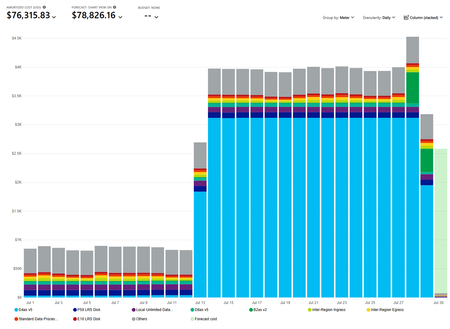
That jump can be expected when switching metrics, because Actual cost and Amortized cost answer different questions. Actual cost shows reservation purchases when billed; amortized cost spreads the reservation price across its term and assigns the daily cost to covered resources. A reservation purchased earlier can therefore make a later month look much higher in amortized view without creating a new charge. Keep the same scope and date range, then filter Pricing model to Reservation and use Daily granularity. Group by Reservation name, then Resource. Check Charge type for UnusedReservation, which identifies paid capacity not used. Compare the result with Actual cost and the invoice; do not add both totals together. If the D4asv5 reservation still shows about $3,120 daily, verify its term, quantity, payment schedule, scope, and utilization. If those do not explain it, export amortized cost details and open a Cost Management support request with the reservation ID.