Forum Discussion

Azure Application Gateway - There are no http settings with pick host name from backend address set
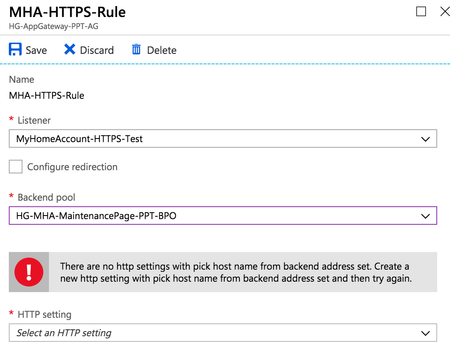

Have you ever figured this out? I am in the same situation. While it <looks> fine from a Powershell view, the fact that the Portal prevents the configuration is weird to me. Also, my Gateway is in "502"-mode currently, not serving any traffic, despite the health-check being OK. I <guess> it has something to do with this.
https://quadro.tech - https://quadro.tech/autopilot, https://quadro.tech/reporting and https://quadro.tech/migration for Office 365 and Exchange

Michel, what does your HTTP setting look like?
When I spoke to Microsoft, they basically said that I needed to tick all of the bottom options (App Service depends on whether or not you're using that - but make sure the others are all ticked):
- Michel ZehnderDec 06, 2018Brass Contributor
I haven't got these ticked.
That would mean however that I can't use a custom hostname that is passed to the backend when using the settings like this, right?!
https://quadro.tech - https://quadro.tech/autopilot, https://quadro.tech/reporting and https://quadro.tech/migration for Office 365 and Exchange
- Duncan WraightDec 06, 2018Copper Contributor
No idea about that I'm afraid. Worth a try though I think - bet your 502 errors stop!
- Michel ZehnderDec 07, 2018Brass Contributor
I know that they will stop, because that was my original configuration. But then the external hostname is not passed to the backend unfortunately... which it needs to be for my scenario to work. But thanks for the reply, I'll keep bugging Azure support for now :)
https://quadro.tech - https://quadro.tech/autopilot, https://quadro.tech/reporting and https://quadro.tech/migration for Office 365 and Exchange