Forum Discussion

Azure Application Gateway - There are no http settings with pick host name from backend address set
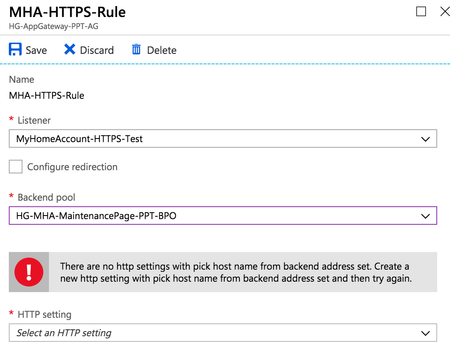

Have you ever figured this out? I am in the same situation. While it <looks> fine from a Powershell view, the fact that the Portal prevents the configuration is weird to me. Also, my Gateway is in "502"-mode currently, not serving any traffic, despite the health-check being OK. I <guess> it has something to do with this.
https://quadro.tech - https://quadro.tech/autopilot, https://quadro.tech/reporting and https://quadro.tech/migration for Office 365 and Exchange
 Duncan WraightDec 06, 2018Copper Contributor
Michel, what does your HTTP setting look like?
When I spoke to Microsoft, they basically said that I needed to tick all of the bottom options (App Service depends on whether or not you're using that - but make sure the others are all ticked):
- Michel ZehnderDec 06, 2018Brass Contributor
I haven't got these ticked.
That would mean however that I can't use a custom hostname that is passed to the backend when using the settings like this, right?!
https://quadro.tech - https://quadro.tech/autopilot, https://quadro.tech/reporting and https://quadro.tech/migration for Office 365 and Exchange
- Duncan WraightDec 06, 2018Copper Contributor
No idea about that I'm afraid. Worth a try though I think - bet your 502 errors stop!