Forum Discussion

access status bar show half height
- Dec 13, 2022
This issue also came up in the thread at another forum https://www.access-programmers.co.uk/forums/threads/office-365-record-selector-bar-is-partly-hidden.325930/.
Another forum member suggested the cause & I can now reliably replicate the issue (tested on 2 PCs) as well as describing the fix
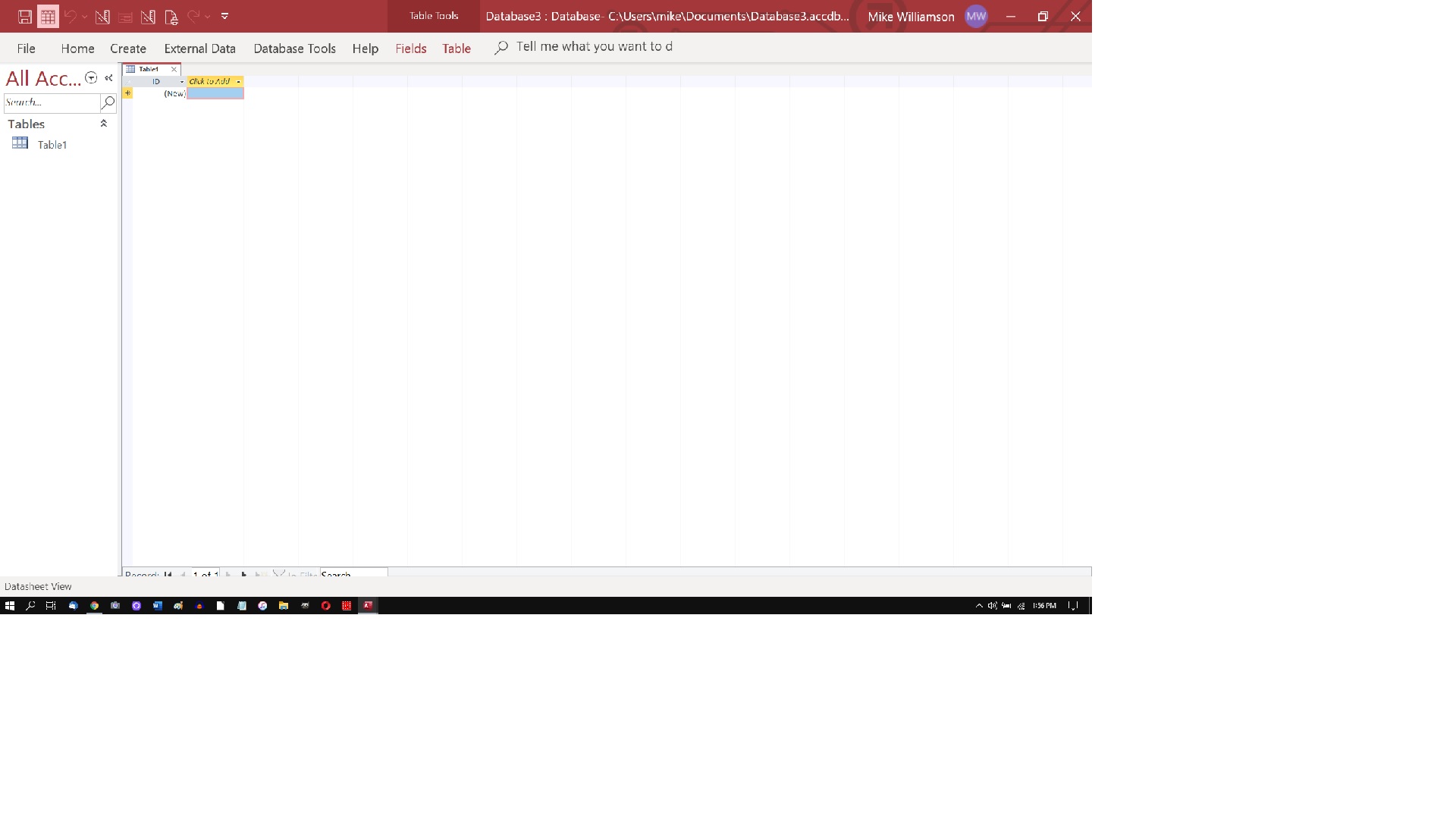
The screenshot below shows my Access window with a form & 2 queries all showing part of the navigation bar hidden
Notice the huge size of the text in the Access menu, nav pane & status bar .... that's the cause
I had previously tested increasing the scaling in Windows settings but that doesn't cause the issue as all screen elements are scaled up by the same amount.
However changing Make Text Bigger in Windows settings by moving the slider to the right does cause the issuebecause the text size is increased but other design elements remain unchanged
To fix the problem, move the slider significantly to the left and click apply.
The default setting is at the extreme left (100%)
Close & re-open Access and all should now be fine
If you need text to be larger, then I suggest using the Make Everything Bigger scaling in Windows Settings instead e.g. 125% or 150% so everything increases in proportion.
Please can anyone affected by ths issue test the above & report back on whether it solves your issue
Thanks

I asked the OP to upload an example database showing this issue on more than one occasion but he/she didn't do so. Doing that would allow me to determine whether the issue is with the apps and, if not, then its probably an issue with monitor display settings

I have the same problem. Have tried changing resolution, font sizes, tabular view, disconnecting second monitor, hiding status bar, rebooting, etc. It is not specific to any one database. I created an extremely simple test database to prove this. The record selector is almost completely covered up in tables, queries, and forms. Haven't been able to find any resolution, and it's really frustrating not to be able to see how many records are in a set. Tried to upload a screen shot but it looks like I don't have permission.
- isladogsNov 02, 2022MVPHi
I'd be happy to look at your test db and see if I can replicate the issue
You can contact me by email - I think you can find the address by clicking on my user name.
If not, go to my website https://isladogs.co.uk and click the Contact link at the bottom of the home page
It would be helpful to know your Access version & bitness together with the same for Windows.
If it helps, you can download my free Access add-in to collect this info: https://isladogs.co.uk/avc-addin/index.html- LighthouseLowellNov 03, 2022Copper Contributor
Thanks for your willingness to look at this. My test database is literally just creating any new blank database. Any objects within it where the record navigator is displayed, it is covered up (seemingly by the status bar, but turning off the status bar does not resolve just makes it covered by the Windows taskbar instead).
My Windows version is: Windows 10 Enterprise Version 21H1 - Build 10.0.19043.1889 64-bit
MS Access version is: Access 365 - Build 16.0.15726.20174 64-bit
This is on a Lenovo T15 notebook. I tried the same thing on a co-worker's similar laptop and had the same issue. I also tested on another co-worker's Lenovo desktop with similar software config and that worked normally.
Playing around more, it seems like it may be related to the Windows taskbar but I still can't resolve it. If I set the taskbar to auto-hide, it doesn't actually auto-hide but now the record navigator is completely invisible/off the bottom of the screen (previously I could only see the very top of the record nav bar, but not enough to use it) *and* the File-Options button in Access is also not visible as it's under the Windows task bar.
Fun stuff, thanks again for your willingness to look at it. I will see if I can find anything re: auto-hiding the Windows taskbar on this Lenovo model. I am also trying to track down a usb monitor to see if that works.
- isladogsNov 04, 2022MVP
@terrylterry90
OK - still happy to look at any example database if you can upload or email it to me as previously explained.
You should be able to upload it if you use the full text editor option as shown in the screenshot
