Forum Discussion

Export and Link Access Query to SharePoint Online

Thanks for the input George!!
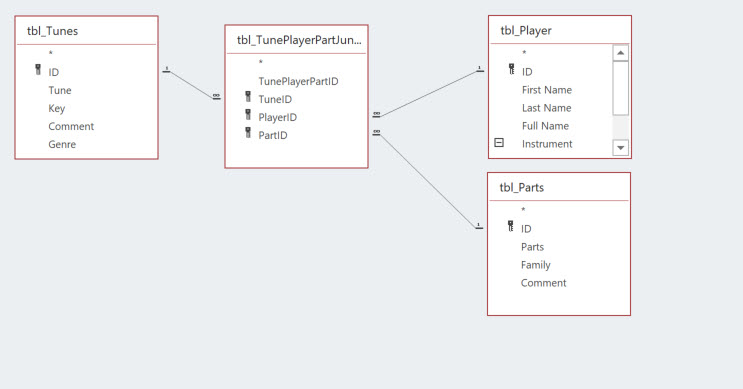
So, the junction table is very important in this case to ensure referential integrity. The linked tables in my test db, LinkedTableTestDB and even the tables in the main db are not directly associated with one another. I will attach pictures for you.
I'll show you the query setup and results in both databases.
- Carl_WilliamsOct 04, 2021Iron Contributor
What I really want, which is both the easiest yet likely most difficult (SURPRISE!!!! MSFT STUFF), is to simply export the query report to SharePoint as a list and create the PowerApps app off that.
Although, it should be semi-automated. Sure, run some code to export BUT like I said previously, the SharePoint list is given an incremented name (:() which is the most ridiculous and most unwanted process anyone would want in this scenario. So nowwwwww you have to go to SharePoint, delete the list then re-export it from Access then likely go into PowerApps and reconnect the data source. Everything else you do in this !@#$%#@$%@# framework you're asked to verify that you want to perform an action or at least provide a choice to do this or that such as write over!!!!Oh yes, we can ask for that in the special "wish list". The list that goes on and on and on and the most functional things and most required, what one would think is normal/expected functionality never get addressed. This is yet another example of oversight. And I dont mean oversight as management/supervisory. Oversight as in mismanagement of "EXPECTED" features in an "integrated" framework.
Yes sireeee. This what I call the ultimate in integration and data management in 2021-2022. Not.- George_HepworthOct 04, 2021Silver Contributor
Carl_Williams I think you are actually making this harder than it has to be.
I see no point to recreating a new list repeatedly. Why? What is that query supposed to be?
In this case, the idea of differentiating lists with some sort of suffix is quite fundamental to all good data management, for example. If that didn't happen, people could accidentally overwrite existing data, losing it with no chance to recover when the same list or table name was used for a new version. That seems to me like it would be a far more serious problem for a lot more people.
It appears that what you want is to repopulate an existing list with fresh data, and you are doing that by creating a new version of the list instead and changing the links and names of the lists. Instead of that approach, why not simply delete records from the already existing list and appending new records from your "Report Query" back to it? Unless you are also changing the structure of the fields as well, that is a lot quicker and less hassle to implement.
Remember, your list, once it exists, can be linked to Access and anything you would do with a local table, like Deleting and Appending records to it, will be the same process. The only real difference is that the data is stored in a different physical location. Is there any reason you couldn't do that?
Finally, I also think we all sometimes expect things to work "the way I want to do it" and complain when they work differently. More often than not, however, it's less stressful to just get on with a solution and save the harsh words for after the job is over.
.
- Carl_WilliamsOct 04, 2021Iron Contributor
No, not trying to make anything more difficult than need be. I simply want a query in Access to update a SharePoint list.
The query includes a junction table. You cant create a report query using a junction table (many to many) AND linked tables. I've tested every scenario I can think of. As is typical you get 75% there then a wall.
I've been working with MSFT stuff for decades in a federal government setting so am quite familiar with the products and know all to well there is much that has been left to workarounds and hacks. Case and point. So I'm quite correct and justified about my "complaints".
IF I simply take the data from the report query and export it to SharePoint, there's no other way to update the list in SharePoint other than deleting and reexporting.
The technique you recommend is all well and good IN Access.