Forum Widgets
Latest Discussions

Azure Event Grid with ASB
Hi, we need to push Event Grid events for blob creation to an Azure Service Bis queue to deduplicate as the EG guarantee "At least one delivery" pattern, but the problem is that we need to deduplicate with blob name as "MessageId" on ASB side. The problem is that the blob name is not present in the event data. we have only "subject" with the full url that can exceed 128 characters, the limit of ASb Messageid. In some duplicate events I found that the filed "data/storageDiagnostics/batchId" is the same for duplicated events. I'm wonderring if this batchId will be always the same for duplicate events, I can use it as "MessagesId" in "Delivery properties"53Views0likes2CommentsLooking for guidance on transferring my Learning Room (Azure Integration + AI)
Hi everyone, I’m Konstantinos, the host of the Learning Room Modern Development with Azure Integration and AI in the Microsoft Learn Skills Hub. With the Learn Expert program being retired, all Learning Rooms will close at the end of June. I’m hoping to keep our room alive by transferring it into an existing Tech Community space — but this can only happen if a community owner approves the move. 🔗 Learning Room: https://techcommunity.microsoft.com/group/a16aab22-66d5-4fc2-8539-b6a382916bda Focus: Hands‑on Azure integration patterns, modern development practices, and applied AI — supporting learners building real‑world solutions. If you are a community owner, moderator, or know who manages a relevant Azure space (Apps on Azure, Azure Architecture, Azure AI, Integration, Developer Tools, etc.), I’d be grateful for any guidance or introductions. Even a quick pointer to the right contact would help. The Tech Community team will handle the transfer if approved — I just need confirmation from the destination owner. Thank you to anyone who can help steer this in the right direction. I’d love to continue supporting learners within the Azure community. KonstantinosKonstantinosPassadisJun 17, 2026Learn Expert56Views0likes1CommentLogic Apps Data Mapper Integer Formatting Issue
Hello team, I am working on a data map that is giving me a hard time in the logic app. For my transformations, I do json-to-json transformation using the new data mapper. I have managed to handle all fields but for some reason one integer field is giving me a very hard time. <number key="id"> <xsl:value-of select="/*/*[@key='mapparameters']/*[@key='counterpartyType1id']" /> </number> Here, if I pass let's say 12345, I want to see 12345 but the result is 12345.0. This action's output is directly being sent to a HTTP call in the logic app and based on the workflow run logs, everything seems okay. In the logs, the value seen as 12345. However, when we check the backend, this field is 12345.0 in the request body and this causes an error as the application does not accept it. I tried to format the number and convert it in any way but with no luck, the issue is this problem started happening out of the blue someday. Does anyone can guide me a potential resolution? Thanks.BerkayMJan 29, 2026Copper Contributor101Views0likes1Comment
Fixed ip address for outbound calls from Azure APIM Standard V2
Hi, I recently ran a PoC deployment of Azure APIM Standard V2 Sku instead of our current Premium Classic instance. This worked well! Performance is great and I am able to route calls to an on-prem network ok using vnet-integration. However, one of the features we currently make use of with the Premium Classic instance is a fixed ip address for calls from APIM to 3rd parties. Is there a way to achieve this using Standard V2? We have tried a nat gateway with fixed ip on the same vnet but this does not seem to help.SolvedBizTalkersSep 29, 2025Tin Contributor501Views0likes1CommentAzure function app to read files from SMB mounted file share
How can I programmatically connect an Azure Function App to multiple (50+) SMB-mounted Azure File Shares that use the same credentials, given that Logic Apps aren't suitable due to their static connection requirements?velmarsJul 24, 2025Copper Contributor212Views0likes1CommentIssue with Custom Domain on APIM and Cloudflare Proxying
Dear all, Last week, we attempted to configure a custom domain name for our Azure API Management (APIM) instance. We use Cloudflare as our DNS provider. The required CNAME record was created with the proxied attribute enabled. However, when configuring the custom hostname in Azure, we encountered the following error: Invalid parameter: CustomHostnameOwnershipCheckFailed. A CNAME record pointing from apim.ourowndomain.net to apim.azure-api.net was not found. As a workaround, we disabled the proxied attribute in Cloudflare, retried the configuration, and it worked successfully. We then re-enabled the proxied attribute, and the custom domain continued to function correctly. However, yesterday, we discovered that the custom domain was no longer working and returned a "404 Web site not found" error page. After extensive troubleshooting—including disabling the proxied attribute on the CNAME record—we were unable to resolve the issue. To restore functionality, we removed and reconfigured the custom domain by following the same steps: Disable the proxied attribute on the CNAME record. Configure the custom domain in APIM. Re-enable the proxied attribute. This resolved the issue again. We suspect that Azure initially validates the CNAME record during the custom domain configuration process when the proxied attribute is disabled. However, after a few days, Azure appears to revalidate the CNAME record and expects it to resolve to *.azure-api.net. Since Cloudflare returns its own IPs when proxying is enabled, Azure may reject the custom domain configuration, leading to the issue. Can anyone confirm whether our assumption is correct? Additionally, is there a recommended workaround for this issue? We are considering deploying a reverse proxy (Application Gateway) to handle Cloudflare requests and forward them to the APIM instance. Thank you in advance for your help. Best regards,mkg310Mar 21, 2025Tin Contributor1.1KViews0likes4CommentsDebug your APIs using request tracing
We are leveraging Azure API Management's tracing capabilities to monitor and log incoming traffic. The primary goal is to track traffic in APIM and attribute it to specific client applications by identifying the appid from JWT tokens included in requests. Additionally, we aim to ensure that trace logs are correctly sent to Log Analytics for debugging and further analysis. To achieve this, we implemented a test policy in a GET method of a cloned API within APIM. The policy is as follows: “<policies> <inbound> <base /> <trace source="InboundTrace" severity="verbose"> <message>Inbound processing started</message> <metadata name="User-Agent" value="@(context.Request.Headers.GetValueOrDefault("User-Agent", "unknown"))" /> </trace> </inbound> <backend> <base /> </backend> <outbound> <base /> <trace source="OutboundTrace" severity="verbose"> <message>Outbound response being sent</message> <metadata name="ResponseCode" value="@(context.Response.StatusCode.ToString())" /> </trace> </outbound> <on-error> <base /> <trace source="ErrorTrace" severity="error"> <message>Error encountered</message> <metadata name="ErrorDetails" value="@(context.LastError.Message)" /> </trace> </on-error> </policies>” This approach aims to ensure the appid appears in the tracerecords attribute of ApiManagementGatewayLogs, enabling us to identify which client applications are consuming specific APIs. Challenges Faced Trace Logs: Trace logs are not appearing in Log Analytics, despite being configured in diagnostics. Using the queries suggested in the documentation, we could not find the TraceRecords field or metadata added by the trace policy. We are unsure if the policy is being correctly applied or if additional configurations are needed. Traffic Attribution: While traffic is traceable, attributing requests to client applications without the appid is challenging. We want to confirm if the approach to extract and log the appid aligns with best practices and whether there are more efficient alternatives. Questions Are there additional configurations needed to ensure trace logs are correctly sent to Log Analytics? Could you provide more detailed examples of KQL queries to check the records generated by the trace policy? Does the proposed approach for extracting and logging appid align with best practices in APIM? Are there any limitations or performance considerations when modifying global policies for this purpose? References Followed Debug APIs in Azure API Management Trace Policy Documentation384Views0likes1CommentAzure API Management Gateway - RBAC on the API level
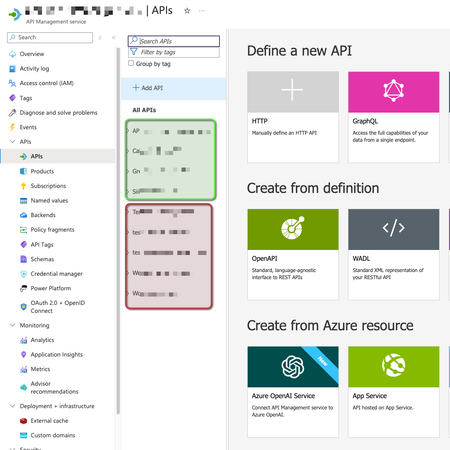
Is it possible to grant access on specific APIs implementation, making users able to see some APIs but not others inside the same Azure API Management Gateway? For example: User1 can manage green ones, but not red ones. Thanks.mkg310Nov 21, 2024Tin Contributor331Views0likes3CommentsAPI Guide: Resubmitting from a specific Action in Logic Apps Standard
In collaboration with Sofia Hubendick This how-to article explains the process of resubmitting a Logic App Standard from a specific action via API. If you want to resubmit the workflow from the beginning, you can use the https://learn.microsoft.com/sv-se/rest/api/appservice/workflow-trigger-histories/resubmit?view=rest-appservice-2024-04-01&tabs=HTTP instead. Workflow Run Histories - Resubmit Authentication I used a managed identity for authentication, which simplifies the process by eliminating the need to obtain a token manually. Additionally, I implemented the new Logic App Standard Operator role. URL The URL for resubmitting an action looks like this: https://management.azure.com/subscriptions/[subscriptionId]/resourceGroups/[resourceGroupName]/providers/Microsoft.Web/sites/[logicAppName]/hostruntime/runtime/webhooks/workflow/api/management/workflows/[workflowName]/runs/[runId]/resubmit?api-version=2022-03-01 Mandatory URL Path Parameters Name Description subscriptionId The Azure subscription Id resourceGroupName The name of the resource group containing the Logic App logicAppName The name of the Logic App workflowName The name of the workflow runId The id of the workflow run to be resubmitted Request Body The API request body is structured as follows; replace the placeholder with the name of the action: { "actionsToResubmit": [ { "name": "[action name]" } ] } Response Name Description 202 Accepted OK Other Status Codes Error response describing why the operation failed.andevjenOct 11, 2024Copper Contributor516Views0likes0Comments




Tags
- logic apps12 Topics
- azure api management4 Topics
- Event Grid4 Topics
- Biztalk 20202 Topics
- biztalk2 Topics
- azure2 Topics
- Visual Studio 20191 Topic
- azure devops1 Topic
- biztalk server1 Topic