Forum Widgets
Latest Discussions

How Do You Handle Multiple Server Certificate Thumbprints in Azure Service Fabric Managed Clusters?
Hi everyone, I wanted to share a common challenge we’ve encountered in DevOps pipelines when working with Azure Service Fabric Managed Clusters (SFMC) — and open it up for discussion to hear how others are handling it. 🔍 The Issue When retrieving the cluster certificate thumbprints using PowerShell: (Get-AzResource -ResourceId "/subscriptions/<SUBSCRIPTION_ID>/resourceGroups/<RG_NAME>/providers/Microsoft.ServiceFabric/managedclusters/<CLUSTER_NAME>").Properties.clusterCertificateThumbprints …it often returns multiple thumbprints. This typically happens due to certificate renewals or rollovers. Including all of them in your DevOps configuration isn’t practical. ✅ What Worked for Us We’ve had success using the last thumbprint in the list, assuming it’s the most recently active certificate: (Get-AzResource -ResourceId "/subscriptions/<SUBSCRIPTION_ID>/resourceGroups/<RG_NAME>/providers/Microsoft.ServiceFabric/managedclusters/<CLUSTER_NAME>").Properties.clusterCertificateThumbprints | Select-Object -Last 1 This approach has helped us maintain stable and secure connections in our pipelines. 🔍 Solution 2: Get current Server Certificate You can also verify the active certificate using OpenSSL: openssl s_client -connect <MyCluster>.<REGION>.cloudapp.azure.com:19080 -servername <MyCluster>.<REGION>.cloudapp.azure.com | openssl x509 -noout -fingerprint -sha1 🛠️ Tip for New Deployments If you're deploying a new SFMC, consider setting the following property in your ARM or Bicep template: "autoGeneratedDomainNameLabelScope": "ResourceGroupReuse" This ensures the domain name is reused within the resource group, which helps reduce certificate churn and keeps the thumbprint list clean and manageable. ⚠️ Note: This setting only applies during initial deployment and cannot be retroactively applied to existing clusters.119Views0likes0CommentsGuidance for Certificate Use in CI/CD Pipelines for Service Fabric
In non-interactive CI/CD scenarios where certificates are used to authenticate with Azure Service Fabric, consider the following best practices: Use Admin Certificates Instead of Cluster Certificates Cluster certificates are used for node-to-node and cluster-level authentication and are highly privileged. For CI/CD pipelines, prefer using a dedicated Admin client certificate: Grants administrative access only at the client level. Limits the blast radius in case of exposure. Easier to rotate or revoke without impacting cluster internals. Best practices to protect your service fabric certificates: - Provision a dedicated Service Fabric Admin certificate specifically for the CI/CD pipeline instead of cluster certificate. This certificate should not be reused across other services or users. - Restrict access to this certificate strictly to the pipeline environment. It should never be distributed beyond what is necessary. - Secure the pipeline itself, as it is part of the cluster’s supply chain and a high-value target for attackers. - Implement telemetry and monitoring to detect potential exposure—such as unauthorized access to the CI/CD machine or unexpected distribution of the certificate. - Establish a revocation and rotation plan to quickly respond if the certificate is compromised.137Views0likes0Comments
Step-by-Step Guide to Creating a Cosmos DB with Private DNS in Azure
Introduction: In this blog post, we will walk through the process of creating a Cosmos DB instance with Private DNS in the Azure cloud environment. Private DNS allows you to resolve the Cosmos DB endpoint using a custom domain name within your virtual network, enhancing security and network management. Follow these steps with accompanying screenshots to set up your Cosmos DB with Private DNS. Prerequisites: Azure subscription Virtual network created Custom domain name Step 1: Create a Cosmos DB Instance: 1.1. Log in to the Azure portal (https://portal.azure.com/). 1.2. Click on "Create a resource" and search for "Azure Cosmos DB." 1.3. Click "Create" to start the Cosmos DB creation process. Step 2: Configure Basics: 2.1. Choose the appropriate subscription and resource group. 2.2. Enter a unique name for your Cosmos DB instance. 2.3. Choose the desired API (e.g., Core SQL for SQL API). 2.4. Select the desired location for your Cosmos DB. Step 3: Networking: 3.1. Under the "Networking" section, select "Enable virtual network." 3.2. Choose the virtual network and subnet where you want to enable Private DNS. 3.3. Click "Next: Advanced" to proceed. Step 4: Advanced: 4.1. Under the "Advanced" section, select "Enable automatic failover" if needed. 4.2. Enter a unique DNS prefix for your Cosmos DB. 4.3. Configure other advanced settings as necessary. 4.4. Click "Review + Create." Step 5: Review and Create: 5.1. Review your configuration settings. 5.2. Click "Create" to start the deployment of your Cosmos DB instance. Step 6: Create Private DNS Zone: 6.1. In the Azure portal, navigate to "Create a resource" and search for "Private DNS Zone." 6.2. Select "Private DNS Zone" and click "Create." 6.3. Choose the subscription and resource group. 6.4. Enter the name of your custom domain (e.g., cosmosprivatedns.local). 6.5. Associate the private DNS zone with the virtual network where your Cosmos DB resides. Step 7: Add Virtual Network Link: 7.1. Inside the Private DNS Zone you created, go to "Virtual network links" and click "+ Add." 7.2. Select the virtual network where your Cosmos DB is located. 7.3. Choose the subnet associated with your Cosmos DB. Step 8: Update DNS Configuration in Cosmos DB: 8.1. Go back to your Cosmos DB instance's settings. 8.2. Under "Connection strings," update the "Hostname" with the custom domain name you created in the Private DNS Zone (e.g., mycosmosdb.cosmosprivatedns.local). Step 9: Test Private DNS Resolution: 9.1. Set up a test application within the same virtual network. 9.2. Use the custom domain name when connecting to the Cosmos DB instance. 9.3. Verify that the connection is successful, indicating the Private DNS resolution is workingYuvaraj_MadheswaranAug 31, 2023Copper Contributor2.7KViews0likes0CommentsApplication Insights PHP SDK or Opentelemetry support
Hi everyone, We are using Symfony framework which is built based on PHP. Our application is hosted on App Service and so far we have been using the https://github.com/microsoft/ApplicationInsights-PHP, which is actually not maintained anymore. I have seen since a couple of months some updates regarding usage of OpenTelemetry to send data to Application Insights as another possibility than using SDK for a given stack. Is there any update on when OpenTelemetry with PHP is supported with Application Insights if this is not the case yet? Any example of implementation people could share? Thank you in advance for your help on this! Valentin.Valentin_WatelJun 14, 2023Copper Contributor3KViews3likes0Comments
Hyperscale Page Servers
According to the docs and the image below there are "covering SSD caches" and "non-covering SSD caches". I can't seem to understand the difference between "covering" and "non-covering". Can someone explain this to me please? https://learn.microsoft.com/en-us/azure/azure-sql/database/media/service-tier-hyperscale/hyperscale-architecture.png?view=azuresql#lightbox This is the link to the image, as I cannot insert the image directly.Ifran_FatehmahomedNov 14, 2022Copper Contributor391Views0likes0Comments
Use Azure Storage Table REST API with AAD token via PostMan
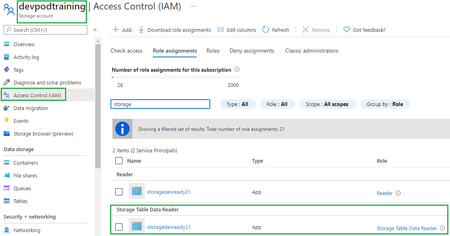
You can refer to below steps for scenarios in which you have an application special requirement and need to call raw Storage table REST API from your dev environment via Postman. It consists of two main HTTP requests: first, to authenticate directly using AD security principal to get access token, second an authenticated storage REST API call for Table Storage. Documentation related Query Entities REST API - https://docs.microsoft.com/en-us/rest/api/storageservices/query-entities Authorize access to tables using Azure Active Directory https://docs.microsoft.com/en-us/azure/storage/tables/authorize-access-azure-active-directory Prerequisites To follow the steps in this article you must have: Azure subscription An Azure AD tenant Registered application (AD Service principal) Steps to reproduce this scenario: Acquire oAuth 2.0 token: Created security principal for application (Azure portal > AAD > app registrations). Documentation reference: https://docs.microsoft.com/en-us/rest/api/servicebus/get-azure-active-directory-token#register-your-app-with-azure-ad Assigned Storage Table Data Reader role at storage account level to SP created in step #1 (wait for 30 mins) Used Postman to get the Azure AD token: Launch Postman. For the method, select GET. For the URI, enter https://login.microsoftonline.com/<TENANT ID>/oauth2/token. Replace <TENANT ID> with the tenant ID value you copied earlier. On the Headers tab, add Content-Type key and application/x-www-form-urlencoded for the value. Switch to the Body tab and add the following keys and values. Select form-data. Add grant_type key, and type client_credentials for the value. Add client_id key, and paste the value of client ID you noted down earlier. Add client_secret key, and paste the value of client secret you noted down earlier. Add resource key, and type https://storage.azure.com/ for the value Select Send to send the request to get the token. You see the token in the result. Save the token (excluding double quotes). You will use it later Called Query Entities storage REST API and passed the oAuth 2.0 token from previous step In Postman, open a new tab. Select GET for the method. Enter URI in the following format: https://<account>.table.core.windows.net /<table>(). Replace <account> with the name of the Storage Account name. Replace <table> with the name of the table. On the Headers tab, add the following three headers. Add Authorization key and value for it in the following format: Bearer <TOKEN from Azure AD>. When you copy/paste the token, don't copy the enclosing double quotes. Select Send to get the entities from table. You see the status as OK with the code 200 as shown in the following image.jumontoyAug 13, 2021Former Employee5.2KViews0likes0Comments
Azure Activity Log with no “Event Initiated by” value
I was working on Azure Public Cloud and found that there're some events in Activity Log with no Caller value as seen below. This is an example: Operation name: Update SQL database Time stamp: Sun Mar 07 2021 12:27:30 GMT+0700 (Indochina Time) Event initiated by: - The changes was made is earliestRestoreDate (Description :This records the earliest start date and time that restore is available for this database (ISO8601 format).) I want to know who initiate this event and wondering if this is a kind of system event. Can someone explain what is this event related to? Thank you!3KViews0likes0CommentsAsp.net framework MVC 5 deployment considerations on Azure PAAS Web App Service
Dear All, We have our Asp.net MVC 5 Application running on OnPrem. Planning it move to PAAS Cloud. While doing this we have couple of questions 1. Share us the checklist which can opt for the MVC application deployment. we have web api service as well? 2. We are using TempData, ViewData for sharing the information between action methods/views. For this can we go for Azure Redis out proc session state to handle these TempData and ViewData objects.? Note: We are not using actual session, only viewbag, tempdata used and we are not using .net core as well And I will explain the 2nd question in another way, when we use .net framework web forms, we used redis cache as session state for the PAAS deployment. Like this MVC needs Redis cache explicitly to store TempData and View Data variables?ultimatesenthilDec 16, 2020Copper Contributor868Views0likes0CommentsWrite Enterprise library exception logs to Azure Blob with date time stamp
Hi Team, We have an Asp.Net web API 2.0 application enabled with Enterprise Library exception handling. As we are hosting the application in Azure App service plan, we need to find a mechanism to store log files in Azure platform ( Azure Blob with date time stamp) As there are multiple .cs files with try catch exception blocks implemented, is there a way, where we can map the "Rolling Flat File Trace Listener" log file path to Azure Blob to collect logs with every day time stamp. <add name="Rolling Flat File Trace Listener" type="Microsoft.Practices.EnterpriseLibrary.Logging.TraceListeners.RollingFlatFileTraceListener, Microsoft.Practices.EnterpriseLibrary.Logging, Version=, Culture=neutral, PublicKeyToken=" listenerDataType="Microsoft.Practices.EnterpriseLibrary.Logging.Configuration.RollingFlatFileTraceListenerData, Microsoft.Practices.EnterpriseLibrary.Logging, Version=, Culture=neutral, PublicKeyToken=" footer="-[END]---------------------------------------" formatter="Text Formatter" header="-[START]---------------------------------------" rollFileExistsBehavior="Increment" rollInterval="Day" rollSizeKB="300" timeStampPattern="dd-MM-yyyy" fileName="Logs\fileName.log" /> Please suggest other possible way with minimal code changes to existing exception handling mechanism. Regards, Sivapratap.Sivapratap1501Dec 03, 2020Copper Contributor1.1KViews0likes0Comments
Communication between Micro services in the same Azure Kubernetes Service (AKS) Cluster - Azure Serv
I am planning to design communication between Micro services which are deployed in the same Azure Kubernetes Service (AKS) cluster. I can make direct REST call between Micro services or I can use a Azure Service Bus and implement event publish and subscribe model to communicate between Micro services. While direct synchronous call approach is not recommended for Micro service to Micro service communication, at the same time use of Azure Service Bus for communication can hit performance as it is a Cloud service outside AKS.I know we can use KubemQ or RabbitMQ as container with IaaS deployment but I think that cannot be done with AKS. Which will be the recommended approach for Microservice to Microservice communication deployed inside the same AKS cluster? Will there be any performance issue with Azure Service Bus when used to communicate between Micrro services in the same AKS cluster? Is there any POC reference which can show the performnace difference between the approaches?AzureArchNov 01, 2020Copper Contributor2.2KViews0likes0Comments

Tags
- Azure Cloud Service9 Topics
- azure storage9 Topics
- azure api management5 Topics
- azure event hub4 Topics
- azure redis3 Topics
- Azure Service Fabric3 Topics
- azure resource manager2 Topics
- azure policy2 Topics
- azure service bus2 Topics
- azure cache for redis2 Topics