Forum Widgets
Latest Discussions
Effective Cloud Governance: Leveraging Azure Activity Logs with Power BI
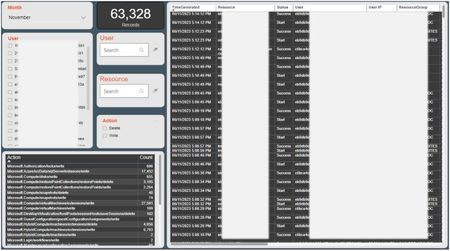
We all generally accept that governance in the cloud is a continuous journey, not a destination. There's no one-size-fits-all solution and depending on the size of your Azure cloud estate, staying on top of things can be challenging even at the best of times. One way of keeping your finger on the pulse is to closely monitor your Azure Activity Log. This log contains a wealth of information ranging from noise to interesting to actionable data. One could set up alerts for delete and update signals however, that can result in a flood of notifications. To address this challenge, you could develop a Power Bi report, similar to this one, that pulls in the Azure Activity Log and allows you to group and summarize data by various dimensions. You still need someone to review the report regularly however consuming the data this way makes it a whole lot easier. This by no means replaces the need for setting up alerts for key signals, however it does give you a great view of what's happened in your environment. If you're interested, this is the KQL query I'm using in Power Bi let start_time = ago(24h); let end_time = now(); AzureActivity | where TimeGenerated > start_time and TimeGenerated < end_time | where OperationNameValue contains 'WRITE' or OperationNameValue contains 'DELETE' | project TimeGenerated, Properties_d.resource, ResourceGroup, OperationNameValue, Authorization_d.scope, Authorization_d.action, Caller, CallerIpAddress, ActivityStatusValue | order by TimeGenerated ascAdeelazizJan 17, 2025Brass Contributor72Views0likes0CommentsHo w to correctly measure Bytes Received/sec &&&&& Bytes Sent/sec
I would like to correctly measure through log analytic and then in Grafana network traffic generated for one or more VMs. For test VMs I have enable Data collection rule and enabled collecting data every 60s for network Interface "Bytes Received/sec" and "Bytes Sent/sec". Inside metric is also enabled. Query that I use in log analytic is : Perf | where TimeGenerated between (datetime(2024-03-19) .. datetime(2024-03-20)) | where Computer == "***********" | where ObjectName == "Network Interface" and CounterName == "Bytes Received/sec" and InstanceName == "Microsoft Hyper-V Network Adapter _2" | summarize BytsSent = sum(CounterValue)/1073741824 by bin(TimeGenerated, 24h),CounterName InsightsMetrics | where TimeGenerated between (datetime(2024-03-19) .. datetime(2024-03-20)) | where Origin == "vm.azm.ms" | where Namespace == "Network" and Name == "ReadBytesPerSecond" | where Computer == "******" | extend NetworkInterface=tostring(todynamic(Tags)["vm.azm.ms/networkDeviceId"]) | summarize AggregatedValue = sum(Val) by bin(TimeGenerated, 1d), Computer, _ResourceId, NetworkInterface Results for Perf is 0,32339 GB/day and for InsightsMetrics is 14.7931 GB/day. If I go to network interface and select metric data for network interface is data that I get return from query in log analytic for Metric same/correct . I have now shorten sample period of data collection rule to 15s, I hope that this will ,give more accurate results. I’m I doing something wrong or I collect data the wrong way. I don’t want to activate inside metric for every VM, I want to activate any data that I’m interesting.BlatniBPMCPMar 25, 2024Copper Contributor411Views0likes0CommentsAzure Devops to Workbook visualization
Hi team, please help us on enabling the azure devops pipeline jobs status, log and relevant dashboard to integrate in azure workbook view rather checking from Azure devops portal. please share the procedure, documentation link on performing this activity. Thanks!SeshadrrNov 16, 2023Iron Contributor311Views0likes0CommentsAzure Monitoring Agent Virtual Machines not connecting to log analytics workspace
Hey there, i tried to rollout monitoring for Azure Virtual Machines. For Testing i created a basic DCR to collect general Performance Counters of the associated VM's. The DCR is in Terraform defined as following : resource "azurerm_monitor_data_collection_rule" "log" { name = "test_rule" location = azurerm_resource_group.test_group.location resource_group_name = azurerm_resource_group.test_group.name kind = "Windows" destinations { log_analytics { workspace_resource_id = azurerm_log_analytics_workspace.default_workspace.id name = azurerm_log_analytics_workspace.default_workspace.name } } data_flow { streams = [ "Microsoft-Perf" ] destinations = [azurerm_log_analytics_workspace.default_workspace.name] } data_sources { performance_counter { streams = [ "Microsoft-Perf" ] sampling_frequency_in_seconds = 60 counter_specifiers = [ "\\Processor Information(_Total)\\% Processor Time", "\\Processor Information(_Total)\\% Privileged Time", "\\Processor Information(_Total)\\% User Time", "\\Processor Information(_Total)\\Processor Frequency", "\\System\\Processes", "\\Process(_Total)\\Thread Count", "\\Process(_Total)\\Handle Count", "\\System\\System Up Time", "\\System\\Context Switches/sec", "\\System\\Processor Queue Length", "\\Memory\\% Committed Bytes In Use", "\\Memory\\Available Bytes", "\\Memory\\Committed Bytes", "\\Memory\\Cache Bytes", "\\Memory\\Pool Paged Bytes", "\\Memory\\Pool Nonpaged Bytes", "\\Memory\\Pages/sec", "\\Memory\\Page Faults/sec", "\\Process(_Total)\\Working Set", "\\Process(_Total)\\Working Set - Private", "\\LogicalDisk(_Total)\\% Disk Time", "\\LogicalDisk(_Total)\\% Disk Read Time", "\\LogicalDisk(_Total)\\% Disk Write Time", "\\LogicalDisk(_Total)\\% Idle Time", "\\LogicalDisk(_Total)\\Disk Bytes/sec", "\\LogicalDisk(_Total)\\Disk Read Bytes/sec", "\\LogicalDisk(_Total)\\Disk Write Bytes/sec", "\\LogicalDisk(_Total)\\Disk Transfers/sec", "\\LogicalDisk(_Total)\\Disk Reads/sec", "\\LogicalDisk(_Total)\\Disk Writes/sec", "\\LogicalDisk(_Total)\\Avg. Disk sec/Transfer", "\\LogicalDisk(_Total)\\Avg. Disk sec/Read", "\\LogicalDisk(_Total)\\Avg. Disk sec/Write", "\\LogicalDisk(_Total)\\Avg. Disk Queue Length", "\\LogicalDisk(_Total)\\Avg. Disk Read Queue Length", "\\LogicalDisk(_Total)\\Avg. Disk Write Queue Length", "\\LogicalDisk(_Total)\\% Free Space", "\\LogicalDisk(_Total)\\Free Megabytes", "\\Network Interface(*)\\Bytes Total/sec", "\\Network Interface(*)\\Bytes Sent/sec", "\\Network Interface(*)\\Bytes Received/sec", "\\Network Interface(*)\\Packets/sec", "\\Network Interface(*)\\Packets Sent/sec", "\\Network Interface(*)\\Packets Received/sec", "\\Network Interface(*)\\Packets Outbound Errors", "\\Network Interface(*)\\Packets Received Errors" ] name = "datasourceperfcounter" } } description = "General data collection rule for collecting windows performance counter rules" } Also i created the association of the DCR and my Virtual Machine using either Terraform, Policies and Portal. The Monitor Agent and identity is assinged in all cases properly. But the Connection of the DCR / DCR Associations doesn't seem to work in case of terraform or policy enrollment. For some reason the log analytic namespace neither receive an Heartbeat of the agent nor creating the tables for the performance counters. If i recreate the association between DCR and vm in those cases it works again. Is there any additional Step required when using the Policies or Terraform to setup the data collection rule or this a bug where some kind of required event is not raised properly ?Hauke_lNov 13, 2023Copper Contributor907Views0likes0CommentsOpenmetrics on Azure observability
Team, I am trying to connect a couple of openmetrics endpoints to Azure Monitor allthough it does not seem to support out of the box, I am overseeing the documentation? is there a easy way to connect openmetrics endpoint ? It seems it might be able to connect the openmetrics endpoints if I deploy Azure Monitor managed service for Prometheus, but its not clear.jcandido345Nov 09, 2023Copper Contributor390Views0likes0CommentsHow to setup a Log Analytics Workspace in a Fabric Notebook
I am using azure-monitor-query to automate some logs we need but can't get the workspace to work in the notebook with service principal credentials. The service principal has read access to the log analytics workspace. credential = ClientSecretCredential( tenant_id= 'tenant_id', client_id= "client_id", client_secret= "client_secret") client = LogsQueryClient(credential) log_workspace_id = "workspace_id" query = """AppRequests | take 5""" start_time=datetime(2021, 7, 2, tzinfo=timezone.utc) end_time=datetime(2021, 7, 4, tzinfo=timezone.utc) try: response = client.query_workspace( workspace_id = log_workspace_id, query=query, timespan=(start_time, end_time) ) if response.status == LogsQueryStatus.PARTIAL: error = response.partial_error data = response.partial_data print(error) elif response.status == LogsQueryStatus.SUCCESS: data = response.tables for table in data: df = pd.DataFrame(data=table.rows, columns=table.columns) print(df) except HttpResponseError as err: print("something fatal happened") print(err) something fatal happened (PathNotFoundError) The requested path does not exist Code: PathNotFoundError Message: The requested path does not existcdreeetzNov 09, 2023Copper Contributor1.9KViews0likes0CommentsHow to organize workspace-based Application Insights resources
With the announcement the classic application insights need to be moved to workspaces by February 29, 2024, I want to understand how to organize our instances. Right now we have 100+ instances of application insights that need to be moved to workspaces. The three current proposals are 1. Make a single log analytics workspace, and simply move everything. 2. Make a log analytics workspace per environment. Dev, QA, Staging, Production and move accordingly. 3. Make a log analytics workspace per environment and move accordingly. Has anyone had experience with this effort? What would you suggest? What are the pros and cons of putting all of the instances into a single workspace? Thanks, Jakejdriscoll1755Sep 19, 2023Copper Contributor639Views0likes0Commentslegacy linux MMA agent still sending data after Primary Key rotation
We have performed a primary / secondary key change for those servers not yet ready to move to AMA. we have noticed a few "onprem" linux syslog nodes still sending data even after the key was rotated but the key was not updated on the agent. is this expected behaviour? linux distro:ubuntu agent v 1.14.23-0mikebaker26Sep 06, 2023Brass Contributor346Views0likes0CommentsAzure Diagnostic data cannot be processed by Azure Stream Analytics due to InputDeserializerError
Planning to steam Azure resource(frontdoor) diagnostic logs to stream to Azure Stream Analytics. However, having troubles on this one as data specifically from AzureDiagnostics failed to get deserialized as input for Stream Analytics job. Error: Error while deserializing input message Id: Partition: [0], Offset: [3663944], SequenceNumber: [285]. Hit following error: Column name: ErrorInfo is already being used. Please ensure that column names are unique (case insensitive) and do not differ only by whitespaces. It's caused by a duplicating column, errorInfo and ErrorInfo on AzureDiagnostic Table, which I am unsure what distinguishes them apart when observing its values. Have any thoughts or solution in mind on how we could simplify or transform these Diagnostic log to possibly remove this duplicating column prior to getting ingested to the Stream Analytics job? Have initially thought of the following solutions, but they aren't so straight-forward and probably costs more and would like to hear other's thoughts as well. 1. Transformation using DCR. I beleive this is ideal for sending Diagnostic Logs to Log Analytics workspace. but this would mean diagnostic logs have to pass through the workspace and then get exported to Stream Analytics which to achieve, may require to add in more components in between the data pipeline. 2. Logic App. Saw somewhere where a scheduled Logic App(probably run by schedule) is used to export data using a query (KQL) from Log analytics workspace then get sent to a storage. Has to modify the destination to an event hub instead perhaps. yet again, to many layers just to pass on the data to ASA. Any other solution you can suggest to refining the incoming data to ASA while minimizing the utilization of compute resources?AizaBCAug 03, 2023Copper Contributor728Views0likes0CommentsIngest Azure Monitor logs in Elasticsearch and visualize it on Kibana
Dear Fellow, If Anyone has did please share ? Thanks & RegardsirshadJul 31, 2023Brass Contributor608Views0likes0Comments
Resources
Tags
- azure monitor1,092 Topics
- Azure Log Analytics400 Topics
- Query Language247 Topics
- Log Analytics63 Topics
- Custom Logs and Custom Fields18 Topics
- solutions17 Topics
- Metrics15 Topics
- Workbooks14 Topics
- alerts14 Topics
- application insights13 Topics