Forum Widgets
Latest Discussions
Using Azure Maps in ArcGIS and QGIS
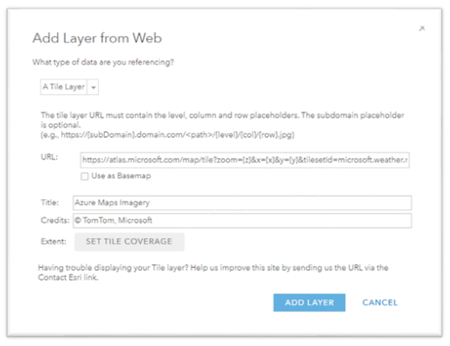
Azure Maps allows you to create location-aware web and mobile applications using simple and secure geospatial services, APIs, and SDKs in Azure. It includes services for maps, traffic, search, routing, spatial operations, mobility, weather, etc. See here for more information. With that said, moving to the cloud can be a huge shift. You have to learn how Microsoft Azure works, learn dozens of new services, change how an organization budgets, build cloud apps, etc. It’s a daunting task so in this article I’m going to show how you can bring the cloud to your existing GIS using a few very simple steps. I’m going to show how to display the Azure Maps base maps in ArcGIS Online, ArcGIS Pro and QGIS. Obtain your Azure Maps account key The first thing you need to do is get your Azure subscription. Follow the steps here for a $200 credit or buy a subscription. Once you have a subscription, you can now create an Azure Maps account by following these instructions. Once you have your Azure Maps account, get your Primary Key from the Azure Portal as described here. Note it because you’ll need it in later steps. You now have an account and a key to start using Azure Maps in ArcGIS or QGIS. Using Azure Maps in ArcGIS Online You are now ready to use the Azure Maps base maps in ArcGIS Online but first let’s review what kind of base maps are available. Azure Maps has several map styles which are referred to as basemaps in ArcGIS. See this document for a description of each one. However, to use an Azure Maps map you will need to refer to it via a URL when adding a tiled layer. The Azure Maps Render API is described here. The URL will look like this and please make sure you are using the latest version of the API as the version date in bold will change as new versions are released: https://atlas.microsoft.com/map/tile?api-version=2024-04-01&tilesetId=microsoft.imagery&zoom={z}&x={x}&y={y}&subscription-key=xxxxxxxxxxx In order to actually use the map, you’ll need to provide a TilesetId and also a subscription key (Primary Key). The TilesetID list is located near the bottom of this page and listed here for reference but be sure to look at our latest documentation as these options may change: Name Type Description microsoft.base string A base map is a standard map that displays roads, natural and artificial features along with the labels for those features in a vector tile. Supports zoom levels 0 through 22. Format: vector (pbf). microsoft.base.darkgrey string All layers with our dark grey style. Supports zoom levels 0 through 18. Format: raster (png). microsoft.base.hybrid string Displays road, boundary and label data in a vector tile. Supports zoom levels 0 through 22. Format: vector (pbf). microsoft.base.hybrid.road string Road, boundary and label data in our main style. Supports zoom levels 0 through 18. Format: raster (png). microsoft.base.labels string Displays labels for roads, natural and artificial features in a vector tile. Supports zoom levels 0 through 22. Format: vector (pbf). microsoft.base.labels.road string Label data in our main style. Supports zoom levels 0 through 18. Format: raster (png). microsoft.base.road string All layers with our main style. Supports zoom levels 0 through 18. Format: raster (png). microsoft.imagery string A combination of satellite and aerial imagery. Only available in S1 pricing SKU. Supports zoom levels 1 through 19. Format: raster (jpeg). microsoft.terra.main string Shaded relief and terra layers. Supports zoom levels 0 through 6. Format: raster (png). microsoft.weather.infrared.main string Weather infrared tiles. Latest Infrared Satellite images shows clouds by their temperature. Please see coverage information for Azure Maps Weather service. To learn more about the returned Satellite data, please see Weather concepts. Supports zoom levels 0 through 15. Format: raster (png). microsoft.weather.radar.main string Weather radar tiles. Latest weather radar images including areas of rain, snow, ice and mixed conditions. Please see coverage information for Azure Maps Weather service. To learn more about the Radar data, please see Weather concepts. Supports zoom levels 0 through 15. Format: raster (png). To use one of these styles you’ll need to pass in the TilesetID and your Primary Key as shown here: https://atlas.microsoft.com/map/tile?zoom={z}&x={x}&y={y}&tilesetId=microsoft.imagery&api-version=<date>&subscription-key=XXXXXXXXXXXXXXXXXXXXXXXXXXXXXXXXXXXXXXXXXX Be sure to replace those Xs with your Azure Maps account Primary Key you noted earlier. To use one of the styles you will need to create a new map in ArcGIS Online. See here. From ArcGIS Online click the Add button and then click Add Layer from Web. Select A Tile Layer from the dropdown option. Paste in the URL we just created. Click Use as Basemap (optional). Enter a title such as “Azure Maps Imagery” and the credits would be “© TomTom, Microsoft”. See here: The imagery should appear on the map. You can now add other layers and other content to your map. For example, to use the weather data add another layer and pass in the following URL: https://atlas.microsoft.com/map/tile?zoom={z}&x={x}&y={y}&tilesetId=microsoft.weather.radar.main&api-version=<date>&subscription-key=XXXXXXXXXXXXXXXXXXXXXXXXXXXXXXXXXXXXXXXXXXX To use this map in ArcGIS Pro, be sure to save the map. Use the imagery in ArcGIS Pro Now that you have a map with an Azure Maps map, you can now use it in ArcGIS Pro. See the section called Add a web map or web scene to the project here. Use Azure Maps in QGIS Another option is to use Azure Maps in Quantum GIS (QGIS). This too is a very easy task. Open QGIS and under the Browser window right-click on XYZ Tile and click New Connection… and enter in a Name such as Imagery and pass in any one of the previous URLs. Click OK. Double-click the layer to add it to the Layers Panel. Re-order the layers as necessary. The results will be added to the map as shown here: Happy mapping. Please provide any feedback below.Ron VincentJan 29, 2025Former Employee9.1KViews1like0Comments
no funciona el html
Dios con nosotros. <body> <font style="BACKGROUND-COLOR: green"><font color="lime">€</font><font color="fuchsia">¢</font><font color="blue">™</font><font color="red">©</font><font color="white">¥</font><font color="gray">£</font></font> </body> <a href="https://drive.google.com/file/d/1qrPcmkx4hSZVkkhxmH1uee18Vaeatn7H/view?usp=sharing" target="_blank" rel="nofollow">Forlamgs antiguo este es la radio para alabar a Jah Dios Jehová Espíritu Santa recuerden que ustedes trajieron ese libro y pague la iglesia a ustedes si no descargan este archivo no son mis amigos o amigas en la radio unos sms click aqui</a> <body> <font style="BACKGROUND-COLOR: yellow" color="aqua" size="7">Dios, <font color="red">Dios, </font><font color="fuchsia">Dios, </font><font color="green">Dios, </font><font color="olive">Dios, </font><font color="navy">Dios, </font><font color="blue">Dios, </font><font color="teal">Dios,</font><font color="purple"> Dios.</font></font> <font style="BACKGROUND-COLOR: red" color="silver" size="7">Dios<font style="BACKGROUND-COLOR: red">, <font color="gray">Dios, </font><font color="aqua">Dios, </font><font color="navy">Dios, </font><font color="fuchsia">Dios, </font><font color="lime">Dios, </font><font color="maroon">Dios, </font><font color="blue">Dios, </font><font color="green">Dios.</font></font></font> <font style="BACKGROUND-COLOR: blue" color="#008000" size="7">Dios, <font color="lime">Dios, </font><font color="purple">Dios, </font><font style="BACKGROUND-COLOR: blue" color="red">Dios, <font color="yellow">Dios, </font><font color="aqua">Dios, </font><font color="olive">Dios, </font><font color="fuchsia">Dios, </font><font color="gray">Dios.</font></font></font> <font style="BACKGROUND-COLOR: purple" color="gray" size="7">Dios, <font color="green">Dios, </font><font color="lime">Dios, </font><font color="aqua">Dios, </font><font color="blue">Dios, </font><font color="yellow">Dios, </font><font color="red">Dios, </font><font color="#ff6633">Dios, </font><font color="blue">Dios.</font></font> <font style="BACKGROUND-COLOR: green" color="#0000ff" size="7">Dios, <font color="red">Dios, </font><font color="white">Dios, </font><font color="black">Dios, </font><font color="fuchsia">Dios, </font><font color="#ff6633">Dios, </font><font color="gray">Dios, </font><font color="purple">Dios, </font><font color="aqua">Dios.</font></font> <font style="BACKGROUND-COLOR: fuchsia" color="#00ffff" size="7">Dios, <font color="red">Dios, </font><font color="purple">Dios, </font><font color="gray">Dios, </font><font color="white">Dios, </font><font color="blue">Dios, </font><font color="teal">Dios, </font><font color="green">Dios, </font><font color="lime">Dios.</font></font> <font style="BACKGROUND-COLOR: #ff6633" color="lime" size="7">Dios, <font color="green">Dios, </font><font color="blue">Dios, </font><font color="red">Dios, </font><font color="aqua">Dios, </font><font color="gray">Dios, </font><font color="fuchsia">Dios, </font><font style="BACKGROUND-COLOR: #ff6633" color="purple">Dios, <font color="yellow">Dios.</font></font></font> </body><a href="https://ricardo-1986-forev.wixsite.com/misitio-2" target="_blank">Alaba a Jah, link para escuchar musica y chat</a> <body> <font style="BACKGROUND-COLOR: #9933cc" color="white">Dios bendice nuestro pan del Dia, asi somos tu criaturas, bendice a nuestros hijos eh hijas, que todo este bien y sano y con muchas fuerzas para el trabajo, toni13.</font> <font style="BACKGROUND-COLOR: lime" color="red">Esto es el supermercado richi alianza con Despenza rocio quien es el mejor la mejor despenza, yo soy richi un ingeniero sin <font color="purple">titJahulos</font> pero intentando por mis medios darte lo mejor del trigo.</font> <font style="BACKGROUND-COLOR: fuchsia" color="blue">Jehová ten misericordia de mi por que soy un pecador, yo se que no soy nada no tengo trabajo, me queda satisfacer la despenzax del bien de la sabiduria.</font> <font style="BACKGROUND-COLOR: yellow" color="green">Hija hijo esto es html, si falla es que no entiendo mucho, sera la ciembra para la comida y eh bevidas de lo que costara mas varato comer hasta ser saciado.</font> <font style="BACKGROUND-COLOR: #ffff00" color="#008000">quiero enviar un saludo a la rockandpop.com.py una radio 955mhz fm pero ellos pasan futbol y dios dijo no a eso.</font> <font style="BACKGROUND-COLOR: navy" color="maroon">En el nombre de mi dios el alticimo te bendigo con lo mejor del trigo y del pan para que seas satisfecho asi.</font> <font style="BACKGROUND-COLOR: #ff6633" color="#800000">Jah Dios te alabare por lo grande que es tu nombre y digna de alabanza segun Dios eres top y me gusta alabarte y es de lo mejor. Oración pidiendo la victoria Al músico principal. Salmo de David. 20 Jehová te oiga en el día de conflicto; El nombre del Dios de Jacob te defienda. 2 Te envíe ayuda desde el santuario, Y desde Sion te sostenga. 3 Haga memoria de todas tus ofrendas, Y acepte tu holocausto. Selah 4 Te dé conforme al deseo de tu corazón, Y cumpla todo tu consejo. 5 Nosotros nos alegraremos en tu salvación, Y alzaremos pendón en el nombre de nuestro Dios; Conceda Jehová todas tus peticiones. 6 Ahora conozco que Jehová salva a su ungido; Lo oirá desde sus santos cielos Con la potencia salvadora de su diestra. 7 Estos confían en carros, y aquellos en caballos; Mas nosotros del nombre de Jehová nuestro Dios tendremos memoria. 8 Ellos flaquean y caen, Mas nosotros nos levantamos, y estamos en pie. 9 Salva, Jehová; Que el Rey nos oiga en el día que lo invoquemos. </font> </body> <div class="separator" style="clear: both;"><a href="https://blogger.googleusercontent.com/img/b/R29vZ2xl/AVvXsEhFtOEYWSRzDSRtYwaI3uoC2brqLafoXkhWStZ5NxHg4UVqvPd1XnLtEhCZUlgLEnrNhQ3n4Oj0RzwNr0J8F76YbX-fuTwlKETC41MM3KRB4rzlG-Jd3X0CtBaOoblxf2WDRmhFMDlVpsTX3iqVsCfBQZE65JeqqQOJ-f8bqqYodh3tXhsM-zNIdU9Q9w/s320/air%20gif.gif" style="display: block; padding: 1em 0; text-align: center; clear: right; float: right;"><img alt="" border="0" width="400" data-original-height="240" data-original-width="320" src="https://blogger.googleusercontent.com/img/b/R29vZ2xl/AVvXsEhFtOEYWSRzDSRtYwaI3uoC2brqLafoXkhWStZ5NxHg4UVqvPd1XnLtEhCZUlgLEnrNhQ3n4Oj0RzwNr0J8F76YbX-fuTwlKETC41MM3KRB4rzlG-Jd3X0CtBaOoblxf2WDRmhFMDlVpsTX3iqVsCfBQZE65JeqqQOJ-f8bqqYodh3tXhsM-zNIdU9Q9w/s400/air%20gif.gif"/></a></div> <div class="separator" style="clear: both;"><a href="https://blogger.googleusercontent.com/img/b/R29vZ2xl/AVvXsEjKOTcRKu1XxUfvcOM_-U3VWo2ZlAbbhXi_slhBhJy5zwLGdtDESsMoObdMGxKjjLA2UKh4-czLkebrRbs0d5Zd4WT8d9PQzj1jjuFJSFQTWhefzz2PSPkSc2nXF82Q_eFjunElPHO-E-nkJyXs3qBVCC6gv754pVCu_oLUUy5VuMDzZVAaHUNsfwIlhQ/s1600/avion%20verde%20shadow.png" style="display: block; padding: 1em 0; text-align: center; "><img alt="" border="0" data-original-height="768" data-original-width="1360" src="https://blogger.googleusercontent.com/img/b/R29vZ2xl/AVvXsEjKOTcRKu1XxUfvcOM_-U3VWo2ZlAbbhXi_slhBhJy5zwLGdtDESsMoObdMGxKjjLA2UKh4-czLkebrRbs0d5Zd4WT8d9PQzj1jjuFJSFQTWhefzz2PSPkSc2nXF82Q_eFjunElPHO-E-nkJyXs3qBVCC6gv754pVCu_oLUUy5VuMDzZVAaHUNsfwIlhQ/s1600/avion%20verde%20shadow.png"/></a></div> <body> <font style="BACKGROUND-COLOR: lime" color="teal">El amor es</font> <font style="BACKGROUND-COLOR: blue" color="green">con los amigos</font><font style="BACKGROUND-COLOR: #ff6633" color="red"> y</font> <font style="BACKGROUND-COLOR: yellow" color="aqua">amigas,</font> </body> Unión Banco © <font size="7"><font style="BACKGROUND-COLOR: silver" color="lime">♬</font><font style="BACKGROUND-COLOR: #ff6633" color="#990099">∞</font><font style="BACKGROUND-COLOR: black" color="white">;</font><font style="BACKGROUND-COLOR: olive">E</font><font style="BACKGROUND-COLOR: navy" color="fuchsia">S</font><font style="BACKGROUND-COLOR: yellow" color="red">♫</font></font> <p> </p> <font color="#FF00CC" style="background-color: rgb(255, 0, 0);">Dios</font> <on> <TITLE>•Jesús Cristoº</TITLE> <body bgcolor="#0000FF"> <select name="richi" size="8" multiple> <option value="1" SELECTED>Value 1</option><option value="2">Value 2</option> </select> <audio autoplay controls mediagroup="richi" contextmenu="true" itemid="play"></audio> <audio controls="controls"> <source src="file.mp3" type="audio/mp3" /> <source src="file.ogg" type="audio/ogg" /> </audio> <INPUT TYPE=FILE NAME="File Selection 1" SIZE=29 STYLE="float: left; width: 8.2cm; height: 1cm"> <FORM METHOD=post ACTION="Submit"> </INPUT> <TEXTAREA ROWS=8 COLS=80> </TEXTAREA> <INPUT TYPE=submit VALUE="Submit"> <P><INPUT TYPE=BUTTON NAME="REFRESH" VALUE="REFRESH" STYLE="width: 1.5cm; height: 0.89cm"> <INPUT TYPE=BUTTON NAME="DELETE" VALUE="DELETE" STYLE="width: 1.5cm; height: 1cm"> <INPUT TYPE=BUTTON NAME="NEW" VALUE="NEW" STYLE="width: 1cm; height: 1cm"> <INPUT TYPE=BUTTON NAME="UNDO" VALUE="UNDO" STYLE="width: 1cm; height: 1cm"> <INPUT TYPE=BUTTON NAME="SAVE" VALUE="SAVE" STYLE="width: 1cm; height: 1cm"> <INPUT TYPE=BUTTON NAME="OPEN" VALUE="OPEN" STYLE="width: 1cm; height: 1cm"> <INPUT TYPE=BUTTON NAME="NEWT" VALUE="NEWT" STYLE="width: 1.5cm; height: 1cm"> <INPUT TYPE=BUTTON NAME="LAST" VALUE="LAST" STYLE="width: 1cm; height: 0.79cm"> <INPUT TYPE=RESET NAME="RESET" VALUE="RESET" STYLE="width: 1cm; height: 0.69cm"> <INPUT TYPE=BUTTON NAME="PESCADO" VALUE="PESCADO" STYLE="width: 2cm; height: 0.5cm"> <INPUT TYPE=BUTTON NAME="COMPRADO" VALUE="COMPRADO" STYLE="width: 2cm; height: 1.04cm"> <INPUT TYPE=SUBMIT NAME="SUBMIT" VALUE="SUBMIT" STYLE="width: 1.5cm; height: 0.81cm"></P> DIOS ayudame. 20000<input type="Radio" accesskey="" tabindex="Union Banco ©" title="FFAA ©" id="₲20000₲" name="₲2000000₲" /> <input type="submit" value="Submit" name="Aceptar"> 300000<input type="Radio" accesskey="" tabindex="Union Banco ©" title="FFAA ©" id="₲300000₲" name="₲300000₲" /> <input type="submit" value="Submit" name="Aceptar"> 600000<input type="Radio" accesskey="" tabindex="Union Banco ©" title="FFAA ©" id="₲600000₲" name="₲600000₲" /> <input type="submit" value="Submit" name="Aceptar"> 3000000<input type="Radio" accesskey="" tabindex="Union Banco ©" title="FFAA ©" id="₲3000000₲" name="₲3000000₲" /> <input type="submit" value="Submit" name="Aceptar"> 8000000<input type="Radio" accesskey="" tabindex="Union Banco ©" title="FFAA ©" id="₲8000000₲" name="₲8000000₲" /> <input type="submit" value="Submit" name="Aceptar"> 110000000<input type="Radio" accesskey="" tabindex="Union Banco ©" title="FFAA ©" id="₲110000000₲" name="₲110000000₲" /> <input type="submit" value="Submit" name="Aceptar"> 550000000<input type="Radio" accesskey="" tabindex="Union Banco ©" title="FFAA ©" id="₲550000000₲" name="₲550000000₲" /> <input type="submit" value="Submit" name="Aceptar"> <font style="BACKGROUND-COLOR: #009900" color="yellow">Jehová Jah Dios Deus Espíritu Santa ♬∞;Es♫🌷💐 Ricardo richi.</font> <a href="https://www.facebook.com/ricardo.richi1786" target="_blank" rel="nofollow">facebook.com/ricardo.richi1786</a> <blockquote class="twitter-tweet"><p lang="und" dir="ltr">♬∞;Es♫🌷💐</p>— Ricardo (@Ricardo21887930) <a href="https://twitter.com/Ricardo21887930/status/1543383277716885506?ref_src=twsrc%5Etfw">July 2, 2022</a></blockquote> <script async src="https://platform.twitter.com/widgets.js" charset="utf-8"></script>ricacc745Jul 09, 2022Copper Contributor686Views0likes0CommentsAddress Collection with Azure Maps Search
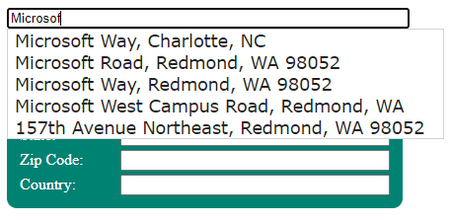
Whether you have a list of addresses or need to collect addresses from customers, the challenge exists that those addresses map to a real location! As you or your company are taking valuable time to collect and likely paying for space to store this information it is important that it be free of misspelling and contain only verified information. With Azure Maps you can create your own address generation experience that covers the world (Geocoding coverage in Microsoft Azure Maps Search service | Microsoft Docs) and tailor it to meet your needs. Here are some ideas how you might power your address collection solution by leveraging Azure Maps Search API. Use Predictive Mode to provide suggested addresses If you are building an experience that collects address information through a web site or form, you can allow only suggested addresses to be entered by having the client enter their address details and only select from a drop down of addresses choices. The Azure Maps Search API has a parameter, typeahead that when set to true will treat the query value as a partial input and sets the API into a predictive mode, assuming that this is incomplete data. You can try our sample solution yourself at Fill Address Form with Autosuggest - Azure Maps Web SDK Samples (azuremapscodesamples.azurewebsites.net) and pull the code from GitHub to modify for use in your solution. Using the samples steps in the Best practices for Azure Maps Search Service | Microsoft Docs you will see the following drop-down experience in the sample: And each of these choices will have a corresponding address in the Search response. Let’s choose the first one, Charlotte. It has the following address that includes some deeper detail: "address": { "streetName": "Microsoft Way", "municipalitySubdivision": "Charlotte", "municipality": "Charlotte", "countrySecondarySubdivision": "Mecklenburg", "countryTertiarySubdivision": "Township 1 Charlotte", "countrySubdivision": "NC", "countrySubdivisionName": "North Carolina", "postalCode": "28273", "extendedPostalCode": "282738105, 282738106, 282738108, 2827382, 282738200", "countryCode": "US", "country": "United States", "countryCodeISO3": "USA", "freeformAddress": "Microsoft Way, Charlotte, NC 28273" } Once I select that option from the drop down the form can be filled with the values from the Search call response, confident that this is a valid address as shown: Confirming visual address location with Azure Maps Search If you are building an experience to validate a physical delivery address, you can use the same method but validate the location against a map instead of entering text in a form. As in the prior sample, the client enters the details of the delivery location but now they can confirm that the correct location by seeing where a pin is placed on the map. If not, they can type more details to change the suggestion options. To try this scenario for yourself, go to Search Autosuggest and JQuery UI - Azure Maps Web SDK Samples (azurewebsites.us) Existing address match with Azure Maps Search Last but not least, if you already have a database or collection of addresses you want to check, the same Azure Maps Get Search Address API receives queries that contain location information, and returns results as latitude and longitude coordinates. This API can be called individually or as a batch as documented here Search - Post Search Address Batch (Azure Maps) | Microsoft Docs. By filtering the results, you can identify addresses that failed to resolve and reach out to that client for an update to their address, ensuring that invalid addresses are identified and repaired. In summary, with Azure Maps, there is a path to only keeping valuable and verified addresses in your solution. Please find these interactive samples and many more to help you with your Azure Maps solution at Azure Maps Web SDK Samples (azuremapscodesamples.azurewebsites.net).IoTGirlApr 09, 2021Microsoft1.9KViews2likes0CommentsAzure Maps: What does it all mean?
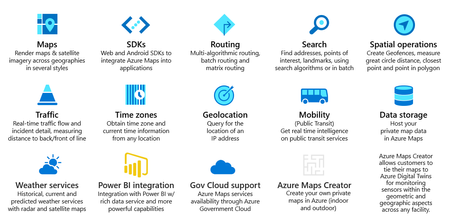
Azure Maps is Microsoft’s geospatial Platform-As-A-Service. It is a set of APIs and SDKs, and end-user apps. This slide covers the basics of what it covers: However, this overview doesn’t quite capture the implications of having these geospatial capabilities in Azure. Let’s discuss them here. One of the first things to realize about Azure Maps is just the idea that these capabilities are built into Azure. Azure Maps is a first party service like the other 200+ services in Azure. As such, it can be used in many ways with many other services. You can use it for IoT, Digital Twins, data processing, dashboards, geocoding, indoor mapping, as part of a function app, logic app, eventing system, machine learning, artificial intelligence, etc. In fact, Azure Maps integrates with some of the other Azure services without you having to do very much. Another way to think about this is that in the past an organization would need to go out and purchase “best in breed” of different technologies and then spend a lot of time and money having to integrate them together. This made sense for many years and is still a viable option in many cases. However, the cloud and Azure Maps are changing the equation. If you combine Azure Maps with Azure IoT, Azure Digital Twins, Azure Stream Analytics, and other Azure services, then you in effect have a multiplicative effect with these services that can in many cases cancel out the need to build and integrate different technologies. The cost and time to integrate are radically different because in some cases there’s nothing to integrate or the integration is just a few clicks away. Another key component of this is the scale and reliability you get out of a PaaS. With Azure Maps, it literally takes 5 minutes to create an Azure Maps account and you are up and running. Compare that to how long it takes to implement a traditional GIS whether on-premises or even in Azure. It’s hard to compare minutes to weeks or even months in the traditional paradigm. Also, because Azure Maps is a PaaS it comes with a Service Level Agreement of 99.9% so you can rest assured that it’s up and running. Likewise, because Azure Maps is a global service (non-regional), it is available in most Azure regions once you create your account. In five minutes, you have a global GIS. That is amazing! You also don’t have to upgrade anything either. When new features arrive, you just get them as part of your account. There’s nothing to upgrade in a traditional sense. Another aspect to consider is the cost. The cloud has changed the whole cost dynamic for IT and that is no different with Azure Maps. First, there is no upfront cost. You don’t need to download anything and you certainly don’t need to open a box. There also aren’t any maintenance fees, or termination fees. You only pay for what you use. That’s it. If you don’t consume anything, you don’t pay anything. Most importantly though is that if you only use one API such as the routing API, that’s all you pay for. You won’t get charged for everything else. Another way to think about this is that GIS has gone from being a capital expenditure to an operational expenditure. Even more important than that, is the fact of economies of scale reduces how much you have to pay for compute and storage which is built into the PaaS. That means that using an Azure Maps API is significantly cheaper than the traditional GIS. Instead of having to pay for servers or even VMs to perform some geospatial operation, you don’t have them. That has been abstracted away. The cost per API call is much less because the cloud infrastructure and storage are so much cheaper due to economies of scale. Another key component of this is that Azure Maps is secure. Azure Maps must adhere to the same compliance as any other Azure service. As noted on the Azure Maps website, “Microsoft employs more than 3,500 security experts who are completely focused on securing your game data and privacy.” That includes Azure Maps. Likewise, Azure Maps respects privacy and is GDPR compliant without you having to do anything. Azure Maps can also take advantage of Azure Active Directory, Azure Security Center, Azure Lighthouse, and many other services. And now for System Integrators and Independent Software Vendors, consider this: Because Azure Maps is a PaaS, that means you can build a SaaS on top it. You can build a general-purpose mapping SaaS so your customers can build maps, perform analysis, integrate with your products, etc. You can also use the APIs to integrate into your apps and place them in the Azure marketplace so your customers can take advantage of them. You can even automate the process of creating an Azure Maps account. Better yet, you can become a Cloud Solution Provider along with Azure Lighthouse and deploy your app in Azure using an Azure App Service and manage customer resources with Azure Lighthouse. Lastly, at the beginning of this entry, I showed the high-level capabilities. This is just the beginning of Azure Maps. As more services are brought online you will be able to opt in and take advantages of those services and all of the other sister services in Azure to build nearly anything and once again you won’t have to upgrade, the security will be built in along with privacy, and many, many other benefits. There is much more to consider so check out the Azure Maps site which points you to the documentation where you can learn more: https://azure.microsoft.com/en-us/services/azure-maps/Ron VincentAug 11, 2020Former Employee4.4KViews0likes0CommentsHelping Reduce CO2-Emissions with Azure Maps
Transportation and Carbon Dioxide Emissions Even though the switch from coal power to less-polluting natural gas has reduced CO2 emissions from its electric grid, transportation has become the largest source of planet-warming greenhouse gases in the United States today, and the bulk of those emissions come from driving in our cities and suburbs. According to the EPA, 60% of those emissions are from the 250 million passenger cars, SUVs and pickup trucks. Freight trucks contribute to an additional 23%. Source: Inventory of U.S. Greenhouse Gas Emissions and Sinks Eco-Friendly Route Optimization Knowing that transportation accounts for a significant share of CO2-Emissions, undertaking responsibilities for its environmental impact are critical. While solutions to reduce emissions are being developed and implemented, it may not have an immediate impact on the existing infrastructure and fleets around the world. A strategic approach to reducing emissions instantly, for existing transportation options, could be through route optimization. Today, many organizations use Route Optimization for optimizing time and expense. They can expand on this, to account for sustainability by optimizing for environmental impact such as fuel consumption and CO2-Emissions. Azure Maps and Eco-Friendly Routing The expectations for eco-friendly routing optimization requires routing algorithms to take into account various factors about the geography and terrain including elevation, inclination, type of roads and location intelligence about traffic & weather patterns along the route. To enable eco-friending transportation, Azure Maps has best of breed content partnerships with TomTom, Moovit and AccuWeather. The Azure Maps partnership with TomTom enables customers to access the freshest maps and traffic-based routing information. Moovit provides real time transit and rideshare data through the Azure Maps API. Integrating Moovit’s transit data into Azure Maps help developers build richer apps that can enable optimizing public transportation options in cities. With the inclusion of Weather Services (in partnership with AccuWeather) as part of the Azure Maps API, customers can seamlessly integrate current & forecast weather as well as weather along a route into their applications. The content partnerships enable Azure Maps users to factor in weather, traffic, public transit and terrain into their routing solutions. The Azure Maps Routing API’s detailed here include API’s for getting route directions, route range and many other options that include batch and matrix routing. The Routing API’s return a route between an origin and a destination, passing through waypoints if they are specified. The route will consider factors such as current traffic and the typical road speeds on the requested day of the week and time of day. This can help determine the most environmentally sustainable routes based on road speeds and traffic. Information returned includes the distance, estimated travel time, and a representation of the route geometry. Additional routing information such as optimized waypoint order or turn by turn instructions is also available, depending on the options selected. The most interesting, from an eco-friendly route optimization perspective, is that the routing service provides a set of parameters for a detailed description of the vehicle-specific Consumption Model. You can specific through the various parameters of the Routing API’s, the engine type of the vehicle for which the routing has to be done: combustion or electric. Depending on the type of the engine and other parameters that you specify including constant speed consumption, acceleration, deceleration, uphill, downhill efficiency and more, the consumption model for the specific vehicle will be created. See the details of the Consumption Model here. The Weather along a route API in Azure Maps returns hyperlocal (one kilometer or less), up-to-the-minute weather nowcasts, weather hazard assessments, and notifications along a route described as a sequence of waypoints. This includes a list of weather hazards affecting the waypoint or route, and the aggregated hazard index for each waypoint might be used to paint each portion of a route according to how safe it is for the driver. Data is updated every five minutes. The service supplements the Azure Maps Route Service that allows you to first request a route between an origin and a destination and use that as an input for Weather Along Route endpoint. This enables better route planning using weather based influencers for optimizing the carbon footprint of the trip. Azure Maps & EV Routing Also, of interest, is that Azure Maps builds out the Electric Vehicle consumption model when the type of engine is specified as Electric. In this case the Routing API’s enable you to enter parameters that include constant speed consumption in kWh Per hundred km, current charge in kWh, maximum charge in kWh and much more. Routing for Electric Vehicles can take into account, locations of charging stations, remaining charge, traffic congestion, best times for travel based on weather conditions and traffic and more. Most electric vehicle batteries lose a percentage of their charge when the temperature dips below freezing. With Azure Maps Weather Services, you can use current or forecasted temperatures to determine your vehicle’s range. Range can determine how far a vehicle can drive along a route, set better expectations for estimated arrival times, and define the route based on locations of charging stations. For a hands on experience with the EV Routing capabilities in Azure Maps, have a look at our Azure Notebooks (Python) based tutorial and walkthrough here: Tutorial: Route electric vehicles by using Azure Notebooks (Python). Managing Routing Exceptions with Geofencing Geofencing is typically used for enabling a virtual perimeter or fence around a geographical area. They have been used for defining danger zones in construction areas, creating perimeters around areas to prevent heavy equipment from entering, for triggering notifications and workflows when someone or something enters a marked zone and much more. Geofencing can also be used for fleet management when combined with routing for exception reporting on activities of fleets and driver behavior. When using the parameters in Azure Maps routing to enable eco-friendly route optimization, companies can use geofencing in conjunction with Routing to ensure that the defined routes are being followed. Azure Maps provides several spatial services as part of this API’s. The Azure Maps GET Geofence and POST Geofence APIs allow you to retrieve proximity of a coordinate relative to a provided geofence or set of fences. An excellent video walkthrough of the Geofencing capabilities is an episode of the Azure IoT Show with OIivier Bloch and Jim Bennet: Geofencing with Azure Maps. For a detailed tutorial and walkthrough of the Geofencing capabilities in Azure Maps, have a look at this: Tutorial: Set up a geofence by using Azure Maps. Another tutorial that delves into how a combination of IoT and Azure Maps capabilities can help track fleets can be found here: Tutorial: Implement IoT spatial analytics using Azure Maps. Azure Maps & Environmental Impact With the increasing threat of climate change, an eco-friendly approach to fleet management and transportation routing is becoming necessary. Through the adoption of alternative fuels and eco-friendly routing options, we can make an impact on the world. For more details on Azure Maps here are some resources: Overview: https://azure.com/maps Documentation: https://aka.ms/AzureMapsDocs Getting Started: https://aka.ms/AzureMapsGettingStarted Code Samples: https://aka.ms/AzureMapsSamples Videos: https://aka.ms/AzureMapsVideos Blog: https://aka.ms/AzureMapsBlog Developer Forums: https://aka.ms/AzureMapsForums Azure Maps IoT School: https://aka.ms/AzureMapsIoTSchool Case Studies: https://aka.ms/AzureMapsCaseStudiesShiShFeb 11, 2020Microsoft3.2KViews1like0CommentsAzure Maps at the IATA Air Hackathon Seattle
The World Health Organization (WHO) estimated that there are more than 1B disabled people worldwide, equivalent to 15% of the world population. Travel is becoming one of the latest frontiers in the journey toward accessibility, and we are seeing more destinations become wheelchair-friendly. In addition to the travel destination itself, there is a need to ensure that the booking process is designed with accessibility in mind. The IATA Air Hackathon Seattle is focused on helping build solutions to enhance the booking experience for passengers with mobility aids (wheelchairs) and/or tracking or mobility aids (wheelchairs). The AIR Hackathon will comprise of: A one-week ideation phase to prepare your project around leisure and business travel (ideation is available only for registered participants and they will be invited on 14 February 2020) A 28-hour coding experience in Seattle, to work on your projects and pitch ideas to a team of industry experts and mentors. The 28-hour coding experience runs from Feb 21 to 23 at the Microsoft campus in Redmond. You will be able to attend some of the workshops that will take place on-site and gain access to mentors that will support you through the Hackathon experience. I will be involved with the IATA AIR Hackathon Seattle on Feb 21-23 to help participants use the Azure Maps API’s if needed. I encourage participants to explore the Azure Maps API’s to enable the location intelligence & mobility aspects of the solutions. Azure Maps makes it easy for all users to navigate an interactive map experience. Users can interact with maps using a mouse, touch, or keyboard. Azure Maps provides screen readers with enhanced descriptions that can combine multiple updates into a single message that is easier to digest and understand. Recently Azure Maps achieved exciting new capabilities & Microsoft certification around accessibility. All apps that use Azure Maps will benefit from the accessibility features that are provided out of the box. Azure Maps also relies on best of breed content partnerships for everything from the maps data, traffic, real time transit, ride share, to weather data. One of the Azure Maps content partnerships is with Moovit. Launched in 2011 in Israel, Moovit has become the world’s most popular transit-planning and navigation app, with more than 500 million users and service in over 3,000 cities across 94 countries. The company is also a leader in inclusive technology, with innovative work that helps people across the disability spectrum use buses, trains, subways, ride-hailing services, and other modes of public transit. In addition to offering a consumer app in 45 languages, Moovit has partnered with Microsoft to provide its multi-modal transit data to developers who use Azure Maps. The partnership will enable the creation of more inclusive cities and more accessible transportation and travel apps. For those of you keen on exploring the Azure Maps API’s for the hackathon, I would like the share the following resources: Overview: https://azure.com/maps Documentation: https://aka.ms/AzureMapsDocs Getting Started: https://aka.ms/AzureMapsGettingStarted Code Samples: https://aka.ms/AzureMapsSamples Videos: https://aka.ms/AzureMapsVideos Blog: https://aka.ms/AzureMapsBlog Developer Forums: https://aka.ms/AzureMapsForums Azure Maps IoT School: https://aka.ms/AzureMapsIoTSchool Case Studies: https://aka.ms/AzureMapsCaseStudies I also encourage you to watch this episode of the Azure IoT Show with Olivier Bloch and Outi Nyman discussing the Mobility Services in Azure Maps: http://bit.ly/2NMbt61 The documentation for the Azure Maps Mobility Services can be found at: http://bit.ly/332vWZv . I will be doing a short presentation on Azure Maps API’s before the Hackathon begins, and I look forward to seeing you all.ShiShJan 31, 2020Microsoft1.6KViews0likes0CommentsAzure Maps Partner Solutions
You may have seen the press release over the weekend about Optio3 & the partnership with Azure Maps: Optio3 to bring Microsoft Azure Cloud and Azure Maps to commercial transportation fleets. The solution from Optio3 for Fleet Management is a great example of how Geospatial / Location Intelligence comes together with IoT with the help of Azure Maps, Azure IoT and Microsoft Connected Vehicle Platform. According to Optio3, Azure Maps gives them a rich set of geospatial capabilities that they need to make their real time fleet operations management solution location-aware. In addition to Optio3, I would love to highlight a small sample of partner solutions that use Azure Maps in innovative ways: Company Solution Description Additional Resources Industry Aira One of the companies that is leveraging the geospatial and mapping capabilities from Azure Maps and the transit capabilities from Moovit, is Aira. Aira is a technology company dedicated to making lives simpler and more engaging. Based in San Diego, California, they build solutions to connect people who are blind, have low vision, or are simply aging into a digital world, with highly-trained professionals who provide visual information on demand. Public transportation is the lifeline to jobs, education, healthcare, and more, yet many blind or low vision riders still have trouble getting to their destination. They may be uncertain that they’ve caught the right bus, or unable to read the entrance sign they need to follow in order to access the subway. In addition, as populations age, the number of people experiencing age-related vision loss rises every day. Press: Moovit, Microsoft and Aira Just Made Public Transportation Better For People With Vision Impairments http://bit.ly/2tJmKgx Smart City, Public Sector Optio3 Optio3 announced an integrated Microsoft Azure IoT and Optio3 remote operations monitoring solution to commercial transportation, motor coach, and transit fleets. Optio3 already uses Azure Maps and Azure Cloud and is looking at utilizing the Microsoft Connected Vehicle Platform. The initial focus is on serving the aftermarket tractor, trailer, truck, bus, van, and motor coach market of existing fleet vehicles. This collaboration is the natural extension of Microsoft and Optio3 joining the Smart Transportation Council, whose mission is to orchestrate remote operations management product development activities across OEMs, to advocate open standards, and to help OEMs deliver streamlined and more powerful solutions to fleet owners and operators at a lower total cost of ownership. Press: Optio3 to bring Microsoft Azure Cloud and Azure Maps to commercial transportation fleets http://bit.ly/2Gd3iLW Logistics, Transportation, Fleet Management Espatial With eSpatial Mapping Software, you can find hidden detail in your data with location analytics which allows you to segment and filter your data to connect business activity directly to a location. You get an interactive snapshot of your data for instant understanding with color-coded maps, graphs, charts, and annotations. You can map and manage your territories for rapid assignment and balancing which allows you to manage your resources more effectively. You can plan sales or service calls with radius and nearest neighbor analysis and make the most of your time in the field with optimized routing. Product Info: http://bit.ly/2RfttYB Retail EasyTerritory EasyTerritory for IoT is a robust application for visualizing and monitoring IoT device status and geofence alerts. EasyTerritory can be used stand-alone or integrated with Microsoft Dynamics 365 and Power BI to asset and device locations and trigger geofence alerts using the immersive Azure Maps! EasyTerritory for Retail is a robust application for boundary management and data visualization for franchisers and retailers. EasyTerritory can be used stand-alone or integrated with Microsoft Dynamics 365 and Power BI to map stores, franchise boundaries, and areas of protection (AOPs) using the immersive Azure Maps! Appsource EasyTerritory for IoT: http://bit.ly/2RwWTAg Appsource EasyTerritory for Retail: http://bit.ly/36eafqF Retail Hexagon A great example of a partner that is delivering solutions on Azure Government cloud is Hexagon Safety and Infrastructure. Their HXGN OnCall portfolio helps public safety agencies of all sizes be more agile and resilient through modernized capabilities spanning call-taking and dispatch, records, analytics, major event management, and mobility. Here is what Kalyn sims, CTO of Hexagon Safety and Infrastructure had to say: “Through our partnership with Azure Maps, Hexagon delivers a rich map experience in our SaaS version of HxGN OnCall, our new portfolio of public safety solutions. It enables public safety agencies to leverage a highly available, CJIS-compliant mapping solution as they serve citizens during some of life’s most crucial moments.” Video: https://youtu.be/ZXuY16cMZhQ Public Sector AudaxLabs Solution for analyzing store locations using Azure Map. The Solution builds an Isochrone around a store location and enables retailers to analyze the around the store. Audax Labs is available to help customers with solving their business challenges using Azure Maps and Geospatial Analytics Demo: http://aka.ms/audaxdemo Retail Beca Earthquakes are a reality of life in some places and their impact can be devastating. New Zealand-based professional services consultancy Beca is using Microsoft Azure to help earthquake-struck communities. Its cloud-based solution, Beacon System, notifies users of the likely impact on properties and organizations. By combining real time earthquake information with knowledge of their client’s assets, it calculates the likelihood of damage. This provides clients with immediate information to help them understand the impacts, make informed decisions, communicate with stakeholders and ultimately get back to business quicker. Beca is using Microsoft Azure Maps to cut analysis time from hours to seconds. Its previous Geospatial Imaging System (GIS) could not generate maps with the speed or scalability necessary for the solution. Here is a link to the story via The Technology Record : http://bit.ly/2XL21Xy Here is a video that tells the story of how Beca helps manage the impact of earthquakes with an Azure Maps based solution: http://bit.ly/34ffQfD Public Sector Perceptual Informatics Perceptual Informatics, is an environmental startup, that was recently awarded Microsoft’s AI for Earth Grant to further its research on the economic effects of climate change on the agriculture industry. Perceptual has selected Azure Maps as their Geospatial & Data Visualization platform and is doing some amazing work with it to identify the sustainability of short- and long-term agricultural investments and to determine costs and mitigate risks associated with climate change. Perceptual Informatics is available to help customers with solving their business challenges using Azure Maps and Geospatial Analytics. Here is a link to a small example of their work (they have plenty of additional models including volatility and risk models): Historical Corn Viewer For the Smart City Expo, the team at Perceptual decided to build a Smart City Dashboard demo using two data sources: (1) satellite radar from the European Space Agency's Sentinel-1 system, and (2) observations from Barcelona's City Hall Open Data Service. They built the dashboard as a showcase for Barcelona City planners to explore various datasets overlaid on the city map. They use remote sensing data from satellite radar to show the depth of the tree canopy cover over the city as well as standing rainwater across the city. You can also compare demographics data, residential & non residential water hookups. They are using the Air Quality data across the city. You can access the demo here. Retail, Smart City, Agriculture I am currently collaborating with several other partners and will publish a more exhaustive list of partner solutions using Azure Maps. I would love to hear of any solutions that you are aware of that uses Azure Maps. Please respond in the comments or reach out to me via email.ShiShJan 25, 2020Microsoft2.7KViews0likes0CommentsAzure Maps at NRF 2020
After participating in the NRF Big Show for the past 15 years as part of the Retail team, I am thrilled to participate in the event in a new role and with a new perspective: I will be representing the Azure Maps team at NRF 2020 and focusing on Location Intelligence in Retail. I will be available in the Microsoft Booth (#4501) for meetings to discuss Geospatial Analytics and Location Intelligence scenarios for Retail. You can schedule a meeting using this LINK. Retailers can gain valuable customer insights by leveraging location intelligence that correlates retail store & customer locations with demographic data, spend behavior data and a lot more. They can use geospatial platforms like Azure Maps to create solutions that identify the most profitable locations as well as enable them to optimize targeted promotions to specific locations based on the geo-segmentations. Data drives growth and digital transformation for Retail and Retailers have realized the value of geospatial data. To become personal and relevant to customers, and goods, it is important for retailers to know the socioeconomic information of their customers. Geospatial data can provide retailers data on income, housing/rent prices, surrounding business performance, population, and age. This provides insight into the inventory and assortment that they need to carry at a hyperlocal level. Another way retail uses geospatial data is in combination with weather pattern predictions. Weather patterns and correlated buying patterns (especially those related to extreme weather) are critical to reduce overstock and out of stock situations. Weather pattern analysis allows grocery stores to determine when they should stock up on non-perishable items. These are just some of the topics that I will be available to discuss & help with during NRF 2020: Retail Catchment Analysis: Catchment is defined as the sphere of influence from which retailers draw their customers. Azure Maps can be used by Retailers to better understand a location and analyze business drivers and disruptors from a spatial perspective. By building isochrones around the store location retailers can search within the Isochrone to determine the demographic mix, parking spaces, competitors and other information that could potentially help drive traffic to, or from, the business. I have collaborated with a partner called Audax Labs to make a Retail Catchment Analysis solution available to retailers. I will be showcasing a demo of the solution at NRF 2020. Here are some additional, around catchment analysis & Azure Maps: Catchment Area Analysis for a Starbucks Store in Seattle using Azure Maps Jupyter Notebook Sourcecode for Retail Catchment Demo on Github Azure IoT Show Retail Location Analytics with Azure Maps Logistics & Last Mile Delivery Azure Maps provides capabilities that enable retailers in dealing with logistics and last mile delivery challenges with capabilities that enable fleet management, efficient routing, real time traffic, real time weather and multimodal transportation options. I will be walking through a demo solution that uses many of the capabilities available in Azure Maps for Route Optimization, Batch and Matrix Routing. Our partnership with Moovit also enables us to make real time transit and ride share information available through the Azure Maps API. Driving Retail Profitability with Location + Weather Intelligence When predicting retail sales, models consider various data points including historical shopping trend data and influencers like economic indicators. In addition, shifting seasons can seriously affect retail sales. Consumers change their buying habits when temperatures spike or drop. The food we eat, the clothes we wear and a lot more can be determined by fluctuations in the weather. Retailers can use weather forecasting to guide inventory decisions while marketing can use it to drive personalized promotions & advertising. Because Location & Weather Intelligence are key components for decision making, Azure Maps is proud to share, in partnership with AccuWeather, the preview of a new set of Weather Services for Azure customers to integrate into their applications. Azure Maps Weather Services adds a new layer of real-time, location-aware information to our portfolio of native Azure geospatial services powering Microsoft enterprise customer applications. I will be talking about & demonstrating how retailers can use weather & location data for better planning. Additional Resources: 1. Driving Retail Profitability with Location + Weather Intelligence 2. Rain or shine: Azure Maps Weather Services will bring insights to your enterprise Power BI Visualization & Location Analytics We will be releasing the Azure Maps control for Power BI in February. I have built out several Power BI Location Analytics demos for Retail that I will be showcasing at NRF 2020. With the addition of Power BI, Azure Maps can now be used by non-developers to quickly analyze store locations, better understand customers based on geospatial information and plan logistics and last mile delivery using geospatial capabilities. I look forward to engaging with you. Please schedule a meeting in the Microsoft booth with me using this link.ShiShJan 02, 2020Microsoft1.9KViews0likes0CommentsAnnouncing: Google Maps to Azure Maps Migration Guide
Microsoft Azure is an ever-expanding set of cloud services to help your organization meet your business challenges. It enables the freedom to build, manage, and deploy applications on a massive, global network using your favorite tools and frameworks. The complete list of Azure Services, including Azure Maps (under the Internet of Things category), can be found here. Azure Maps provides developers from all industries, powerful geospatial capabilities, packed with the freshest mapping data available to provide geographic context to web and mobile applications. Azure Maps is an Azure One API compliant set of REST APIs for Maps, Search, Routing, Traffic, Mobility, Time Zones, Geolocation, Geofencing, Map Data, and Spatial Operations accompanied by both Web and Android SDKs to make development easy, flexible, and portable across multiple platforms. For individuals & organizations that already subscribe to Microsoft Azure, Azure Maps is already included in your subscription. For those of you using Google Maps, with your existing Microsoft Azure Account, you can explore Azure Maps for its capabilities, pricing, best of breed content partnerships and ability to integrate with other Azure services. You can manage your Azure Maps account through the Azure portal. After you have an account, you can implement the APIs in your website or mobile application. If you don't have an Azure subscription, create a free account before you begin. To get started with the Google Maps migration guide, click on this link. It includes details on migrating web apps, Android Apps and web services. Here is a list of useful technical resources for Azure Maps: Overview: https://azure.com/maps Documentation: https://aka.ms/AzureMapsDocs Web SDK Code Samples: https://aka.ms/AzureMapsSamples Developer Forums: https://aka.ms/AzureMapsForums Videos: https://aka.ms/AzureMapsVideos Blog: https://aka.ms/AzureMapsBlog Azure Maps Feedback (UserVoice): https://aka.ms/AzureMapsFeedbackShiShDec 19, 2019Microsoft1.4KViews0likes0CommentsDriving Sustainable Mobility for Smart Cities using Azure Maps
Smart Cities are increasingly exploring ways to reduce the social, environmental and climate impact of their mobility/transportation options with sustainable mobility solutions. There are many definitions of sustainable mobility (or sustainable transportation). One such definition, from the European Union Council of Ministers of Transport, defines a sustainable transportation system as one that: Allows the basic access and development needs of individuals, companies and society to be met safely and in a manner consistent with human and ecosystem health, and promotes equity within and between successive generations. Is affordable, operates fairly and efficiently, offers a choice of transport mode, and supports a competitive economy, as well as balanced regional development. Limits emissions and waste within the planet's ability to absorb them, uses renewable resources at or below their rates of generation, and uses non-renewable resources at or below the rates of development of renewable substitutes, while minimizing the impact on the use of land and the generation of noise. The Azure Maps team participated in the Smart City Expo World Congress in November and was engaged in several conversations with City Planners on ways to drive sustainable mobility. Azure Maps, partners with best of breed content providers to make data that is critical for city planning available natively through its API. This includes mapping data and real time traffic data from TomTom, real time transit and ride share data from Moovit and current and forecast weather data from AccuWeather. One of the Azure Maps content partnerships is with Moovit. Launched in 2011 in Israel, Moovit has become the world’s most popular transit-planning and navigation app, with more than 500 million users and service in over 3,000 cities across 94 countries. The company is also a leader in inclusive technology, with innovative work that helps people across the disability spectrum use buses, trains, subways, ride-hailing services, and other modes of public transit. In addition to offering a consumer app in 45 languages, Moovit has partnered with Microsoft to provide its multi-modal transit data to developers who use Azure Maps, and a set of mobility-as-a-service solutions to cities, governments, and organizations. The partnership will enable the creation of more inclusive smart cities and more accessible & sustainable transit apps. To showcase the multi-modal transit options as well as sustainable mobility options, the Azure Maps team partnered with Gus Salloum, a program manager in Microsoft, with a deep passion for finding creative ways of commuting to work in a sustainable way while getting his minimum physical activity goals accomplished by biking part of the way. Gus brought his ideas and vision to the annual Microsoft Hackathon, billed to be one of the biggest private hackathons on the planet, to help make his multimodal commute app real. To add the sustainability element he built out a costing algorithm for every commute option indicating the route and transport options environmental impact. A great example of how, many cities calculate the social and environmental impact of transportation can be found online from the City of Calgary. You can find a detailed video walkthrough of Gus’s hackathon project at LINK We would love to help city planners with sustainable mobility solutions for your cities.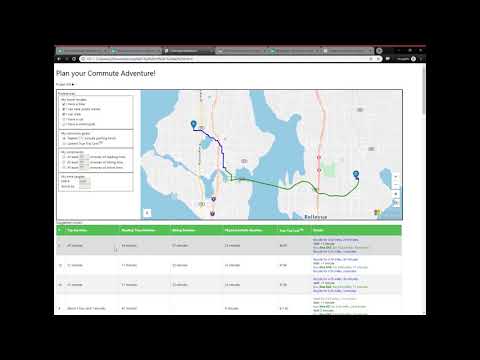 ShiShDec 18, 2019Microsoft2.2KViews1like0Comments






Tags
- azure maps8 Topics
- PowerApps1 Topic
- iot1 Topic
- PowerPlatform1 Topic
- geocoding1 Topic
- ssis1 Topic
- Azure Pricing1 Topic
- geolocation1 Topic
- Address Search API1 Topic
- Formatted Address1 Topic