Forum Widgets
Latest Discussions
From On-premises Datacenter to Azure Hybrid with Azure Arc for Servers
With Microsoft Azure Arc services you can bring Great Azure features to your on-prem datacenters, or to other Cloud providers. I wrote a #MVPLABSerie Blogposts about the benefits of Azure Hybrid which I like to share with the Tech Community: #MVPLABSerie Azure Hybrid with Arc Enabled Windows Servers on-premises #MVPLABSerie Azure Arc enabled Servers #MVPLABSerie Azure Update Management Center (Preview) and Azure Arc enabled Servers #MVPLABSerie Azure Arc enabled SQL Server Health Assessment #MVPLABSerie Azure Defender for Cloud with Azure Arc enabled SQL Server Security Baseline for Azure Arc enabled Servers and Arc Kubernetes As an IT Specialist of Datacenter(s) and Cloud I really like these Azure hybrid benefits to keep your datacenter up-to-date and secure! Hope this #MVPLABSerie is helpful for you and your Business. Cheers, James4.2KViews6likes0CommentsBLOG: Explaining Azure Local additions to licensing and hardware ecosystem - June 2026
Changelog: 1.3 - added Azure Local OEM licensing 1.2 - improved readability in licensing comparison section, adding sources. 1.1 - corrections for S2D + SAN / or SAN only, added link for solution comparison. 1.0 - initial version In this blog I will inform you about noteable additions and changes in terms of Azure Local Licensing and changes to the qualified, certified hardware required. Some of these changes also making it much easier re-using existing hardware with Azure Local, such as SANs. As this blog uses a couple of acronyms, please make yourself familiar with these in the terminology section at the end of this post, as it differs a bit from what is used with Windows Server. 🆕Change 1 - Licensing updates: Microsoft has released an addition to their all-known Azure Local pricelist and licensing conditions. What's new? Host Servicing Fee and revoked Azure Hybrid Benefits for Azure Local have been clarified based on its deployment decisions, when used with S2D + SAN or SAN and ALDO. Formerly revoked for M365 Local through product terms changes. With this Microsoft has introduced a new tier model for Azure Local Host fees based on the specific assignment of the deployed instance. Tier 1: Azure Local using Storage Spaces Direct (default) Tier 2: Azure Local for disaggregated deployments or hyperconverged deployments with external storage. Tier 3: Azure Local with disconnected operations, locally hosted control plane. Learn more about the the new Azure Local pricing tiers. Important note: Please always consult Microsoft Product Terms preferably over other pages, slides etc., understanding the definitive terms that apply. Any licensing statements written or displayed outside Product Terms - including this blogpost - are considered complementary. They might be incomplete or outdated given the context and respective licensing program that applies. 🆕Change 2 - Azure Local Solutions - hardware and ecosystem changes: Microsoft Azure Local Solutions page, formerly Azure Local Solution catalog, has seen a subtle but major overhaul some time ago. I would like to elaborate on these. The previously well-known "pyramid" of hardware certification and defined feature and support set for Azure Local has been revised. Tier 1: Premier Solutions Tier 2: Integrated Systems Tier 3: Validated Nodes The new hardware certification and defined feature and support sets: Tier 1: Premier Solutions Tier 2: Integrated Systems 𝗪𝗵𝗮𝘁 𝗵𝗮𝗽𝗽𝗲𝗻𝗲𝗱 𝗼𝗿 𝘄𝗶𝗹𝗹 𝗵𝗮𝗽𝗽𝗲𝗻 𝘁𝗼 𝘆𝗼𝘂𝗿 𝗩𝗮𝗹𝗶𝗱𝗮𝘁𝗲𝗱 𝗡𝗼𝗱𝗲𝘀? First, Validated Systems not to confuse with Azure Local validated hardware - have been entirely removed from the Azure Local Solutions | Microsoft, as a selectable solution category. Given the indications and filtering options - to my understanding - it is very unlikely that future hardware refreshes will be provided by the OEMs based on the Validated Systems. Thus I consider Validated Systems phased out / deprecated based on the readings on the Solution page, while there is no official announcement I am aware of. 𝗗𝗼𝗲𝘀 𝘁𝗵𝗶𝘀 𝘃𝗼𝗶𝗱 𝘆𝗼𝘂𝗿 validated solution 𝘆𝗼𝘂 𝗵𝗮𝘃𝗲 𝗱𝗲𝗽𝗹𝗼𝘆𝗲𝗱 𝗮𝗻𝗱 𝗿𝘂𝗻𝗻𝗶𝗻𝗴? I'd say no in most cases based on the age of the hardware and would like to advise the following: Brace and keep calm. 🙏🏻 Please consult the Azure Local Catalog for changes at your pace, identifying your deployed hardware. Checking for supportability (limited support or end of support statements). Validated Nodes are still visible in the Azure Catalog when choosing the filter options as shown in the picture, while the category filter itself has been removed. Please check with your Microsoft Partner and OEM, if deployed and still supported Validated Solutions actually got upgraded / or are upgradeable to Premier Nodes. I have been informed some are upgradeable from Validated Solution directly to Premier Nodes but this requires a redeployment of the nodes. How can I find my running Validated Nodes, when not listed (upgraded) in Premier Solutions or Integrated Systems? There is a selector in the Azure Local Solutions overview, call qualification generation. Wait, is that a kind of upselling? Speaking about the hardware for Azure Local, in my understanding this consolidation from a 3-tier model to a 2-tier model was long overdue and in my personal opinion I welcome it based on the technical changes and requirements Azure Local 23H2 and 24H2 implied. I wouldn't describe it as upselling and here is a pointer why: Some time ago, most Integrated Systems (Nodes) have been upgraded to Premier Solutions at no additional cost to partners and customers by Dell Technologies. While Dell took the lead, many OEMs followed suit. This also means that all fully supported deployed Azure Local nodes consistently support Quick Reboot, skipping lenghty BIOS POST time, when no UEFI firmware is pending for installation. Thankfully though, the inital Azure Local 23H2 approach by Dell, which involved pairing Premier Nodes with a mandantory layer of OEM provided software, has been dismissed. This approach required customers accepting the benefits of Premier Solutions while getting charged , storage capacity, CPU and RAM in return for a OEM specific management software and other OEM provided benefits. Vae victis, early adopters. While these remain supported, this is no longer the case for Premier Solutions of neither OEM offering these. What are your benefits when after the change potential upgrade? Please find this verbose comparison and also check the tabs on the top of the linked page: Comparison of Azure Local solutions. The benefits are huge, beneficial and practical for everyday operation, troubleshooting and support. Why the change? Microsoft has drastically improved the servicing workflow by using Azure Update Manager, Cluster Aware Update mechanisms and healthchecks, with the goal to near one-click automate the download, deployment and installation of SBE while also maintaining the Azure Local solution and keeping it up-to-date, with a friction-less and production-safe upgrade mechanism. This means monthly patching for Azure Local, since version 12.x builds based on Windows Server 2025 kernel were introduced, upgrade and monthly update reliability has finally met and exceeded expectations. Note that 11.x builds starting from 23H2 had some 'first release issues', but all teams at Microsoft worked extremely hard to overcome these. Learn more about the Azure Local releases and their update, upgrade and supportability terms. Azure Local Licensing Changes - Azure Hybrid Benefits for Windows Server Datacenter Tier / Scenario CSP Subscription (MCA) EA with SA MCA‑E with SA or Subscription Other Programs with SA Azure Local OEM 🟩 Tier 1 — Azure Local w. S2D Full AHB benefits Host fee pricing: 10$ per active core per month, unless exempted. 🖥️ No Azure Local fees or Windows Server Guest OS fees 🪪 WS Arc Management benefits elibigle 🔌 Connected 🖥️ No Azure Local fees or Windows Server Guest OS fees 🪪 WS Arc Management benefits elibigle 🔌 Connected 🖥️ No Azure Local fees or Windows Server Guest OS fees 🪪 WS Arc Management benefits elibigle 🔌 Connected 🖥️ Azure Host and Guest OS fees apply - you might license Guest OS with Windows Server Azure Subscription or through volume licensing. 🪪 WS Arc Management benefits elibigle 🔌 Connected 🖥️ No Azure Local fees or Guest OS fees ❌ no WS Arc Management benefits 🔌 Connected 🟧 Tier 2 — Azure Local w. S2D + SAN or Azure w. SAN Azure Local host fees apply Host fee pricing: 20.1 $ per active core per month. No exemption. 🖥️ 💲Azure Host and Guest OS fees apply - you might license Guest OS with Windows Server Azure Subscription or through volume licensing. 🗄️S2D + SAN or SAN only 🪪 WS Arc Management benefits elibigle 🔌 Connected 🖥️ 💲Azure Host and Guest OS fees apply - you might license Guest OS with Windows Server Azure Subscription or through volume licensing. 🗄️S2D + SAN or SAN only 🪪 WS Arc Management benefits elibigle 🔌 Connected 🖥️ 💲Azure Host and Guest OS fees apply - you might license Guest OS with Windows Server Azure Subscription or through volume licensing. 🗄️S2D + SAN or SAN only 🪪 WS Arc Management benefits elibigle 🔌 Connected 🖥️ 💲Azure Host and Guest OS fees apply - you might license Guest OS with Windows Server Azure Subscription or through volume licensing. 🗄️S2D + SAN or SAN only 🪪 WS Arc Management benefits elibigle 🔌 Connected 🖥️ Azure Local fees reduced to 10$/per active core per month. No Guest OS fees 🟥 Tier 3 — Azure Local ALDO Offline, no Azure Arc access Host fee pricing: Contact Microsoft or eligible Microsoft partner 🖥️💲 Azure Host and Guest OS fees apply - you might license Guest OS with Windows Server Azure Subscription or through volume licensing. 🪪 WS Arc Management benefits elibigle 🔌❌ fully disconnected 🖥️ 💲Azure Host and Guest OS fees apply - you might license Guest OS with Windows Server Azure Subscription or through volume licensing. 🪪 WS Arc Management benefits elibigle 🔌❌ fully disconnected 🖥️ 💲Azure Host and Guest OS fees apply - you might license Guest OS with Windows Server Azure Subscription or through volume licensing. 🪪 WS Arc Management benefits elibigle 🔌❌ fully disconnected 🖥️💲 Azure Host and Guest OS fees apply - you might license Guest OS with Windows Server Azure Subscription or through volume licensing. 🪪 WS Arc Management benefits elibigle 🔌❌ fully disconnected not eligible afaik 🟦 M365 Local on Azure Azure Local host fees apply Host fee pricing: Contact Microsoft or eligible Microsoft partner 🖥️ 💲Azure Host and Guest OS fees apply - you might license Guest OS with Windows Server Azure Subscription or through volume licensing. 🪪 WS Arc Management benefits elibigle 🔌 Connected 🖥️ 💲Azure Host and Guest OS fees apply - you might license Guest OS with Windows Server Azure Subscription or through volume licensing. 🪪 WS Arc Management benefits elibigle 🔌 Connected 🖥️ 💲Azure Host and Guest OS fees apply - you might license Guest OS with Windows Server Azure Subscription or through volume licensing. 🪪 WS Arc Management benefits elibigle 🔌 Connected 🖥️ 💲Azure Host and Guest OS fees apply - you might license Guest OS with Windows Server Azure Subscription or through volume licensing. 🪪 WS Arc Management benefits elibigle 🔌 Connected not eligible afaik sources: https://www.microsoft.com/licensing/terms/productoffering/MicrosoftAzure/MCA#clause-2250-h3-1 (primary) https://learn.microsoft.com/en-us/azure/azure-arc/servers/windows-server-management-overview (complementary) https://azure.microsoft.com/en-us/pricing/details/azure-local/ (complementary) https://learn.microsoft.com/en-us/windows-server/get-started/azure-hybrid-benefit?tabs=azure-local (complementary) Azure Local Terminology Term / Category Definition Nodes Physical servers participating in an Azure Local deployment. Instance A cluster of Azure Local nodes forming a single logical deployment. AzL S2D Azure Local using highest‑performance, highly available local Software‑Defined Storage (S2D). System Builder Extension (SBE) packages Fully tested and supported driver + firmware recipes for the current Azure Local release, provided by OEMs in partnership with Microsoft for Premier Solutions. Solution Categories Defines ease of deployment, support boundaries, and feature availability across Azure Local solution types. Azure Local hyperconverged deployments with external storage (Azure Local S2D + SAN) Azure Local S2D combined with qualified SAN‑attached storage. Azure Local for disaggregated deployments (Azure Local with SAN) Azure Local without S2D, using qualified SAN‑attached storage. Azure Local Disconnected Operations (ALDO) Fully disconnected, locally hosted control plane mimicking Azure Portal functionality, ensuring full‑stack data locality for strict governance requirements. Azure Local M365 Azure Local configuration enabling Microsoft 365‑like services on‑premises using a specialized node and instance setup. Azure Local The on‑premises Azure‑consistent platform for compute, storage, and hybrid management. CSP (Cloud Solution Provider) Sales motion/program. Not related to Intune CSP policies. MCA (Microsoft Customer Agreement) Licensing framework underlying CSP purchases. Microsoft Product Terms (PT) Official licensing terms — the single authoritative source for Microsoft licensing information. Windows Server / Azure (Local) Hybrid Benefits (AHB) Licensing benefits for applicable programs, especially valuable for Arc‑enabled servers with active Software Assurance. Particularly beneficial for customers licensing Windows Server Datacenter hardware cores via Enterprise Agreement with SA or CSP Subscription. AHB varies by product and program; Product Terms remain the authoritative source. Software Assurance (SA) Term based or compulsory in Subscriptions, bundle of licensing and usage benefits compared to perpetual licensing. Since Arc and Azure Local ROI goes far beyond "running the latest". Missed anything, spotted wrong? Let me know in the comments below.Solved1.3KViews4likes10Comments Aaida_AboobakkarFeb 09, 2025Microsoft975Views4likes6Comments
Introducing Azure Arc Discussion Space
Azure Arc helps you extend Azure management to any infrastructure and enables deployment of Azure data services anywhere - across on-premises, edge, and multicloud. We created this discussion space for you so that you can discuss Azure Arc enabled servers, Azure Arc enabled Kubernetes, Azure Arc enabled SQL Server, and Azure Arc enabled data services, and also ask questions from us. You will find the product overview of Azure Arc here Azure Arc documentation can be found here. -MarkoMarkoHottiSep 22, 2020Microsoft1.4KViews4likes0CommentsLAB: Azure Arc with Private Endpoint
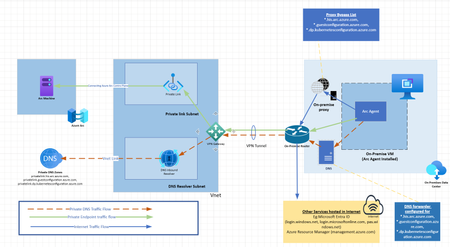
What is Azure Arc? Azure Arc is a set of technologies that extends Azure management and enables Azure services to run across on-premises, multi-cloud, and edge environments. It allows you to manage resources such as servers, Kubernetes clusters, databases, and applications running outside Azure using familiar Azure tools and services like Azure Policy, Azure Monitor, and Defender for cloud. With Azure Arc, you can bring these resources into Azure's control plane, standardize operations, and apply consistent security and governance across your entire IT landscape. This simplifies hybrid and multi-cloud management while leveraging Azure's features, making it easier to innovate and maintain control over your infrastructure. What is Azure Private Endpoint? Azure Private Endpoint is a network interface that connects you privately and securely to a service powered by Azure Private Link. By using a private IP address from your virtual network, the private endpoint brings the service into your virtual network, ensuring that traffic between your virtual network and the service remains private. This setup eliminates exposure from the public internet, enhancing security. Private endpoints can be used with various Azure services, such as Azure Storage, Azure SQL Database, and Azure Cosmos DB. They provide secure connectivity between clients on your virtual network and the service, using the same connection strings and authorization mechanisms as public endpoint. What are the benefits of configuring private link for your arc machines? Enabling Azure Arc for your machines involves several network and system requirements. Organizations are sometimes concerned about allowing certain public endpoints through their firewall and proxy. In this context, Private Endpoints can be used to ensure that some connections to Azure remain within the Microsoft backbone network. While this service does not eliminate the need for internet connectivity entirely, you will still need to allow public access for Microsoft Entra ID and Azure Resource Manager servers. However, this method significantly reduces the challenge of IP/FQDN whitelisting for internet access. When you create private endpoints in a virtual network for Azure Arc, it will create a resource with Azure Hybrid Compute as the target. Additionally, it will create several private DNS zones and assign them to the private endpoint. The private endpoint will have IPs assigned from the specified virtual network address range. See the screenshot below. These IPs are now directly linked to Azure Arc services, enabling private connectivity through Azure LAB Architectural Diagram LAB Pre-requisites An On-premises machine. (Internet traffic can be directed firewall or proxy for security) On-premises DNS An Azure Subscription VPN/Express-route Connection between On-premises and Azure Infrastructure Understand the Limitations and features The components that will be created as part of LAB A private endpoint which has Hybrid compute as source point Private DNS zones for Azure Arc services A private DNS resolver in Azure. Azure DNS doesnt accesspt dns queries coming from non-azure sources. Hence you need to configure azure private dns zone . You will get a private IP while creating inbound enpoint for resolver. DNS Forwarder need to be created in on-premise DNS to private IP of Azure private DNS resolver's inbound IP Powershell script to onboard machine Azure arc machine : Will be created once on premise machine gets connected to azure arc. Traffic flow There are three kind of traffic flow is involved here. DNS flow: To resolve the domain names of private endpoints Private endpoint flow: Actual traffic to Azure arc services Internet flow: Traffic to Microsoft Entra ID and Azure Resource manager control plane Private endpoint and private DNS Flow Let's suppose the Azure Arc agent initiates traffic to one of the Azure Arc services FQDNs, such as gbl.his.arc.azure.com. On-premises machines need to resolve the FQDN to an IP address, so they send a DNS request to the on-premises DNS server. The DNS forwarder is configured to send *.gbl.his.arc.azure.com DNS queries to the Private DNS resolver configured in Azure. The Private DNS resolver receives the DNS query and resolves it, as these domains are already linked to the virtual network where the resolver resides. Once the on-premises DNS server receives the IP resolution from the Azure DNS resolver, it sends it back to the on-premises machine. Now that the on-premises machine has the IP (private IP), it sends the actual traffic to the IP of the private endpoint. The private endpoint receives the traffic, and since this interface is directly linked to the Azure Arc services (the intended destination), the connectivity is successfully established. Steps: Generate Onboarding script. Private endpoint can be created while generating the script itself. Go to Azure Arc-->Machines-->Create You can select option which best suited for you. I am selecting Add multiple servers. Provide Resource Group,Region,OS details. Create Private endpoint using option provided Provide Virtual Network and subnet for private endpoint Provide or create new service principal. Note secret of service principal Goto Download and run script session. You can copy script and run it directly or you can download script and run it. Please do not forget to update service principal secret in script. You can verify the resources created as part of Private endpoint created There will be three private DNS zones created A private endpoint resource will be created with hybrid compute as target resource Create a private DNS resolver and inbound endpoint in it. Provide necessary details. Add inbound endpoint and click create Note the private IP of inbound endpoint, which is needed to specify DNS forwarder in on-premise Configure DNS forwarder in On-premise DNS Add all three private DNS zone domains Bypass private DNS zone domains (This step is required if you have internet proxy in your infrastructure. Now you are all set to deploy script generated in for onboarding Now you can see the onboarded machine in azure arc portalAaida_AboobakkarFeb 07, 2025Microsoft1.7KViews3likes2CommentsAzure Local - Design the infrastructure - some bad design choices I have stumbled on
Hi. I wanted to share my lasted blog article where I touch on some of the bad design choices I have stumbled on when working with customers existing Azure Local deployments that broke down or in other ways behaved with poor performance or disruptions. https://www.chkja.dk/2025/07/16/azure-local-design-the-infrastructure/ I hope to inspire and feel free to share your knowledge here in the thread :)Chris_toffer0707Jul 16, 2025Iron Contributor354Views2likes1CommentAzure Arc - State Configuration (DSC)
Please confirm my understanding, onboarding an on-prem server to Azure Arc does not automatically enable State Configuration? Additional steps are required to onboard the Azure Arc node for state configuration (DSC) in an automation account. If this is the case then the creation of an automation account, onboarding the on-prem server to state configuration and deploying the connected machine agent (Azure Arc) may be preferable to reduce the number of times the on-prem server needs to be configured interactively or via PowerShell (either local or remote)?SolvedPaul BendallJul 22, 2021Iron Contributor5.8KViews2likes5Comments
Update servers with Arc, but leave SCCM installed
We have multiple servers that we want to update with Arc instead of SCCM. Want to leave SCCM installed for reporting purposes. We found a few registry keys that point to the on-prem SCCM server. I've tried removing them, but they are reinstalled by the client after a reboot. Is there a clean way to disable this feature so that Arc handles all the monthly updates?jmaravigliaJun 11, 2025Tin Contributor256Views1like1CommentLearning Azure with Ofek – Azure Arc
is a solution that simplifies hybrid environment management and it’s free. Azure Arc allows you to manage and govern on-premises resources and resources from other clouds like AWS and GCP directly within your Azure environment. You can connect physical servers, virtual machines, Kubernetes clusters, and SQL Servers, and manage them as if they were native Azure resources. Azure Arc extends Azure capabilities to your on-premises and multi-cloud environments. It enables you to deploy services like Azure Policy, Defender for Cloud, and Azure Monitor easily across environments. You can also centrally manage SQL Server with performance assessments, cloud backups, Azure authentication, and pay-as-you-go licensing. The big advantage is unified management of policies, security, updates, and monitoring from the same Azure interface. From my experience, Azure Arc is ideal for organizations operating in hybrid environments or those still in transition to the cloud. Feel free to reach out for any questions.173Views1like1Comment
Azure Arc Gateway and Azure Arc Proxy
Hi, I had an internal discussion regarding the purpose of the Azure Proxy. Can the Azure Arc Proxy A) take over the communication of other VMs, servers or Arc Agents that cannot access the internet. In other words, the Arc Proxy is a proxy for other Arc Agents on other servers. B) or does the Azure Arc Proxy only serve as a proxy on the VM itself for the extensions installed on the same machine, thus simplifying communication of the individual servers over an enterprise proxy server and reducing the URLs that need to be whitlisted. I think the graphic can be misinterpreted https://learn.microsoft.com/en-us/azure/azure-arc/servers/arc-gateway?tabs=portal I would be grateful for a brief confirmation and clarification. Many thanks in advanceSolvedjbiApr 01, 2025Copper Contributor533Views1like2Comments





Tags
No tags to show