Forum Widgets
Latest Discussions

jaqsiwriter
Very informative post. I appreciate the detailed guidance and the effort to help other users troubleshoot the problem.jaqsicoderJul 01, 2026Tin Contributor42Views0likes0CommentsBLOG: Explaining Azure Local additions to licensing and hardware ecosystem - June 2026
Changelog: 1.3 - added Azure Local OEM licensing 1.2 - improved readability in licensing comparison section, adding sources. 1.1 - corrections for S2D + SAN / or SAN only, added link for solution comparison. 1.0 - initial version In this blog I will inform you about noteable additions and changes in terms of Azure Local Licensing and changes to the qualified, certified hardware required. Some of these changes also making it much easier re-using existing hardware with Azure Local, such as SANs. As this blog uses a couple of acronyms, please make yourself familiar with these in the terminology section at the end of this post, as it differs a bit from what is used with Windows Server. 🆕Change 1 - Licensing updates: Microsoft has released an addition to their all-known Azure Local pricelist and licensing conditions. What's new? Host Servicing Fee and revoked Azure Hybrid Benefits for Azure Local have been clarified based on its deployment decisions, when used with S2D + SAN or SAN and ALDO. Formerly revoked for M365 Local through product terms changes. With this Microsoft has introduced a new tier model for Azure Local Host fees based on the specific assignment of the deployed instance. Tier 1: Azure Local using Storage Spaces Direct (default) Tier 2: Azure Local for disaggregated deployments or hyperconverged deployments with external storage. Tier 3: Azure Local with disconnected operations, locally hosted control plane. Learn more about the the new Azure Local pricing tiers. Important note: Please always consult Microsoft Product Terms preferably over other pages, slides etc., understanding the definitive terms that apply. Any licensing statements written or displayed outside Product Terms - including this blogpost - are considered complementary. They might be incomplete or outdated given the context and respective licensing program that applies. 🆕Change 2 - Azure Local Solutions - hardware and ecosystem changes: Microsoft Azure Local Solutions page, formerly Azure Local Solution catalog, has seen a subtle but major overhaul some time ago. I would like to elaborate on these. The previously well-known "pyramid" of hardware certification and defined feature and support set for Azure Local has been revised. Tier 1: Premier Solutions Tier 2: Integrated Systems Tier 3: Validated Nodes The new hardware certification and defined feature and support sets: Tier 1: Premier Solutions Tier 2: Integrated Systems 𝗪𝗵𝗮𝘁 𝗵𝗮𝗽𝗽𝗲𝗻𝗲𝗱 𝗼𝗿 𝘄𝗶𝗹𝗹 𝗵𝗮𝗽𝗽𝗲𝗻 𝘁𝗼 𝘆𝗼𝘂𝗿 𝗩𝗮𝗹𝗶𝗱𝗮𝘁𝗲𝗱 𝗡𝗼𝗱𝗲𝘀? First, Validated Systems not to confuse with Azure Local validated hardware - have been entirely removed from the Azure Local Solutions | Microsoft, as a selectable solution category. Given the indications and filtering options - to my understanding - it is very unlikely that future hardware refreshes will be provided by the OEMs based on the Validated Systems. Thus I consider Validated Systems phased out / deprecated based on the readings on the Solution page, while there is no official announcement I am aware of. 𝗗𝗼𝗲𝘀 𝘁𝗵𝗶𝘀 𝘃𝗼𝗶𝗱 𝘆𝗼𝘂𝗿 validated solution 𝘆𝗼𝘂 𝗵𝗮𝘃𝗲 𝗱𝗲𝗽𝗹𝗼𝘆𝗲𝗱 𝗮𝗻𝗱 𝗿𝘂𝗻𝗻𝗶𝗻𝗴? I'd say no in most cases based on the age of the hardware and would like to advise the following: Brace and keep calm. 🙏🏻 Please consult the Azure Local Catalog for changes at your pace, identifying your deployed hardware. Checking for supportability (limited support or end of support statements). Validated Nodes are still visible in the Azure Catalog when choosing the filter options as shown in the picture, while the category filter itself has been removed. Please check with your Microsoft Partner and OEM, if deployed and still supported Validated Solutions actually got upgraded / or are upgradeable to Premier Nodes. I have been informed some are upgradeable from Validated Solution directly to Premier Nodes but this requires a redeployment of the nodes. How can I find my running Validated Nodes, when not listed (upgraded) in Premier Solutions or Integrated Systems? There is a selector in the Azure Local Solutions overview, call qualification generation. Wait, is that a kind of upselling? Speaking about the hardware for Azure Local, in my understanding this consolidation from a 3-tier model to a 2-tier model was long overdue and in my personal opinion I welcome it based on the technical changes and requirements Azure Local 23H2 and 24H2 implied. I wouldn't describe it as upselling and here is a pointer why: Some time ago, most Integrated Systems (Nodes) have been upgraded to Premier Solutions at no additional cost to partners and customers by Dell Technologies. While Dell took the lead, many OEMs followed suit. This also means that all fully supported deployed Azure Local nodes consistently support Quick Reboot, skipping lenghty BIOS POST time, when no UEFI firmware is pending for installation. Thankfully though, the inital Azure Local 23H2 approach by Dell, which involved pairing Premier Nodes with a mandantory layer of OEM provided software, has been dismissed. This approach required customers accepting the benefits of Premier Solutions while getting charged , storage capacity, CPU and RAM in return for a OEM specific management software and other OEM provided benefits. Vae victis, early adopters. While these remain supported, this is no longer the case for Premier Solutions of neither OEM offering these. What are your benefits when after the change potential upgrade? Please find this verbose comparison and also check the tabs on the top of the linked page: Comparison of Azure Local solutions. The benefits are huge, beneficial and practical for everyday operation, troubleshooting and support. Why the change? Microsoft has drastically improved the servicing workflow by using Azure Update Manager, Cluster Aware Update mechanisms and healthchecks, with the goal to near one-click automate the download, deployment and installation of SBE while also maintaining the Azure Local solution and keeping it up-to-date, with a friction-less and production-safe upgrade mechanism. This means monthly patching for Azure Local, since version 12.x builds based on Windows Server 2025 kernel were introduced, upgrade and monthly update reliability has finally met and exceeded expectations. Note that 11.x builds starting from 23H2 had some 'first release issues', but all teams at Microsoft worked extremely hard to overcome these. Learn more about the Azure Local releases and their update, upgrade and supportability terms. Azure Local Licensing Changes - Azure Hybrid Benefits for Windows Server Datacenter Tier / Scenario CSP Subscription (MCA) EA with SA MCA‑E with SA or Subscription Other Programs with SA Azure Local OEM 🟩 Tier 1 — Azure Local w. S2D Full AHB benefits Host fee pricing: 10$ per active core per month, unless exempted. 🖥️ No Azure Local fees or Windows Server Guest OS fees 🪪 WS Arc Management benefits elibigle 🔌 Connected 🖥️ No Azure Local fees or Windows Server Guest OS fees 🪪 WS Arc Management benefits elibigle 🔌 Connected 🖥️ No Azure Local fees or Windows Server Guest OS fees 🪪 WS Arc Management benefits elibigle 🔌 Connected 🖥️ Azure Host and Guest OS fees apply - you might license Guest OS with Windows Server Azure Subscription or through volume licensing. 🪪 WS Arc Management benefits elibigle 🔌 Connected 🖥️ No Azure Local fees or Guest OS fees ❌ no WS Arc Management benefits 🔌 Connected 🟧 Tier 2 — Azure Local w. S2D + SAN or Azure w. SAN Azure Local host fees apply Host fee pricing: 20.1 $ per active core per month. No exemption. 🖥️ 💲Azure Host and Guest OS fees apply - you might license Guest OS with Windows Server Azure Subscription or through volume licensing. 🗄️S2D + SAN or SAN only 🪪 WS Arc Management benefits elibigle 🔌 Connected 🖥️ 💲Azure Host and Guest OS fees apply - you might license Guest OS with Windows Server Azure Subscription or through volume licensing. 🗄️S2D + SAN or SAN only 🪪 WS Arc Management benefits elibigle 🔌 Connected 🖥️ 💲Azure Host and Guest OS fees apply - you might license Guest OS with Windows Server Azure Subscription or through volume licensing. 🗄️S2D + SAN or SAN only 🪪 WS Arc Management benefits elibigle 🔌 Connected 🖥️ 💲Azure Host and Guest OS fees apply - you might license Guest OS with Windows Server Azure Subscription or through volume licensing. 🗄️S2D + SAN or SAN only 🪪 WS Arc Management benefits elibigle 🔌 Connected 🖥️ Azure Local fees reduced to 10$/per active core per month. No Guest OS fees 🟥 Tier 3 — Azure Local ALDO Offline, no Azure Arc access Host fee pricing: Contact Microsoft or eligible Microsoft partner 🖥️💲 Azure Host and Guest OS fees apply - you might license Guest OS with Windows Server Azure Subscription or through volume licensing. 🪪 WS Arc Management benefits elibigle 🔌❌ fully disconnected 🖥️ 💲Azure Host and Guest OS fees apply - you might license Guest OS with Windows Server Azure Subscription or through volume licensing. 🪪 WS Arc Management benefits elibigle 🔌❌ fully disconnected 🖥️ 💲Azure Host and Guest OS fees apply - you might license Guest OS with Windows Server Azure Subscription or through volume licensing. 🪪 WS Arc Management benefits elibigle 🔌❌ fully disconnected 🖥️💲 Azure Host and Guest OS fees apply - you might license Guest OS with Windows Server Azure Subscription or through volume licensing. 🪪 WS Arc Management benefits elibigle 🔌❌ fully disconnected not eligible afaik 🟦 M365 Local on Azure Azure Local host fees apply Host fee pricing: Contact Microsoft or eligible Microsoft partner 🖥️ 💲Azure Host and Guest OS fees apply - you might license Guest OS with Windows Server Azure Subscription or through volume licensing. 🪪 WS Arc Management benefits elibigle 🔌 Connected 🖥️ 💲Azure Host and Guest OS fees apply - you might license Guest OS with Windows Server Azure Subscription or through volume licensing. 🪪 WS Arc Management benefits elibigle 🔌 Connected 🖥️ 💲Azure Host and Guest OS fees apply - you might license Guest OS with Windows Server Azure Subscription or through volume licensing. 🪪 WS Arc Management benefits elibigle 🔌 Connected 🖥️ 💲Azure Host and Guest OS fees apply - you might license Guest OS with Windows Server Azure Subscription or through volume licensing. 🪪 WS Arc Management benefits elibigle 🔌 Connected not eligible afaik sources: https://www.microsoft.com/licensing/terms/productoffering/MicrosoftAzure/MCA#clause-2250-h3-1 (primary) https://learn.microsoft.com/en-us/azure/azure-arc/servers/windows-server-management-overview (complementary) https://azure.microsoft.com/en-us/pricing/details/azure-local/ (complementary) https://learn.microsoft.com/en-us/windows-server/get-started/azure-hybrid-benefit?tabs=azure-local (complementary) Azure Local Terminology Term / Category Definition Nodes Physical servers participating in an Azure Local deployment. Instance A cluster of Azure Local nodes forming a single logical deployment. AzL S2D Azure Local using highest‑performance, highly available local Software‑Defined Storage (S2D). System Builder Extension (SBE) packages Fully tested and supported driver + firmware recipes for the current Azure Local release, provided by OEMs in partnership with Microsoft for Premier Solutions. Solution Categories Defines ease of deployment, support boundaries, and feature availability across Azure Local solution types. Azure Local hyperconverged deployments with external storage (Azure Local S2D + SAN) Azure Local S2D combined with qualified SAN‑attached storage. Azure Local for disaggregated deployments (Azure Local with SAN) Azure Local without S2D, using qualified SAN‑attached storage. Azure Local Disconnected Operations (ALDO) Fully disconnected, locally hosted control plane mimicking Azure Portal functionality, ensuring full‑stack data locality for strict governance requirements. Azure Local M365 Azure Local configuration enabling Microsoft 365‑like services on‑premises using a specialized node and instance setup. Azure Local The on‑premises Azure‑consistent platform for compute, storage, and hybrid management. CSP (Cloud Solution Provider) Sales motion/program. Not related to Intune CSP policies. MCA (Microsoft Customer Agreement) Licensing framework underlying CSP purchases. Microsoft Product Terms (PT) Official licensing terms — the single authoritative source for Microsoft licensing information. Windows Server / Azure (Local) Hybrid Benefits (AHB) Licensing benefits for applicable programs, especially valuable for Arc‑enabled servers with active Software Assurance. Particularly beneficial for customers licensing Windows Server Datacenter hardware cores via Enterprise Agreement with SA or CSP Subscription. AHB varies by product and program; Product Terms remain the authoritative source. Software Assurance (SA) Term based or compulsory in Subscriptions, bundle of licensing and usage benefits compared to perpetual licensing. Since Arc and Azure Local ROI goes far beyond "running the latest". Missed anything, spotted wrong? Let me know in the comments below.Solved1.3KViews4likes10Comments
Alert on Pending Updates
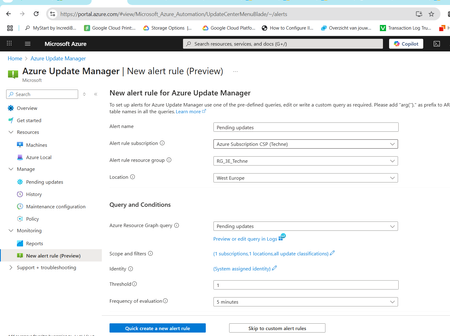
Hi, We've set up several onpremise servers with the Azure Arc agent, to allow us to manage updates via Azure Update Manager. I'd like to get a mail notification with pending updates before the maintenance is scheduled. Azure Update Manager provides a New alert rule (preview) feature that allows me to setup a new alert for pending updates easily. The issue is that it runs every 5 minutes, fires the alert, and sends the email every 5 minutes. Ideally this is sent before the maintenance schedule runs (every 2 weeks), so I know which updates will be applied before they get applied. Changing the frequency of evaluation can be changed to 1 day max, but that will trigger the message to be sent every day. I figured that I could edit the alert rule and change the Query type to Single event (preview), but not sure if that's the solution. When I try this, I cannot edit or save a query. No way to add something to the query and there's no save button: Any idea how I could trigger a Pending Update alert rule to run on a scheduled basis, eg every 2 weeks ? Thanks Best regards, Joeri MichielsJoeri_MichielsJul 16, 2025Copper Contributor345Views0likes1CommentAzure Local - Design the infrastructure - some bad design choices I have stumbled on
Hi. I wanted to share my lasted blog article where I touch on some of the bad design choices I have stumbled on when working with customers existing Azure Local deployments that broke down or in other ways behaved with poor performance or disruptions. https://www.chkja.dk/2025/07/16/azure-local-design-the-infrastructure/ I hope to inspire and feel free to share your knowledge here in the thread :)Chris_toffer0707Jul 16, 2025Iron Contributor355Views2likes1CommentMy Mistake: installing azure local OS On laptop
Let me begin by apologizing to all experienced tech community professionals who have posted numerous discussions resulting in numerous solutions. I should have known that to start a discussion you really need to be as succinct as you can be, not unlike creating a perfect prompt while submitting something to an AI model. I was unaware that my discussion needed to be approved before being available to all -how come AI doesn't do that approval? 7 hours later... A big thank you to the moderator of this Category. They really saved me by giving extra time to read and re-read my initial post. Ugh... My self-imposed punishment for being a knucklehead is to dig a little deeper. I'm doing that and I'm onto something. When I think I have a more complete set of instructions to do what I'm doing, I'll provide details and hopefully I will be self-aware of written and unwritten rules of the Tech Community Road In future postsgregorywoodruffstlJun 15, 2025Tin Contributor128Views0likes0CommentsInstalling azure local os on a laptop
I don't know if it is possible but I would like to try installing azure local on a laptop that has a two terabyte SSD drive. it is an LG Gram laptop. the reason I would install it on the laptop is the laptop was damaged while being transported by an ambulance to hospital the laptop did they lowered the the gurney and the laptop was underneath and so the laptop was crushed into the shape of a 8th moon. if it is possible what I'd like to do is install the azure local os and then from the azure portal provision a Windows 11 operating system initially for testing purposes. if I can be successful at that then I would try installing Azure Local On one of several servers I have in my home that have multiple network cards I also have a bank of 56 public IP addresses So I think I have everything necessary but I'd like to start with the laptop any tips would be appreciated i've searched high and low maybe I'm just not good at searching but hoping somebody out there take a minute to tell me I'm parking up the wrong tree or maybe you can provide me with a link to a good article or just tell me what I need to do. In the end maybe I can use the laptop and it's drive for restoring data for insights or some or maybe have one BM running on it Anything I can do to use the on premise Hardware that I have would help from a cost standpoint. I am limited in what I can do as far as neurologically because of a spinal cord injury but that's not a crutch it's just an FYI. I'm pretty sure one of you is way smarter than me and way more experienced than I So thanks In advance we're taking the time to point me in whatever direction I need have a good afternoonSolvedgregorywoodruffstlJun 15, 2025Tin Contributor748Views0likes7Comments
Update servers with Arc, but leave SCCM installed
We have multiple servers that we want to update with Arc instead of SCCM. Want to leave SCCM installed for reporting purposes. We found a few registry keys that point to the on-prem SCCM server. I've tried removing them, but they are reinstalled by the client after a reboot. Is there a clean way to disable this feature so that Arc handles all the monthly updates?jmaravigliaJun 11, 2025Tin Contributor256Views1like1CommentLearning Azure with Ofek – Azure Arc
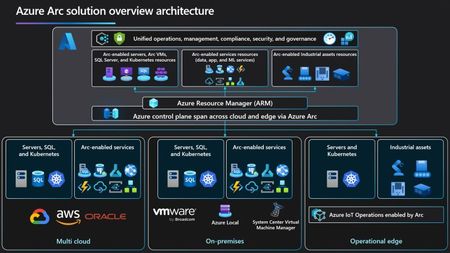
is a solution that simplifies hybrid environment management and it’s free. Azure Arc allows you to manage and govern on-premises resources and resources from other clouds like AWS and GCP directly within your Azure environment. You can connect physical servers, virtual machines, Kubernetes clusters, and SQL Servers, and manage them as if they were native Azure resources. Azure Arc extends Azure capabilities to your on-premises and multi-cloud environments. It enables you to deploy services like Azure Policy, Defender for Cloud, and Azure Monitor easily across environments. You can also centrally manage SQL Server with performance assessments, cloud backups, Azure authentication, and pay-as-you-go licensing. The big advantage is unified management of policies, security, updates, and monitoring from the same Azure interface. From my experience, Azure Arc is ideal for organizations operating in hybrid environments or those still in transition to the cloud. Feel free to reach out for any questions.173Views1like1Comment
Azure Arc Gateway and Azure Arc Proxy
Hi, I had an internal discussion regarding the purpose of the Azure Proxy. Can the Azure Arc Proxy A) take over the communication of other VMs, servers or Arc Agents that cannot access the internet. In other words, the Arc Proxy is a proxy for other Arc Agents on other servers. B) or does the Azure Arc Proxy only serve as a proxy on the VM itself for the extensions installed on the same machine, thus simplifying communication of the individual servers over an enterprise proxy server and reducing the URLs that need to be whitlisted. I think the graphic can be misinterpreted https://learn.microsoft.com/en-us/azure/azure-arc/servers/arc-gateway?tabs=portal I would be grateful for a brief confirmation and clarification. Many thanks in advanceSolvedjbiApr 01, 2025Copper Contributor533Views1like2Comments
Can't install Azure ARC on multiple Server 2025 devices
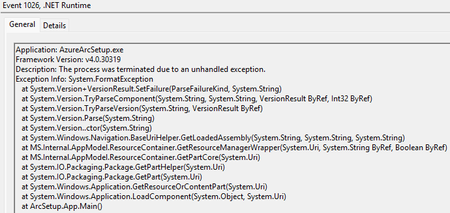
I have multiple Server 2025 devices that when I click "Launch Azure Arc Setup" button on taskbar icon or "Azure Arc Setup" on start menu nothing happens. I then tried to download arcsetup.exe and it never advanced beyond the initializing Windows Installer screen. I got it to work on one server and 4-5 all have the same problem. Both physical and VM. Below are errors in the event log.hoyty76Mar 19, 2025Steel Contributor976Views1like6Comments



Tags
No tags to show